Summarize this blog post with:
Looking at your Amazon Ads data right now, could you explain why your ACOS changed this week?
Not just what changed. Not just which campaign spent more. But the actual reason behind it.
That’s where most analysis breaks down. Pulling reports is easy. Explaining performance isn’t.
This playbook flips that. You’ll learn how to analyze Amazon Ads data in Claude through targeted prompts that surface real insights using Two Minute Reports MCP. We’ve also included 7 Amazon Ads analysis prompts designed around real-world PPC scenarios to make this actionable.
What can Claude help you analyze in Amazon Ads?
Two Minute Reports MCP connects Claude directly to your Amazon Ads data across campaigns, ad groups, placements and individual ads, along with the full suite of performance metrics that matter. Here’s what that unlocks your PPC workflow:
Now that you know what Claude can analyze, the quality of your output comes down to one thing: how you ask. More details about it in the next section.
Before You Ask Claude Anything: A Simple Framework for Amazon Ads Analysis
Most Amazon Ads analyses break down because they jump straight to recommendations. That’s how you end up acting on incomplete or misleading signals. Instead, use this sequence:
The 4D Framework
Detect: Start with what changed. Pull impressions, clicks, spend, ACOS, and ROAS across your date range and ask Claude to flag anomalies. Don’t interpret yet, just surface what moved.
“Compare ACOS across my campaigns for the last 7 vs. 14 days and flag anything that shifted more than 20%.”
Diagnose: Once you know what changed, drill into why. Break it down by campaign, ad group, keyword, placement or product until you isolate the source.
“For campaigns where ACOS increased, break down performance by search term and identify which terms drove the spike”
Decide: Now you have enough context to act. Ask Claude to recommend a specific action, such as pause, scale, adjust bids, add negatives, or restructure.
"Based on this search term data, which terms should be added as negatives and which campaigns need bid adjustments?"
Deploy: Close the loop with a test. Every decision should feed the next cycle.
“What should I A/B test next based on these placement performance gaps?"
Skip a step, and Claude gives you a surface-level answer. Follow it, and you get an analysis that actually holds up under scrutiny. With the framework in place, the next step is enabling Claude to work with your Amazon Ads data. Let’s have a look at it.
How to Connect Amazon Ads to Claude using Two Minute Reports MCP?
Before you proceed, ensure you have the following:
- Any Claude user (Free or Pro) can connect to Two Minute Reports MCP and start querying directly in Claude.
- If you don’t have a Two Minute Reports account yet, you can explore it with a 14-day free trial – no setup complexity, and you can follow along as you go.
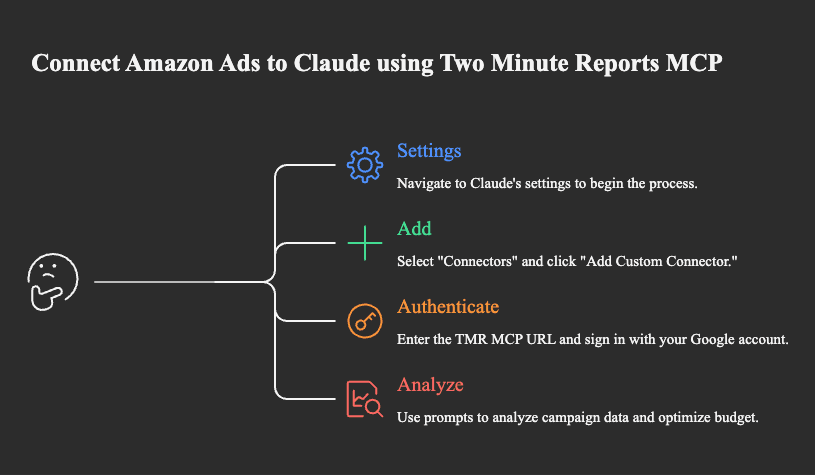
Here’s how you can connect Amazon Ads to Claude via TMR MCP in three simple steps – no code, no custom scripts needed.
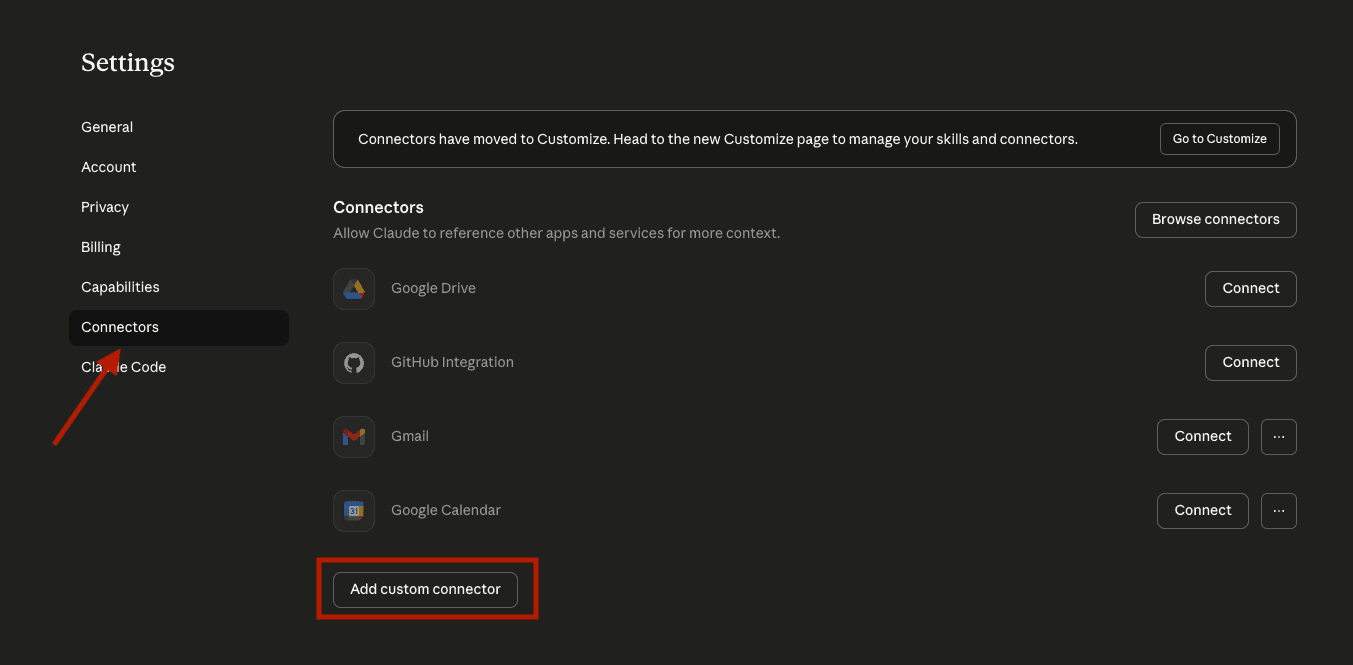
1. Go to Claude → Settings → Connectors → Add Custom Connector
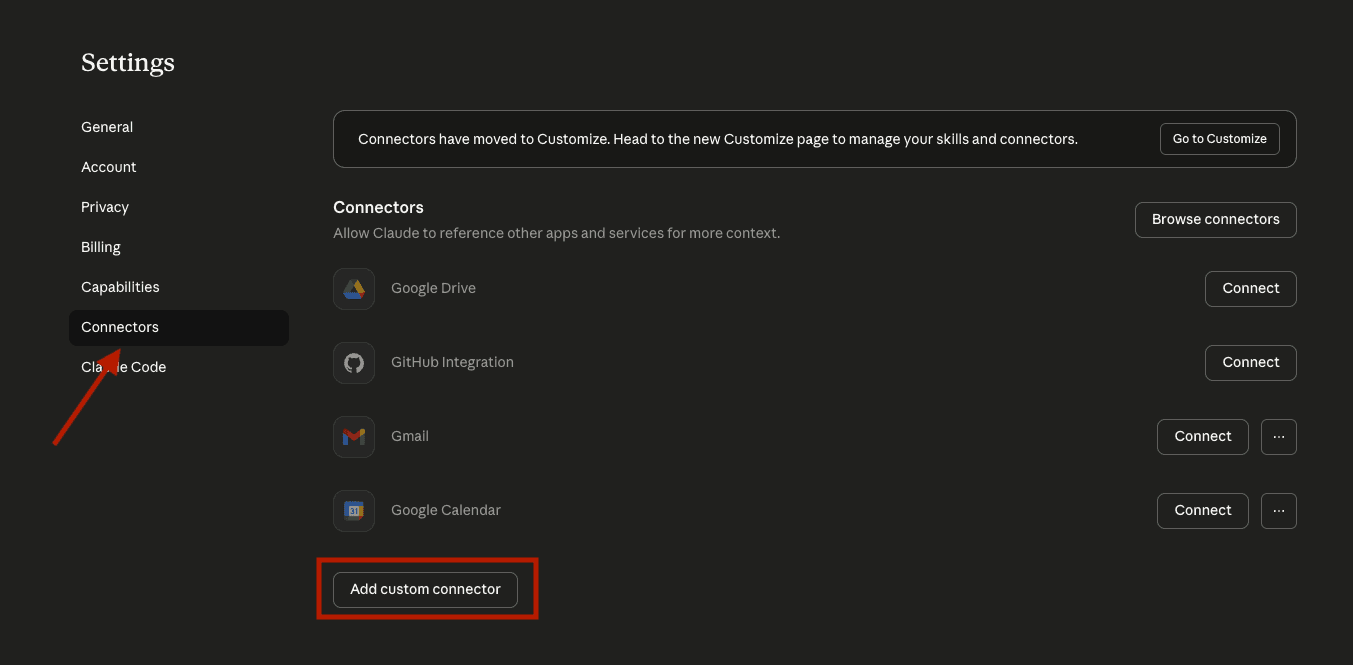
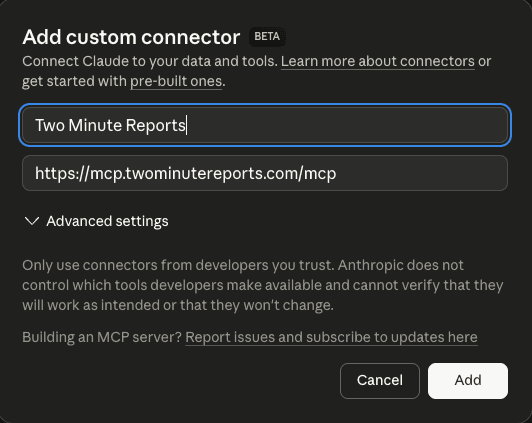
2. Enter a name for the connector. Next, in the Remote MCP server URL field, paste the following URL and click Add: https://mcp.twominutereports.com/mcp
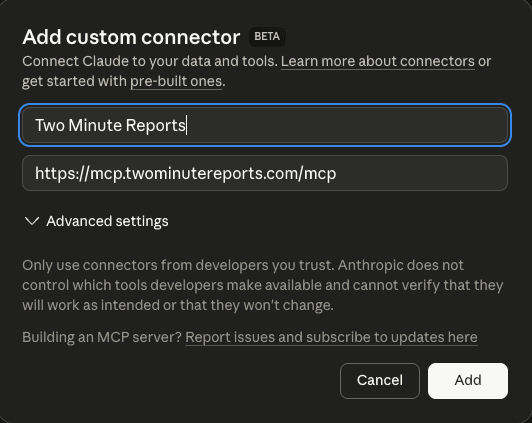
3. After adding the connector, click Connect and sign in with your Google account linked to your Two Minute Reports account. Once authenticated, Claude will be able to access your data securely.
Perform a quick check to ensure that your Amazon Ads data is connected to Claude
Once Claude starts to process your query, you can ask more specific questions to visualize performance insights.
Note: With Speedboost, Two Minute Reports keeps your Amazon Ads data up to date, ensuring each response reflects current campaign performance.
7 Amazon Ads Analysis Prompts You Can Run in Claude
Your Amazon Ads data is now ready. Next, use structured prompts to diagnose campaign performance, prioritize actions, and make faster PPC decisions. It help you navigate from question → analysis → action.
Copy-paste these prompts in Claude and get answers to your questions in seconds.
Prompt 1: Diagnose why ACOS is increasing
Use case: Explain the rise in ACOS before it impacts ROAS and profitability.
What you’re trying to achieve: Whether ACOS is rising because clicks are getting more expensive, CVR is dropping or overspending in underperforming campaigns.
What to do next: If CPC is the problem, review bids and placement. If CVR causes the block, examine the product listings, search terms and audience intent. Pause underperforming campaigns and shift your budget to the best-performing ones to restore scalability.
Prompt 2: Mine search terms for new growth opportunities
Use case: Turn raw search-term data into keyword-expansion ideas.
What you’re trying to achieve: Which search terms have high conversion potential to tighten targeting, and which terms should be excluded.
What to do next: Use high-intent search terms in exact or phrase-match manual campaigns, depending on your structure. Exclude negative keywords wherever appropriate. Keep borderline terms under observation until they reach a meaningful threshold.
Prompt 3: Compare Sponsored Products, Sponsored Brands and Sponsored Display
Use case: Understand whether a specific ad type is contributing to growth or instability.
What you’re trying to achieve: How each campaign type is contributing to spend, sales, and efficiency and whether your current ad mix is still justified.
What to do next: If Sponsored Products have the highest returns, preserve them first. If Sponsored Brands are expensive but strategically important, refine placements, creatives, or brand-term coverage rather than cutting blindly. If Sponsored Display is weak, review targeting and check whether the right format is being used for the right objective.
Prompt 4: Find wasted spend
Use case: Identify where money is being spent without producing enough return.
What are you trying to achieve: Which campaigns, ad groups, keywords, or search terms are consuming budget without generating high-quality conversions.
What to do next: Pause or negate terms with heavy spend and little return. Reduce bids on borderline targets that still have some value but are too expensive at current levels. Separate uncertain terms into isolated tests. Keep efficient terms active, but monitor trend changes before scaling them.
Prompt 5: Reallocate budget towards stronger performers
Use case: Decide where the budget should move instead of simply cutting spending.
What are you trying to achieve: Which campaigns are most likely underfunded relative to their effectiveness, and which ones are absorbing too much budget for the return they generate.
What to do next: Increase the budget on high-converting campaigns. Reduce exposure in campaigns that are consistently underperforming. If needed, phase budget changes over several days so you can confirm that performance improves rather than just shifting volatility around the account.
Prompt 6: Find campaigns where placement is the hidden problem
Use case: Overall campaign performance looks weak, but you suspect the issue is really placement-specific.
What are you trying to achieve: Identify campaigns where one placement is distorting results and creating misleading overall averages.
What to do next: Split your analysis by placement before making broad campaign cuts. If one placement is dragging the campaign, adjust bids there first instead of reducing the entire campaign. This helps preserve the profitable portion while correcting the inefficient one.
Prompt 7: Decide whether placement bid adjustments should change
Use case: You’re paying more for certain ad placements and want to know if they’re worth it.
What you’re trying to achieve: Determine whether your current placement strategy is aligned with actual performance.
What to do next: Lower bid pressure where placement efficiency is consistently weak. Maintain or cautiously increase placement emphasis where conversion rate and sales justify the extra cost. Recheck performance after changes rather than making multiple aggressive adjustments at once.
Note: Claude’s insights can be misleading if:
- You use a very short time range
- Your campaign naming lacks consistency
- You skip the diagnosis and jump to recommendations
- You follow its suggestions without evaluating against your goals
With these targeted prompts, you can drill down into the invisible parts of your campaign that need attention and make data-driven optimizations to scale profits.
How to Use Claude To Scale Amazon Ads Reporting for Your Clients?
Whether you manage multiple clients’ Amazon ad accounts or run Amazon ad campaigns at scale, here’s how to leverage Claude integrations:
1. Generate client-ready Amazon Ads reports
- Deliver updated Amazon Ads dashboards that reflect your client’s actual campaign performance.
- Include compelling narratives in your client reports generated in Claude; just edit and hit send, no need to write from scratch.
- Generate output in any format, such as PDF, Excel, CSV, etc., along with tailored recommendations based on your client’s campaign.
- Make every report look like yours; tell Claude to include your agency logo and deliver branded reports at scale.
- Share your reports via link or email to multiple clients, all at once.
2. Manage multiple Amazon Ads accounts in one place
With Two Minute Reports, every client’s Amazon Ads account is connected and ready to query. Analyze one or more clients’ campaign performance in a simple prompt, filtered exactly the way you need.
Note: Specify your client’s Amazon Ads account ID or name directly in your prompt to pull account-specific data. Copy and paste the below prompt in Claude.
Here’s the prompt:
3. Ask questions and make confident decisions
Prioritize your findings by business impact. This will surface the critical issues at first, so you know how to plan and act accordingly.
Here’s the prompt:
4. Automate Amazon Ads Reporting at defined intervals
Schedule your reports with Two Minute Reports and use Claude to write the performance narrative that goes with every send. Your clients know what happened and what comes next, without you writing from scratch every time.
Pro tip: Personalize the narrative by mentioning your client’s goals, their key products and the metrics they care about most to make every automated report feel contextual and value-driven.
Here’s the prompt:
Your Amazon Ads Data is Ready. Are You?
Pulling Amazon Ads data manually, formatting it, and figuring out what it means takes hours you don’t have. With Two Minute Reports MCP, connect your Amazon Ads data directly to Claude and use natural language prompts to know what’s working, what isn’t, and how to improve profits, so all you have to do is act on it.
Connect your Amazon Ads to Claude using Two Minute Reports MCP and get actionable answers to your questions in seconds. Get started for free by signing up for the 14-day free trial.
Frequently Asked Questions
You can connect Amazon Ads data to Claude in three simple steps using Two Minute Reports MCP: Go to Claude → Settings → Connectors → Add Custom Connector, enter the Remote MCP server URL (https://mcp.twominutereports.com/mcp). Click Connect and sign in with your Google account linked to your Two Minute Reports account. No scripts or dev knowledge required.
No. Any Claude user (Free or Pro) can connect to Two Minute Reports MCP and start querying their Amazon Ads data directly in Claude.
After connecting, run this quick verification prompt: Show me total impressions, clicks, and spend from my Amazon Ads account for the last 30 days. If Claude returns real data, your connection is working correctly.
Ask Claude to review the last 30 days and group campaigns, keywords, and search terms into three buckets: likely wasted spend, borderline terms and terms worth keeping. Claude justifies each group based on spend, clicks, conversions, sales and ACOS, so you know what to pause, reduce or preserve for growth.
With Two Minute Reports MCP for Claude, you can query multiple client accounts in a single prompt, generate performance narratives in Claude, include your agency logo and deliver reports in PDF, Excel or CSV format. You can share reports via link or email to multiple clients at once via automated report scheduling.
Prompt Claude with: "Generate a client-facing Amazon Ads summary for [Client Name] covering this week. Their primary focus is [goal]. Compare spend, ROAS, and ACOS against last week. Flag any campaign that moved significantly. Close with one recommendation aligned to their goal. Write in plain language." Edit as needed and send.
Related Blogs




Meet the Author
Shalini MuruganShalini is driven by ideas that create a tangible impact. At Two Minute Reports, she specializes in content that helps marketers optimize their reporting workflows. When she's not transforming complex data into meaningful insights, you might find her lost in a book, jotting down ideas in her notebook, or connecting the dots others overlook.

