Summarize this blog post with:
Running paid campaigns without understanding your competitors is like driving full speed in fog with no headlights. You might make it home, but it’ll be more luck than strategy. PPC competitor analysis reduces that guesswork. It helps you see who you’re actually up against in the auction, how they position themselves, and why your costs and results look the way they do.
Remember that PPC competitor analysis is not just about finding direct competitors. You’ll also find newly launched, niche-driven players targeting or bidding for the same competitive keywords as you do. This knowledge allows you to refine your campaigns, capitalize on gaps, and sharpen your advertising strategy.
With that said, let’s dive deeper into the steps you can take to uncover these insights and transform them into actionable ROI.
Key data insights for PPC competitor analysis
Most of the insights you need for a competitive PPC strategy are available within the ad platforms you use every day. Here’s how you can tap into these reports to understand the emerging landscape:
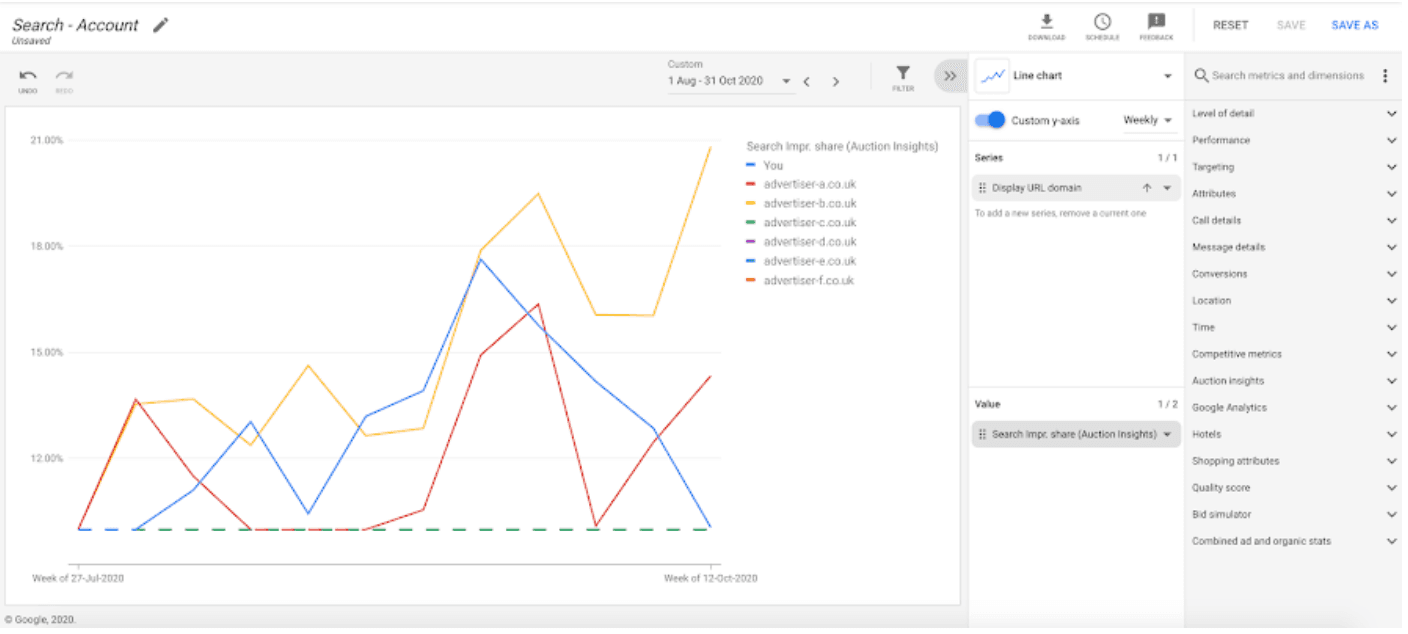
Auction insights reports
These reports reveal which domains show up in the same auctions, how frequently you overlap, and how often they appear above you. This turns vague assumptions about competitors into a clear, compelling list, giving you a solid foundation for competitive analysis.
Search terms reports
With this, you can see the search terms that people actually typed to click your ads. When certain queries are expensive, volatile, or suddenly crowded, competitive pressure is usually part of the story.
These reports also reveal which intents your competitors care about most, helping you find gaps or areas to optimize, such as adding negative keywords or refining targeting.
Standard performance reports
Standard performance reports at the campaign, ad group, and keyword level help you zoom in on where the competition is the fiercest. For example, you might discover that bidding on broad, generic keywords is driving up costs, while more specific long-tail keywords are underpriced and less competitive. This lets you refine your strategy, focusing on areas where you can outperform competitors.
SERP and external observations
Numbers alone don’t show the full picture. It’s essential to take a look at the actual search results to see who is appearing for your queries. You could use the Ad Preview tool to view who appears for your key queries, what their ads look like, and how the page is laid out.
Pay attention to how many ads show above the organic results and which formats are present, like call ads, sitelinks, or image extensions. That layout affects how hard you have to work to win the click.
Ad libraries and transparency centers give you more examples of competitor ads and themes over time. Keyword tools and industry benchmarks add context around search volume and typical CPCs, but treat their competitive numbers as estimates, not exact truths.
Together, your account metrics and these external views give you the raw material for meaningful analysis and set you up for deeper PPC competitor analysis going forward.
Core metrics for competitive PPC analysis
Here are the most crucial metrics to track and optimize for better campaign performance.
CTR (click-through rate)
CTR shows how appealing your ads are compared to everything else on the page. If CTR is much lower than you’d expect, it often means your message doesn’t resonate as well as competitor ads, or the message match between your query and copy is off.
Conversion rate
The conversion rate tells you how well your landing page and offer turn clicks into leads or sales. When competitors improve their pages, your relative performance can slip even if your ads stay the same. Sometimes, a landing page problem is really a “competitors got better” problem.
Cost per acquisition (CPA)
CPA shows what you’re paying to win a customer or lead. If CPA climbs while conversion rate is flat, it’s a hint that you’re stuck in a bidding war or losing Quality Score against others in the auction.
Return on ad spend (ROAS)
ROAS is your big-picture “is this worth it?” metric. Aggressive competitors can push up CPCs and squeeze ROAS if you don’t adjust your targeting, messaging, or offers.
Quality Score
A higher quality score can signal that competitors are more relevant for the same intent. This is either because their ad copy fits better or their landing pages do a great job.
Impression share, overlap rate, and position-above rate
These come from Auction Insights. Together, they show who’s actually in the race and who’s winning the most attention.
- Impression share: How often your ad shows vs. how often it could have shown. This tells you how much visibility you’re actually capturing.
- Overlap rate: How often another advertiser’s ad appears at the same time as yours. This shows who you’re really competing with in live auctions.
- Position-above rate: How often the competitor’s ad appears above yours when you both show. This tells you who’s winning the better spots more often.
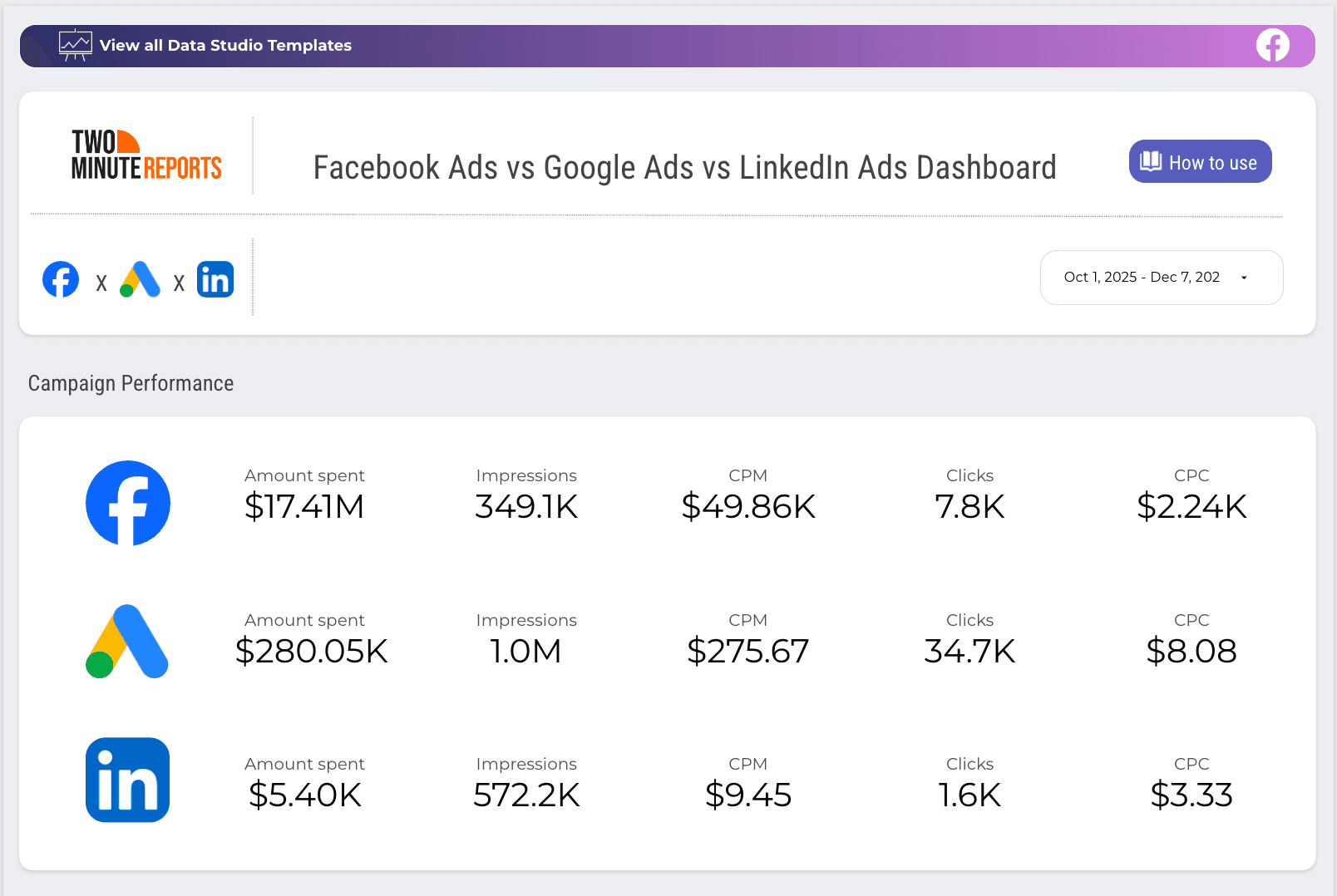
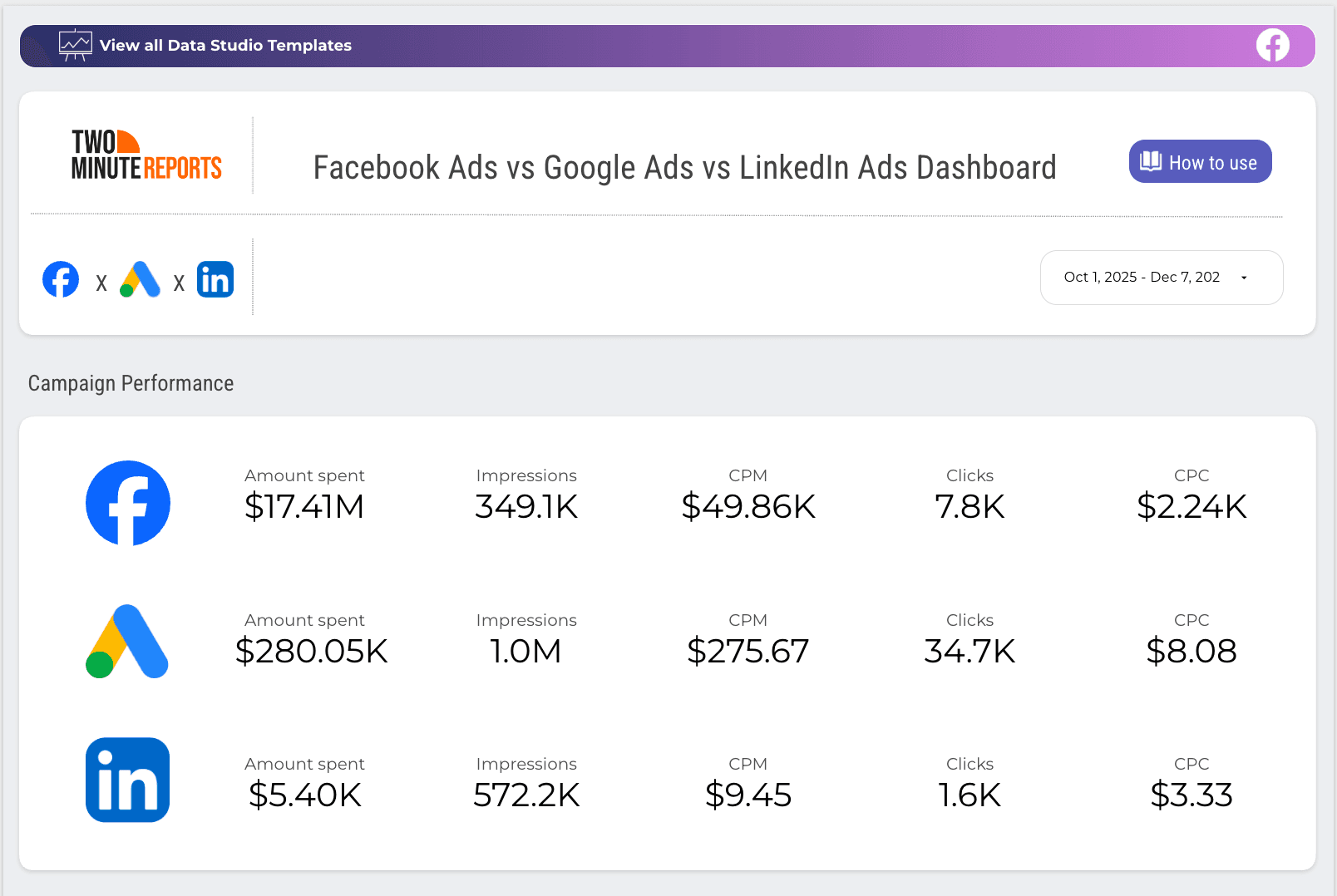
Track amount spent, impressions, CPM, CPC and other key metrics in a centralized dashboard. Unlock cross-channel ROI within minutes and make smarter decisions.
How to Run a PPC Competitor Analysis (Step by Step)
In a typical review, you ask questions like:
- Which topics and search terms do competitors show up for again and again? Which ones do they seem to ignore?
- How do they write their headlines and descriptions? What promises do they make to win the click?
- Do their pages match what people searched for? Is it easy for a visitor to know what to do next?
- How often do they appear, and how high do they sit on the page compared to you?
- Are they only active in Search, or do they also use Shopping, Display, or Video ads?
Here’s a clear process you can implement for PPC competitor analysis.
Step 1: Identify your real PPC competitors
Who are you actually competing with in the auction? Your business competitors aren’t always the same as your PPC competitors. Sometimes a blog, marketplace, or comparison site is more aggressive on your core terms than the brands you normally think about.
Use auction insights to see which domains keep showing up with you and how often. Then confirm what you see by checking the SERP with an Ad Preview tool for a few important queries.
Step 2: Track competitor keywords and search presence
Once you know who you’re up against, look at where they show up. Use your search terms and keyword data to see which themes feel most crowded. Generic phrases often have more competition than specific, long-tail queries.
For a handful of important searches, notice which competitors appear most often, who tends to sit near the top of the page, and whether the same brands show up across many related terms. That gives you a rough map of where competitors focus their budget and attention.
Step 3: Analyze competitor ad copy and angles
Study how they talk to your shared audience. Read their ads the way a potential customer would. Notice the promises they make, the problems they highlight, and the language they use.
Ask yourself what they’re offering that might feel attractive. Consider whether they lean more on price, convenience, features, or trust, and if they use strong calls to action or generic “Learn more” lines.
You’re not looking for lines to steal here. You’re looking for patterns. If every competitor mentions speed and you don’t, that’s a signal. For example, if nobody talks about support or onboarding, that might be a gap you can fill.
Step 4: Evaluate competitor landing pages and experience
Follow their ads to the pages they send people to. Check whether the landing page actually delivers on the promise made in the ad. Look at how clear the headline is, whether the offer is easy to understand, and how simple it is to take the next step.
Pay attention to how well the page matches the original search intent, how trustworthy it feels, and how easy it is to act on mobile. That’s where a lot of paid search clicks happen. Put yourself in the visitor’s shoes and be honest: would you feel more confident buying from them or from you?
Step 5: Assess audience and targeting clues
You’ll never see a competitor’s exact targeting settings, but you can still infer a lot from what shows up.
Look at which locations their ads seem to target, based on city or region hints in the copy and extensions. If you work across multiple markets, you might notice some brands are active only in certain regions while others spread themselves everywhere.
Check how their pages behave on mobile versus desktop. If the layout is clunky on a phone, there’s a good chance they aren’t prioritizing mobile visitors. If everything feels tailor-made for smaller screens, they probably expect a lot of paid search traffic to come from mobile.
You can also pick up hints about the audience they care most about by reading their language. Some ads speak to buyers who are just getting started, while others assume a high level of sophistication. Some clearly aim at solo founders or small businesses, while others are written for mid-market or enterprise teams.
All these clues help you understand who they’re trying to win and whether they’re going after the same people as you.
Step 6: Summarize your findings
By now, you’ve looked at competitors from several angles: keywords, ads, landing pages, and likely targeting patterns. The final step is to pull all that together.
A simple way to do this is to answer three questions for each major competitor:
- Where are they clearly stronger than us right now?
- Where are we clearly stronger than them?
- Where is nobody doing a great job yet?
For example, one brand may dominate short, generic keywords but use weak landing pages. Another might have excellent pages but only seems to bid on a narrow set of terms. You may also spot themes or questions that no one addresses directly.
Those become natural openings for you. And you don’t need a complex framework for this. With a dedicated PPC reporting software, you can continuously refine your approach, optimize for the best keywords and adjust bidding strategies based on real-time performance data.
Turn Competitive Insights Into Better PPC Decisions
PPC Competitor analysis (and paid search analysis) only matters if it changes what you do next. Don’t just build a pretty report. Make clearer choices with your budget, your messaging, and your time. With accurate, data-driven PPC client reporting, you can package your competitive insights in a way that’s easy to understand and act on.
Here are the key takeaways:
- Start with your ads. Once you’ve seen how others frame the problem and promise results, it’s easier to spot where your own copy feels thin.
- Look at your landing pages with fresh eyes. You’ve seen how competitors greet visitors, how quickly they explain the value, and how they build trust. Now compare your experience to theirs. Small changes here often move the needle more than another round of ad tweaks.
- Your keyword choices are another important lever. Competitive insight helps you answer questions like, “Is this term expensive because it’s truly valuable, or because everyone is lazily bidding on it?”
As you see the bigger picture, bidding and budgeting also become less mysterious. For example, if you know a deep-pocketed competitor is hammering a certain category with aggressive offers, you can decide whether it’s worth matching their energy.
Lastly, treat PPC competitor analysis as a habit, not a one-time project. You don’t need to run a full deep dive every week, but checking in regularly keeps your paid search analysis honest. When performance shifts, you’ll already have a feel for who’s active, who’s quiet, and how the market is evolving.
Frequently Asked Questions
PPC competitor analysis involves tracking and reviewing your competitor’s paid search strategies, such as the keywords they target, landing pages, ad copy and bidding strategies. It helps identify gaps, align your PPC campaigns, and make informed decisions about budget, messaging and keyword targeting to improve ROI.
By analyzing how competitors frame their ads, you can spot weaknesses in your own copy, uncover new value propositions, and tweak ad messaging. Observing competitors’ results also helps you identify underperforming keywords, enabling you to fine-tune your strategy and achieve better results with your budget.
When reviewing competitors' landing pages, focus on how they present value, build trust, and encourage conversions. Compare their call-to-action (CTA), design, and user experience with yours. Often, small improvements in your landing page can outperform ad tweaks and lead to better conversion rates.
While in-depth analysis can be done periodically, it's crucial to check in regularly to monitor market shifts. Frequent updates to your PPC strategy based on real-time competitor data allow you to stay competitive, adapt to changes in bidding patterns, and ensure that your budget and targeting remain optimized.