
Summarize this blog post with:
TLDR; DashThis Pricing: Quick Summary DashThis’s new pricing is primarily structured based on the number of dashboards and data sources included in each plan. Because agencies often create one dashboard per client, the dashboard-based pricing model can require upgrading to higher tiers as you onboard new clients. Who Should Consider DashThis Pricing? Works best for individuals or small teams managing a fixed number of clients with relatively simple reporting workflows. Who Should Look Elsewhere? Growing agencies that anticipate onboarding new clients regularly, teams that need white-label branding without committing to higher tiers, and marketers looking for flexible reporting beyond a standalone dashboard environment. |
DashThis is updating its pricing with effect from March 30th, 2026. Earlier, plans were based on the number of dashboards as a core factor. Now, data sources are entering the equation too, which changes the cost structure significantly for agency owners and marketers managing multiple clients.
Before you commit, you have three questions worth exploring:
- How will this impact your existing client reporting workflow?
- What limitations should you watch out for?
- How does DashThis stack up against other options at this new price point?
In this guide, I’ll walk you through a detailed breakdown of DashThis’s new pricing plans, its impact on your reporting workflow, and the strongest alternative so you can make a confident decision.
DashThis Pricing Overview: What Has Changed?
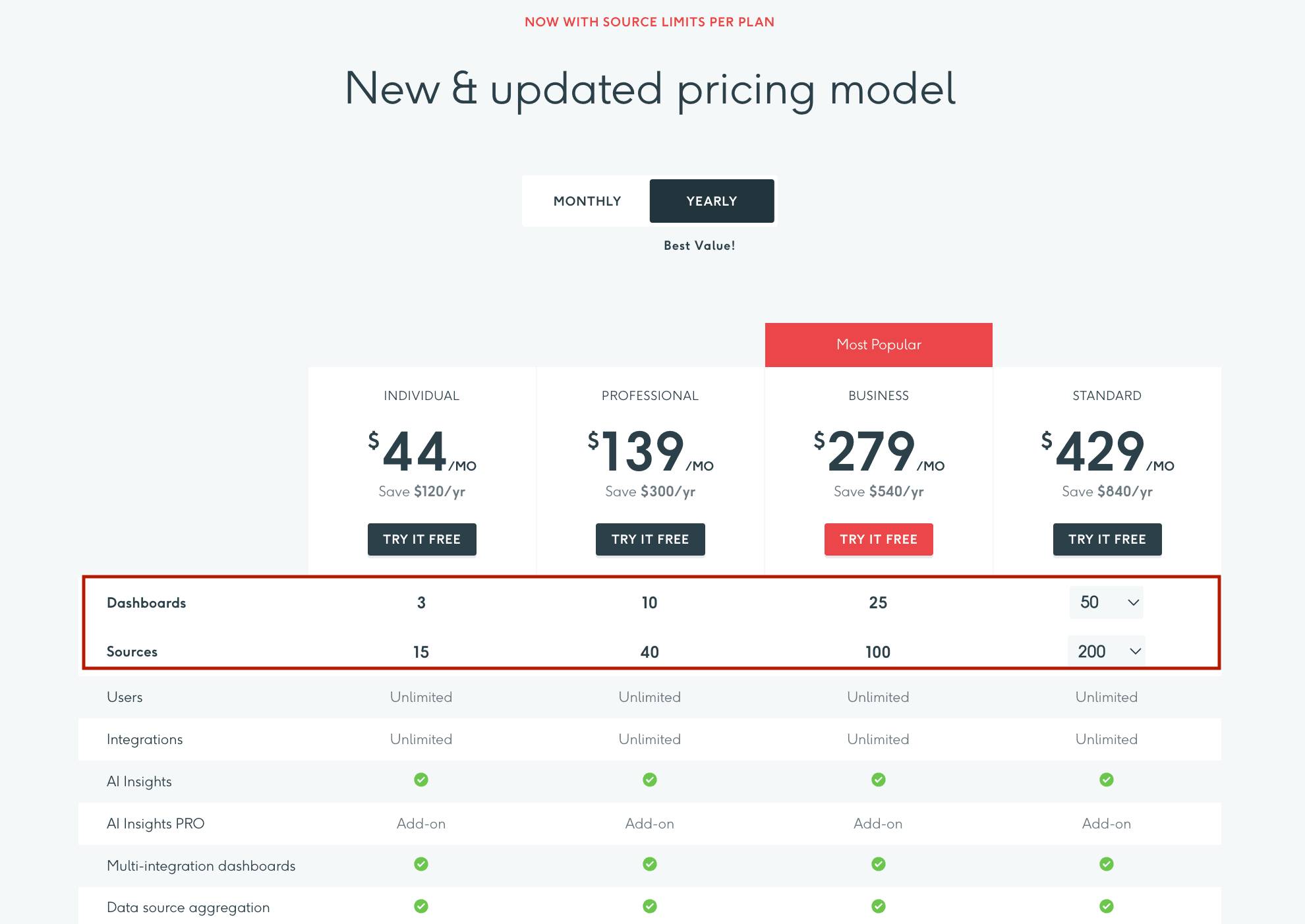
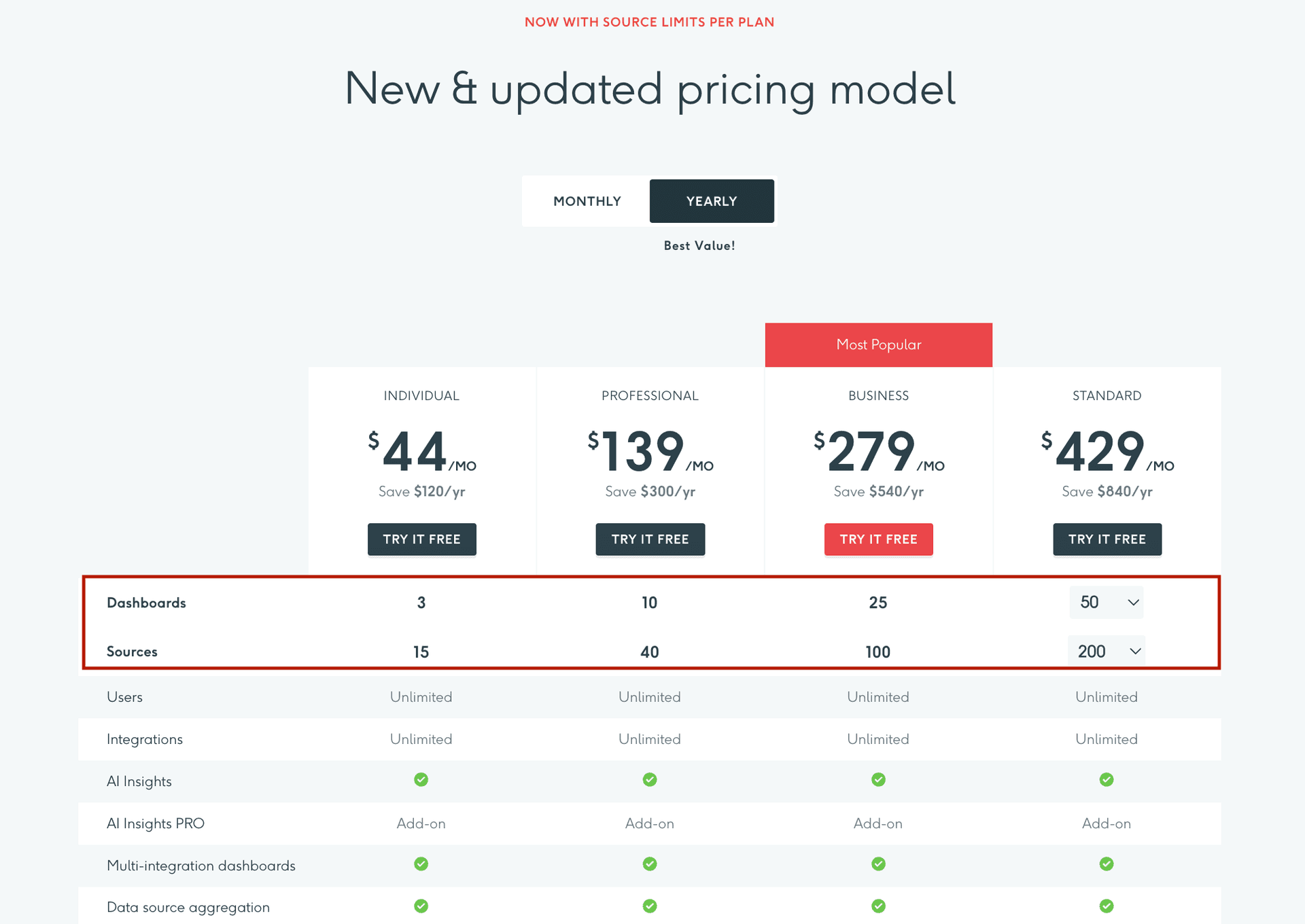
DashThis’s new pricing structure uses source-based pricing, meaning your plans now depend on the number of dashboards you create and the data sources you connect.
For agencies and marketing teams, this means pricing typically scales with the number of clients, dashboards, or integrations, depending on your use case.
To understand where the costs accelerate, pay attention to how quickly both the dashboard cap and the source limit tighten as you move up plans:
The real question is whether these limits hold up as your reporting needs grow. Let’s break it down in the next section.
DashThis Pricing Plans: A Complete Breakdown
Here’s a detailed breakdown of the new pricing plans and what they mean for your business.
1. Dashboard Volume and Data Source Limits
Before diving into the key details, here’s how DashThis interprets dashboards and data sources.
What counts as a dashboard: In DashThis, one dashboard equals one marketing report. A single dashboard can combine data from multiple platforms. Although DashThis allows you to clone dashboards, each cloned dashboard is still counted as a separate live dashboard.
What counts as a data source: A data source is counted when an account is actively connected to at least one dashboard. Each connected account (e.g., a Google Ads account or a GA4 property) counts as a unique data source.
So what does this change mean for your business?
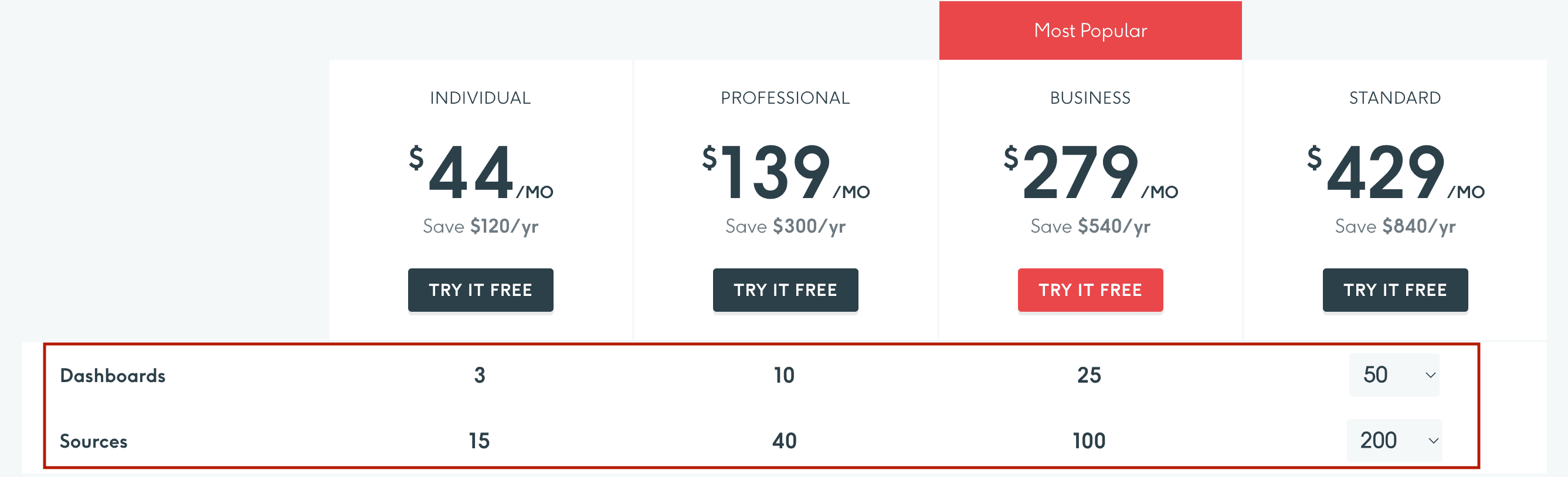
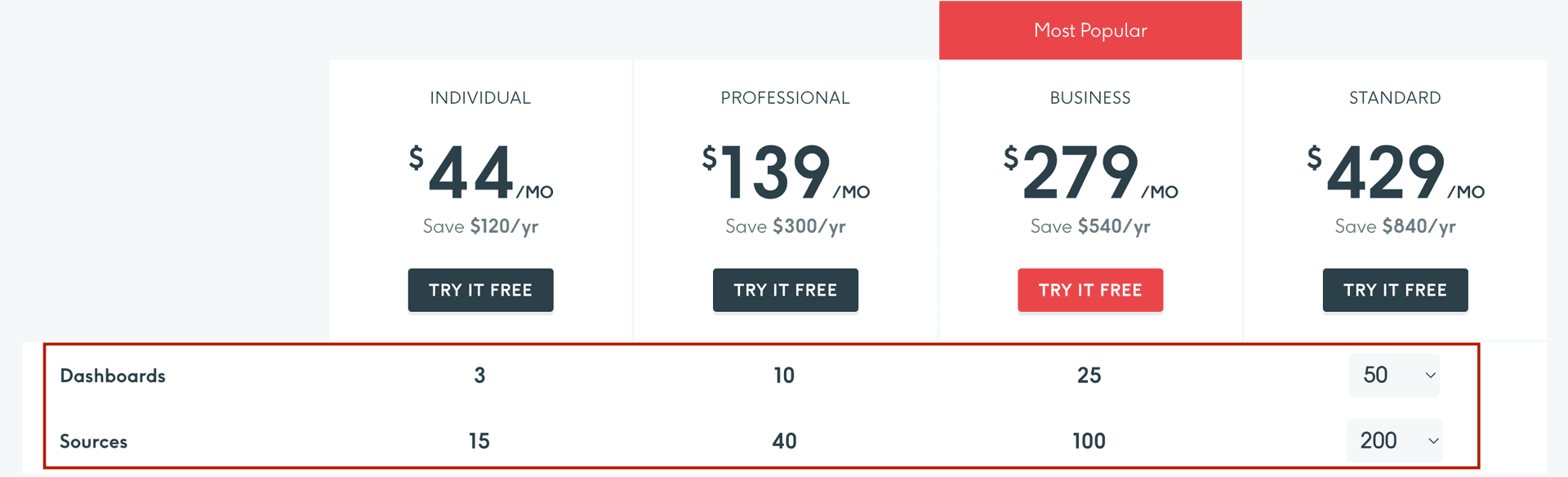
Agencies often create separate dashboards for different clients, campaigns, or reporting needs. As the number of clients or platforms grows, the required dashboards and data sources increase as well.
For example, consider you run an agency managing six clients. If each client dashboard pulls data from three platforms, such as Google Ads, Meta, and LinkedIn Ads, and each platform is connected through a single account, the reporting setup would look like:
- Number of dashboards: 6
- Number of data sources: 18
In this scenario, the Individual plan (3 dashboards, 15 data sources) would not be sufficient. The agency would likely need the Professional plan ($139/month), which supports up to 10 dashboards and 40 data sources.
Overall, DashThis works well when your reporting needs are small, helping you build simple, visual dashboards. However, as your agency grows and you onboard new clients, the number of dashboards and connected data sources tends to increase. Eventually, teams may need to upgrade to higher pricing tiers to support expanding reporting needs.
Because of this, it’s important to consider not just whether DashThis fits your budget today, but also how well it aligns with your reporting needs as your client base expands in the future.
2. White-labeling: What You Unlock As Plans Upgrade
DashThis positions itself as a reliable white-label marketing tool enabling agencies to create branded, professional dashboards. Depending on your plan, you can include a logo, preset themes, and custom colour themes to align with your agency’s identity.
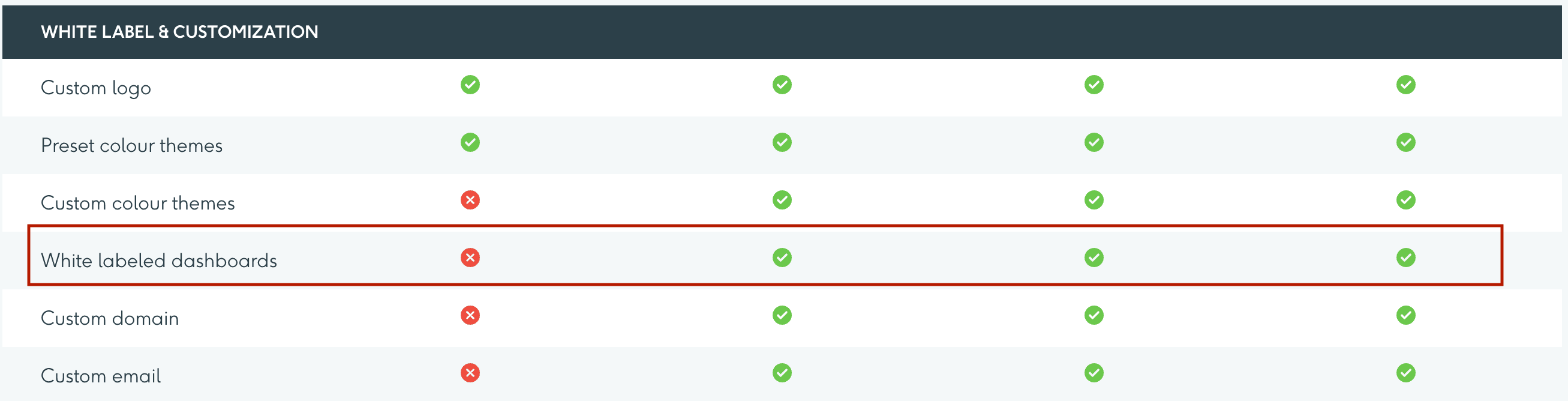
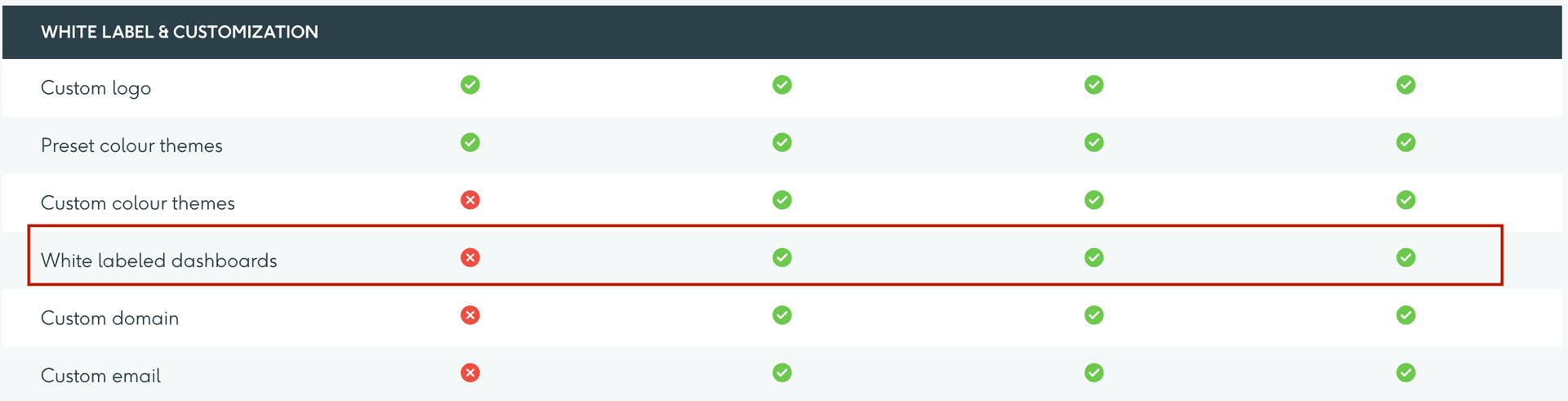
However, fully removing DashThis branding requires you to upgrade to the Professional plan ($139/month). For small agencies and freelancers managing just a few dashboards, white-label reporting can be a comparatively expensive feature to unlock, even if their usage doesn’t justify the upgrade.
3. Templates and Customization: How Much Flexibility Do You Get?
DashThis provides a library of pre-built templates covering common reporting needs such as SEO, PPC, social media, etc. While templates can speed up report creation, some users stated that customization could be more flexible when building complex dashboards. For example, a verified G2 reviewer mentioned:
“It is little annoying to move things around in a dashboard. You have to move each individual widget to a new section rather than moving an entire section in a dashboard.”
Another verified G2 user also pointed out that the range of reporting metrics and dashboard access control could be improved: “The amount of reporting metrics available could be better. Getting client’s dashboard access to exactly what they need can be difficult sometimes.
An analysis of user reviews shows that DashThis needs a visual upgrade. As DashThis pricing scales based on the number of dashboards, agencies often evaluate how efficiently they can customize each dashboard they create.
If building or adjusting reports requires additional manual effort, the time spent refining dashboards can become a significant factor as reporting needs grow.
4. DashThis Integrations
DashThis supports around 30 integrations across categories, including display advertising, SEO, analytics, etc, covering the core platforms most marketing teams rely on for daily workflows.
However, the integration library has notable gaps. For instance, ecommerce platforms such as Shopify and Amazon Seller are not available as native integrations. Similarly, several PPC platforms, such as Amazon Ads, Snapchat Ads, and Twitter Ads, are not directly supported.
For a tool where pricing is now tied to data source limits, these gaps carry real weight. You’re paying for a set number of data sources for each plan, but if a platform your client relies on isn’t supported natively, you either work around it or look elsewhere. That friction adds up when you are managing plan limits carefully. One of the users has stated this as a key concern:
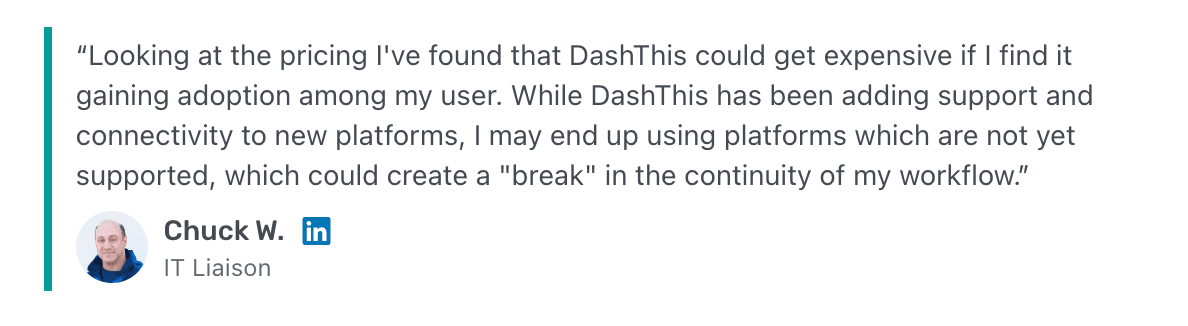
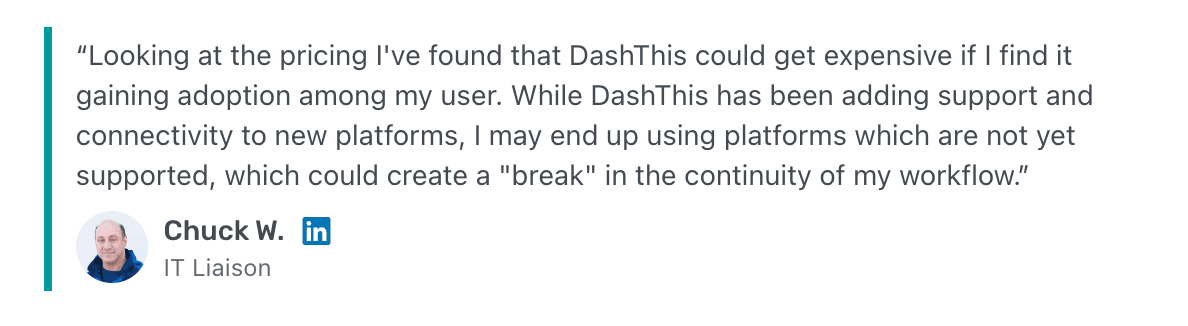
In the end, the real value of a reporting tool’s pricing depends on whether it can connect to the platforms your reporting workflow relies on.
Is DashThis Worth The Cost?
It depends on where you are as an agency. If you’re managing fewer than 5 clients with a small, predictable set of integrations, DashThis is capable. But most agencies aren’t built for a static reporting workload.
The moment your client count grows past a plan threshold, you pay significantly more. The moment you need fully branded white-label reports, you need a Pro plan ($139/month). The more data sources you add, the closer you hit the source cap. Each of these limits exists independently, which means you get squeezed on multiple fronts at once.
For growing agencies managing 10+ clients with branding and scalable reporting needs, the cost justification gets harder every time.
That’s why many growth-stage agencies look for DashThis alternatives that scale reporting without scaling the bill at the same rate. We’ll cover the strongest option in the next section.
DashThis vs Two Minute Reports: What Stands Out?
The most common mistake agencies make when evaluating alternatives is swapping one set of limitations for another. A tool that charges per user rather than per dashboard addresses a different problem than the one you actually have.
What growing agencies need is a reporting tool where the pricing model doesn’t compete with their growth model. One where building reports doesn’t need recalculation and where white-label branding is a starting point, not a premium upgrade. Two Minute Reports is built around that model.
Two Minute Reports is a marketing reporting tool built for agencies, freelancers and data teams who want automated, client-ready dashboards within minutes. It works natively inside Google Sheets and Google Data Studio, platforms your team already rely on. The no-code setup takes under two minutes, unlimited reporting is available across all plans, and full white-labelling is included without requiring a higher-tier plan.
To help you make the right decision, here’s an overview that compares Two Minute Reports and DashThis in terms of key capabilities.
However, the core difference comes down to one thing: DashThis prices based on what you build and Two Minute Reports prices around what you connect. Here’s a simple way to know which one fits your workflow:
Choose DashThis if:
- You manage a small, stable client roster and don’t anticipate significant growth.
- You prefer a standalone reporting platform with built-in dashboards.
- Your reporting needs are simple and unlikely to require deep customization.
Choose Two Minute Reports if:
- Your client base is actively growing, and you need affordable pricing that scales with it.
- You already work inside Google Sheets and Google Data Studio.
- You want to create unlimited reports and dashboards using 100+ white-label templates.
- You want white-label branding without committing to a higher tier.
- You need more flexibility in how you connect and customize data.
- You need a reporting tool that handles large datasets with high scalability.
How to Get Started with Two Minute Reports?
Here’s a simple 4-step workflow to help you get started with Two Minute Reports:
- Sign up for a 14-day free trial to explore how Two Minute Reports fits into your existing workflow before committing.
- Choose your preferred destination: Google Sheets or Google Data Studio.
- Connect your marketing platforms available across 30+ integrations to track and measure performance.
- Build and automate multi-client marketing reports faster to streamline reporting workflows without manual effort.
Wrapping Up
For marketers and agencies with a fixed, predictable client count, DashThis is capable. But its dashboard and source-based pricing model create real scaling pressure as your client count grows, making it a less practical fit for agencies in active growth.
Two Minute Reports is built for that growth stage. With full white-labelling starting at $9/month, unlimited reporting across all plans, and faster data retrieval via Speedboost, your agency can onboard new clients and scale reporting seamlessly without any unexpected upgrades.
Want to see if Two Minute Reports is the right fit? Talk to our support team today.
Frequently Asked Questions
DashThis’s new pricing plan starts at $44/month (billed yearly) for the Individual plan, which includes 3 dashboards and 15 data sources. The Pro plan costs $139/month and goes upto the Standard plan costing $429/month.
DashThis pricing is based on the number of dashboards (reports) and data sources (connected accounts). As you hit these thresholds, you may have to upgrade to higher plans.
No. DashThis does not support unlimited dashboards. Each plan comes with a fixed number of dashboards, and you must upgrade to create more for your client campaigns.
DashThis can work well for smaller teams, but for agencies managing multiple clients, pricing may increase as dashboards and data sources expand.
DashThis works well for smaller teams with fixed reporting needs. If your client base is growing, Two Minute Reports is the practical choice – unlimited reports, white-label branding from $9/month and 5X faster dashboard loads via Speedboost.
Related Blogs


Meet the Author
Shalini MuruganShalini is driven by ideas that create a tangible impact. At Two Minute Reports, she specializes in content that helps marketers optimize their reporting workflows. When she's not transforming complex data into meaningful insights, you might find her lost in a book, jotting down ideas in her notebook, or connecting the dots others overlook.

