
Summarize this blog post with:
Every marketer knows Google Ads pricing is not one-size-fits-all. But knowing that and actually knowing what you will pay are two very different things.
A legal firm and a restaurant can run ads on the same platform, target the same city, and pay completely different prices per click. Not because one got lucky, but because Google Ads pricing is shaped by a specific set of factors, including your industry, your keywords, how your ads are built, and how well your account is managed.
While some of these are outside your control, most of them are not.
This guide breaks down everything that shapes your costs, so you can walk into Google Ads with a budget grounded in reality and not a guess.
Google Ads Pricing at a Glance
Most small businesses allocate between $1,000 and $10,000 per month on Google Ads. Cost per click varies significantly depending on where your ads appear. However, the average CPC on the Google Search Network typically ranges from $1 to $2, while the Google Display Network usually comes in at $1 or less per click.
What Factors Drive Google Ads Pricing?
There is no single number that defines what Google Ads will cost you. What you pay comes down to a mix of factors, some within your control, some not. Here are the ones that matter most.
Industry and Competition
Your industry sets the baseline for everything. Sectors like legal, accounting, and financial services consistently see higher CPCs because the value of a single client is significantly higher. When each conversion carries a strong revenue potential, advertisers are naturally willing to pay more per click.
Customer Lifetime Value
The higher the lifetime value of your customer, the more you can justify spending to acquire one. Businesses with high-value, long-term clients can afford higher acquisition costs because each conversion delivers sustained revenue over time.
A simple rule of thumb: your CLV should be at least three times your customer acquisition cost. If it is, a premium CPC can still make sense.
Customer Lifecycle and Funnel Stage
Are you targeting someone who has never heard of you, or someone actively looking for what you offer? That distinction changes your costs significantly.
Broad, awareness-stage keywords tend to be more competitive and convert slowly. High-intent, bottom-of-funnel keywords often cost more per click but convert faster and more efficiently. Matching your keywords to where your customer is in their journey is one of the simplest ways to improve ROI.
Keyword Intent
Even within the same industry, intent drives price. High-intent searches like “lawyer near me” tend to cost more because the user is ready to take action. In contrast, informational queries like “how much does a lawyer cost?” are typically cheaper, as the user is still in the research phase.
The closer a keyword sits to a buying decision, the more advertisers bid for it.
Seasonal and Market Trends
External conditions can shift CPCs in ways that have nothing to do with your account. During the COVID-19 pandemic, many industries saw sharp drops in advertising costs as demand fell and advertisers pulled back. As markets stabilized and competition returned, CPCs rose again.
A similar pattern emerges every year around Black Friday, major holidays, and high-demand travel seasons. If your industry has predictable demand spikes, build them into your budget before they hit.
Account Quality
You can maintain your account's health by keeping keyword lists clean, writing relevant ad copy, and acting on performance data regularly. Account quality is one of the few cost factors you can directly influence.
AI Overviews, AI Mode, and the New Pressure on CPCs
This one is newer, and most advertisers are still catching up to it.
AI Overviews now appear at the top of Google results for a growing share of searches. Zero-click searches, where users get their answer without clicking anything, have climbed from 56% to nearly 69%. That means fewer clicks available in organic search and more advertisers competing for the paid spots that are still visible. The practical result is upward pressure on CPCs, particularly for informational queries.
How Google Ads Budgeting Works?
Getting your budget right is not just about picking a number. It is about understanding how Google interprets and spends that number, because the two are not always the same thing.
Key Terms Decoded
Four terms come up constantly in Google Ads, and they are easy to conflate:
Budget is the maximum you are willing to spend over a set period.
Bid is the maximum you are willing to pay for a single click or conversion.
Spend is what Google actually charges you after the auction runs.
Cost is your cumulative total across clicks, conversions, or impressions over time.
Most advertisers who burn through their budget in the first week are not overspending. They are under-informed about how these four terms interact. Your bid does not equal your spend, and your daily budget does not equal what you will be charged on any given day.
Daily vs. Monthly Budget Logic
Google caps your monthly spend at 30.4 times your daily budget. A $100 daily budget means you will never be charged more than $3,040 in a month.
On high-traffic days, Google may spend up to twice your daily budget to capture demand. It balances that out on quieter days. Your monthly ceiling stays protected regardless.
Ad Types and Budget Allocation
Different ad types serve different purposes and carry different costs.
For an ecommerce business with a $10,000 monthly budget, a sensible split weights Search and Shopping most heavily since they capture existing demand, with Display and Video allocated for awareness at a lower cost per impression.
Manual vs. Automated Bidding
The right choice depends on where you are in your campaign journey.
Manual bidding gives you full control at the keyword level. It is the right starting point when you are still learning which keywords convert and which do not.
Automated bidding hands optimisation to Google's machine learning, adjusting bids in real time based on signals like device, location, and time of day. It performs better but needs data to learn from, typically a few months of campaign history before it works reliably.
Start manual. Switch to automated once your account has enough conversion data to give the algorithm something meaningful to work with.
How Google Actually Determines Your Cost Per Click?
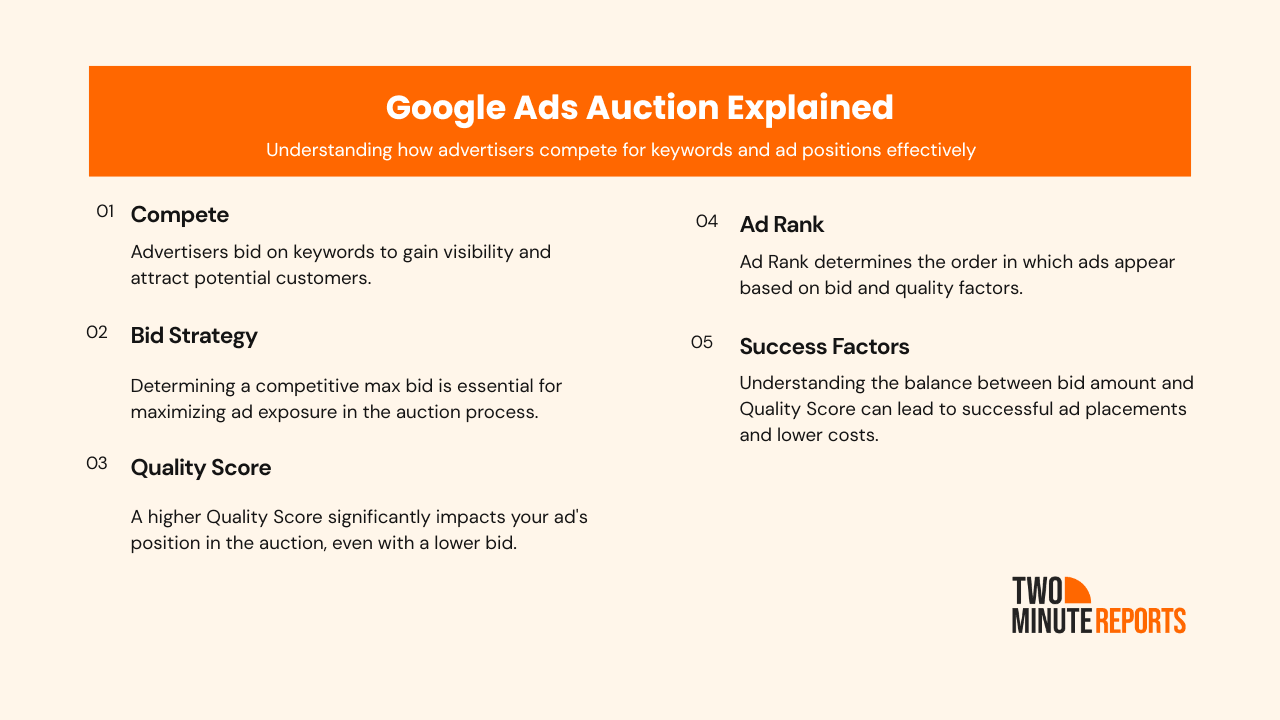
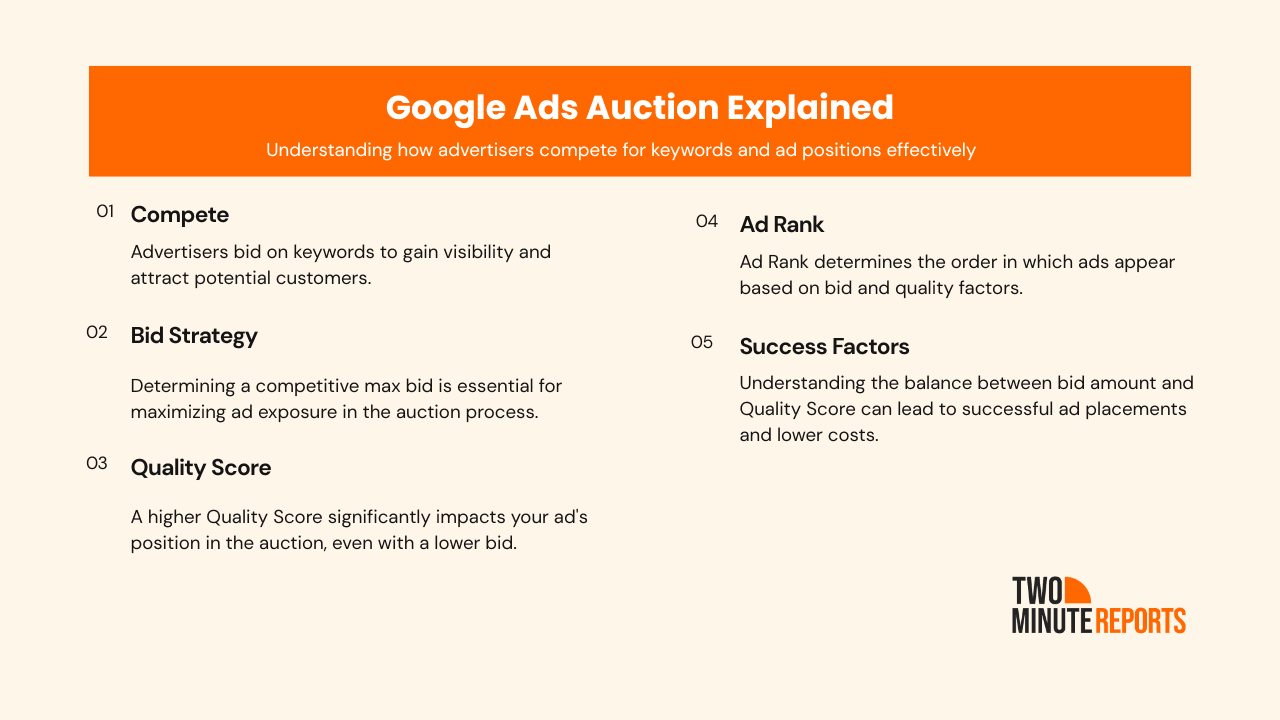
Most advertisers assume they are simply buying a position on Google. The higher you bid, the higher you rank. But that is not how it works, and understanding the actual mechanics can change how you approach your entire campaign strategy.
Quality Score
Quality Score (1-10) depends on three core factors:
- How relevant your ad is to the keyword you are bidding on
- How likely people are to click on your ad based on its history
- The experience your landing page delivers after the click
A high Quality Score tells Google your ad is useful to the person searching. And Google rewards that by lowering what you need to pay to compete.
Ad Rank
Your Ad Rank is what actually determines whether your ad shows and where it appears. A higher Ad Rank wins a better placement. A lower Ad Rank means your ad loses vital position, regardless of how much you are willing to spend.
CPC
You don’t pay your maximum bid. Google’s auction charges you the minimum required to outrank the competitor below you, based on your Ad Rank.
In practice, this means advertisers with stronger relevance and better-performing ads can pay less per click and still rank higher. Better ads help improve campaign efficiency. That is the core logic of the Google Ads auction.
Advanced Targeting That Affects Your Costs
Your bid is just one part of what determines what you pay. How you target, when your ads run, and which devices you appear on all move the needle on cost.
Ad Scheduling
You do not have to run your ads around the clock.
Dayparting lets you concentrate your budget on the hours when your audience is most active. For a local business operating 9 am to 6 pm, ads running at 2 am are not just wasteful; they pull budget away from the hours that actually convert. Matching your schedule to your peak conversion windows is one of the simplest optimisations you can make.
Geotargeting
Location shapes competition, and competition shapes cost. Broad city-wide targeting puts you up against every advertiser in that market. Narrowing to specific zip codes or neighborhoods brings costs down while keeping your ads in front of the right people. For local service businesses, tighter geo-targeting often outperforms wider campaigns on both cost and conversion rate.
Device Targeting
Desktop and mobile clicks are not priced the same. Desktop CPCs run 50 to 100 percent higher on average than mobile CPCs. The reason is simple: desktop users convert at significantly higher rates, even though mobile drives more raw clicks. If your landing page is not optimised for mobile, you are paying for clicks that are unlikely to convert. Fixing that, or shifting more budget toward desktop, can improve returns without increasing total spend.
Hidden Costs Beyond Ad Spend
Your monthly ad spend is not your total Google Ads investment. For most businesses, there are two or three additional cost layers that rarely get factored into the initial budget conversation.
Agency and consultant fees
If you are working with a PPC agency or freelance consultant, pricing typically follows either a flat monthly retainer or a percentage of ad spend. The percentage model is more common at higher spend levels, while fixed retainers are often used for smaller or controlled budgets. For lower budgets in particular, management fees can represent a significant share of total spend, making efficiency and performance even more critical.
PPC management software
Tools for bid management, reporting, and campaign automation typically run between $50 and $1,000 per month, depending on the platform and the scale of your account. If you are managing campaigns manually inside Google Ads alone, this cost may not apply yet. But as campaigns grow, the time savings from purpose-built software usually justify the expense.
Landing pages and testing infrastructure
Driving traffic to a poorly converting page is one of the fastest ways to waste ad spend. Building dedicated landing pages, running A/B tests, and iterating on copy and design all carry a cost, whether that is a developer's time, a landing page tool subscription, or both.
A realistic total Google Ads investment for a small to mid-sized business is not just the ad spend. It is ad spend plus management plus tools plus conversion infrastructure. Planning for all four from the start prevents the kind of budget surprises that make campaigns look unprofitable when they are actually just undercosted.
Smart Bidding Strategies to Optimize Your Google Ads Pricing
Smart Bidding is Google's suite of automated bid strategies powered by machine learning. The main ones worth knowing are Target CPA, Maximize Conversions, and Target ROAS, each suited to a different campaign goal and stage.
The most important thing to understand before using any of them: they need data to work. Smart Bidding strategies typically require at least two months of campaign history to optimize reliably. Activating them too early on a fresh account often leads to inefficient spending while the algorithm is still learning.
A few quick wins while you are building toward Smart Bidding readiness: start with long-tail keywords to keep CPCs lower, use negative keywords to cut wasted spend, set bid caps to protect your budget, and pause anything that is spending without converting.
How to Calculate a Starter Google Ads Budget?
Before you pick a number, work backwards from what you actually want to achieve. Here is a simple formula to get you to a budget grounded in real math rather than a gut feeling.
Step 1: Define your monthly conversion target
How many leads, sales, or signups do you need from Google Ads this month? Start here. Everything else flows from this number.
Step 2: Estimate your conversion rate
What percentage of clicks typically turn into a conversion? If you have no data yet, set a conservative starting estimate based on your industry and intent level.
Step 3: Calculate the clicks you need
Divide your conversion target by your conversion rate. If you need 20 conversions at a 4% conversion rate, you’ll need 500 clicks.
Step 4: Multiply by your expected CPC
Multiply the required clicks by your estimated cost per click. For example: 500 clicks at $3.00 CPC = $1,500 monthly budget.
Step 5: Sense check against projected revenue
Estimate the revenue from those conversions and compare it to your spend. If 20 conversions generate $4,000 in revenue, a $1,500 budget may be viable. If the margin is too tight, revisit your assumptions, either your CPC, conversion rate, or target volume
Tracking & Reporting Your Google Ads Spend
Setting a budget is step one. Knowing whether that budget is actually working is step two, and it is where a lot of advertisers fall short.
Running campaigns across Search, Display, Shopping, and Video simultaneously means your spend data lives in multiple places. Without a consolidated view, it is easy to miss where money is leaking until it shows up as a bad month-end number.
This is where a Google Ads reporting tool like Two Minute Reports fits in.
If you are pulling Google Ads data into Google Sheets or Google Data Studio, Two Minute Reports automates that pipeline. Instead of manual exports and stitched-together spreadsheets, you get the updated view of CPC, ROAS, cost per conversion, and budget pacing across all your campaigns in one place.
For agencies and teams managing multiple clients or campaign types, access to the most current data matters more. Two Minute Reports is the reporting layer that sits on top of your Google Ads account and makes your cost data readable, trackable, and actionable without the manual work.
Tips on How to Lower Your Google Ads Cost
You do not always need a bigger budget to get better results. Most of the time, you need a tighter strategy.
Improve your Quality Score
This is the single highest-leverage move available to you. A better Quality Score lowers your CPC and improves your position at the same time. Focus on tightening the match between your keyword, your ad copy, and your landing page. All three need to feel like they are answering the same question.
Use negative keywords
Every irrelevant click is money out of your budget. Negative keywords tell Google which searches you do not want to show up for. Review your search terms report regularly and add anything that is attracting clicks with no chance of converting.
Tighten your targeting
Narrow your geography to where your customers actually are, schedule your ads to run during your peak conversion hours, and adjust bids by device based on where your conversions actually come from.
Focus on long-tail keywords
Short, generic keywords tend to be more competitive and often come with higher costs due to broad intent. Long-tail keywords are more specific, usually reflect clearer intent, and tend to convert better. A plumber bidding on "emergency plumber in downtown Austin" will pay less and convert better than one bidding on "plumber."
Pause what is not working
Underperforming keywords and ad groups quietly drain budget every day. Set a regular cadence, weekly or fortnightly, to review what is being spent without converting and pause it. Concentrating your budget on what is already working is often more effective than trying to fix what is not.
Optimise your landing page
Make improvements to page speed, headline clarity, and call-to-action placement to meaningfully reduce your effective cost per lead.
Conclusion
Google Ads pricing is not a fixed cost. It is an outcome.
What you pay is shaped by the industry you are in, the Quality Score your ads earn, the bidding strategy you choose, how precisely you target your audience, and how consistently you optimise over time. Pull these levers in the right direction, and your costs move with it.
The businesses that get the most out of Google Ads are not always the ones with the biggest budgets. They are the ones who understand how the platform works and make informed decisions at every step, from keyword selection to landing page experience to how they read their reporting data.
Frequently Asked Questions
Usually, one of the three reasons: your Quality Score is low, you are bidding on highly competitive keywords, or your targeting is too broad. Start by checking your Quality Score in the Google Ads dashboard. Improving ad relevance and landing page experience is often the fastest way to bring CPC down.
Add negative keywords to stop wasted clicks, narrow your geo-targeting to your highest-converting areas, pause keywords that spend without converting, and shift budget toward your top-performing campaigns. Reducing spend and protecting leads is possible; it just requires knowing where the waste is coming from.
There is no official minimum budget for Google Ads. You can technically run campaigns on very small daily spends, but extremely low budgets will limit your ability to generate meaningful data and optimize performance.
In low-competition industries, it can work as a starting point. In competitive verticals like legal, finance, or home services, $500 will get used up quickly with limited results. So plan well in advance to compete with highly competitive niches to prevent overspending.
Related Blogs




Meet the Author
Shabika VenkidachalamShabika, at her core, is a storyteller who believes even data-heavy topics can be infused with heart. At Two Minute Reports, she blends creative writing with user intent to create clear, purposeful content that is deeply human. Away from her desk, she finds inspiration in nature, where creativity flourishes without distractions.

