
Summarize this blog post with:
YouTube has become a non-negotiable growth channel. With 82% of marketers reporting positive ROI from video, brands are investing heavily in content production. The prevailing belief is simple: publish consistently, grow steadily, and convert eventually.
But YouTube growth isn’t linear.
A video gains traction, yet revenue stays flat. Subscribers increase, but engagement drops. Watch time increases while conversions remain unclear. The path from attention to action is fragmented, often spanning multiple touchpoints and delayed decisions.
The problem here isn’t the lack of data. It’s the lack of structured interpretation.
Though YouTube Studio shows performance metrics, it doesn't translate them into strategic clarity. It becomes complicated, especially when you’re managing multiple clients or channels. That’s where a properly structured, consistent and scalable YouTube Analytics report becomes essential.
In this guide, you’ll learn how to create a YouTube Analytics report that turns data into direction and how to scale it efficiently using Two Minute Reports.
Key Takeaways:
- A YouTube Analytics report is a strategic growth document. It explains why performance changed and what to optimize next.
- Track core signals like Watch Time, Retention, CTR, Subscriber Growth, Traffic Sources and RPM, but always analyze them in context.
- Structure your reports in a clear flow: Visibility → Engagement → Growth → Revenue.
- Customize reports based on the content format, audience behavior, and channel maturity.
- End every report with a clear optimization and next action.
What is a YouTube Analytics Report?
A YouTube Analytics report is a strategic performance document that explains why your client’s channel is growing or why it isn’t. It helps uncover:
- Viewer behavior patterns – how audiences discover content, how long they stay, and where they drop off.
- Engagement signals – which content formats and types convert viewers into subscribers and which fail to sustain attention.
- Distribution dynamics – whether growth is driven by search, social media or external sources of traffic.
- Revenue alignment – how visibility and retention translate into measurable business outcomes.
By connecting these important signals, you can create a clear and compelling performance narrative – showcasing what it means, why it happened and what should change next. That’s the difference between simply exporting video analytics and delivering useful insights to clients.
Why Create a YouTube Analytics Report?
YouTube performance doesn’t retain clients. Strategic clarity does.
You can generate views, increase watch time, and grow subscribers, but if you can’t clearly explain what those numbers mean for your client’s investment, your value becomes replaceable.
That’s why creating a YouTube Analytics report becomes essential – converting content performance into decision-making clarity. Here’s why it matters:
1. Client Retention Through Proof of Value
As an agency owner or marketer, you lose clients when the value you try to prove isn’t visible.
A YouTube Analytics report turns activity into proof. It connects key metrics such as views, watch time, and engagement to data-driven outcomes such as leads, pipeline influence, and revenue contribution. Instead of saying, “the channel is growing”, show them how growth translates into measurable impact.
Clear reporting reinforces trust. Trust strengthens client relationships.
2. Understand What Drives Attribution
YouTube doesn’t promote videos randomly. It evaluates CTR, watch time, and viewer satisfaction to decide whether to recommend your content.
A YouTube Analytics report helps you identify:
- Which videos trigger algorithmic expansion?
- Where does distribution hit barriers?
- How do traffic sources shift over time?
Without this clarity, growth becomes guesswork.
3. Align Content Strategy with Audience Behavior
Not all views are equal.
You need to know:
- Which topics attract returning viewers?
- Which content formats convert attention into sales?
- Does traffic from YouTube Shorts support growth?
With evidence-based answers, you can develop a strong content strategy that resonates with your audience.
4. Diagnose Retention Leaks Before Growth Stalls
High views don’t add value if viewers drop off early.
Your report should ideally spot:
- Weak, generic intros.
- Content pacing issues.
- Content formats that are responsible for driving the lowest engagement.
By analyzing these patterns with consistent, accurate data, you can eliminate a decline in reach and overall visibility.
The Strategic Value of YouTube Analytics Reporting
10 Most Important Metrics To Include In Your YouTube Analytics Report
Let’s explore the top 10 YouTube Analytics metrics that play a crucial role in optimizing your video marketing performance:
1. Watch Time
Watch time is YouTube’s primary growth metric. If watch time is rising but impressions are flat, distribution is constrained. If impressions grow but watch time stagnates, content quality is the issue. Optimize for total session contribution, not just views.
2. Average View Duration
Average View Duration reveals how long viewers stay engaged on average.
Compare the average view duration across formats and topics. If shorter videos have proportionally higher AVD but lower total watch time, test hybrid formats. Growth comes from balancing depth and retention.
3. Audience Retention Curve
The retention curve shows exactly where viewers drop off and where engagement spikes.
Look for:
- Sharp drop in first 30 seconds → weak hook.
- Mid-video dips → pacing issues.
- Late spikes → high-value segment worth repurposing.
Retention curves tell you where you lose attention and where you earn it.
4. Impressions Click-Through Rate (CTR)
Refers to the percentage of viewers who click to watch a video after seeing its title or thumbnail. It shows whether people are compelled to click in the first place.
Optimization lever: A/B test thumbnails before rewriting scripts.
5. Subscriber Growth Rate
Subscriber growth per video reveals how well content turns viewers into long-term followers.
If high-view videos generate low subscribers, your value proposition isn’t clear. Add stronger positioning, clear niche messaging or consistent series formats.
6. Unique Viewers
This metric measures how many distinct viewers reach your YouTube channel.
If views rise but unique viewers stay flat, you’re circulating within the same audience. To expand, analyze content effectiveness and optimize for Search and Suggested discovery.
7. New vs Returning Viewers
This metric compares first-time viewers with repeat viewers.
High new viewers + low returning viewers = exposure without loyalty.
High returning viewers = compounding channel authority.
Balancing both is the winning recipe for your channel's sustainability.
8. Viewer Demographics
Demographics validate whether your content attracts the intended audience.
Mismatch between the target ICP and the viewer profile signals messaging misalignment. Use this data to refine topic angles, examples and positioning.
9. Top YouTube Search Terms
Search terms reveal the queries that bring people to your videos.
If you rank for transactional queries, optimize CTAs. If you rank only for informational queries, refine the funnel progression.
10. Revenue Per Mille (RPM)/ Estimated Revenue
RPM reflects monetization efficiency per 1,000 views.
For agencies, this metric connects content performance directly to financial impact.
Here’s a summary table of the above-discussed YouTube analytics metrics:
How to Create a YouTube Analytics Report?
Tracking the right metrics is the first step. Now let’s structure them into a clear, client-ready YouTube Analytics report using Two Minute Reports.
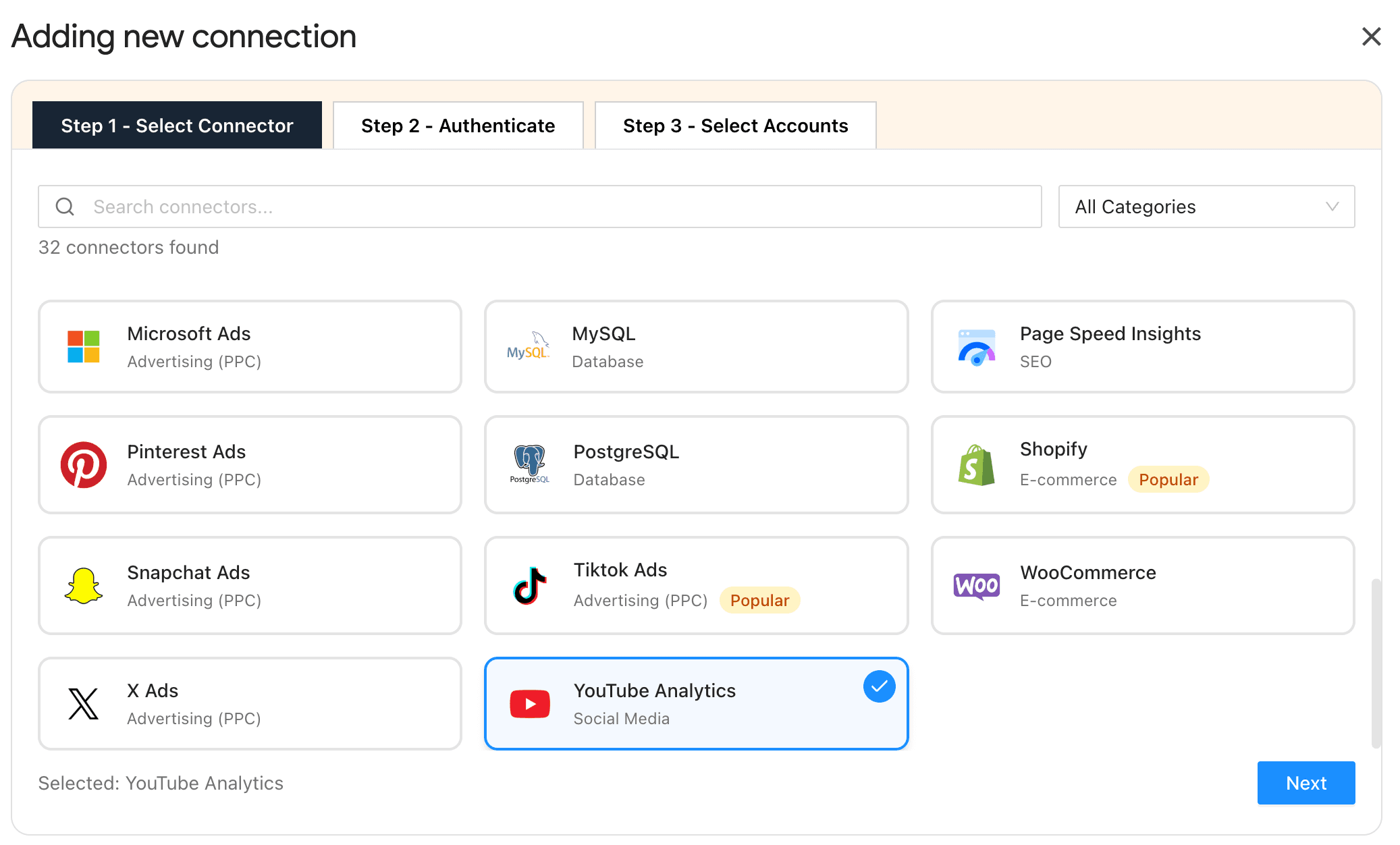
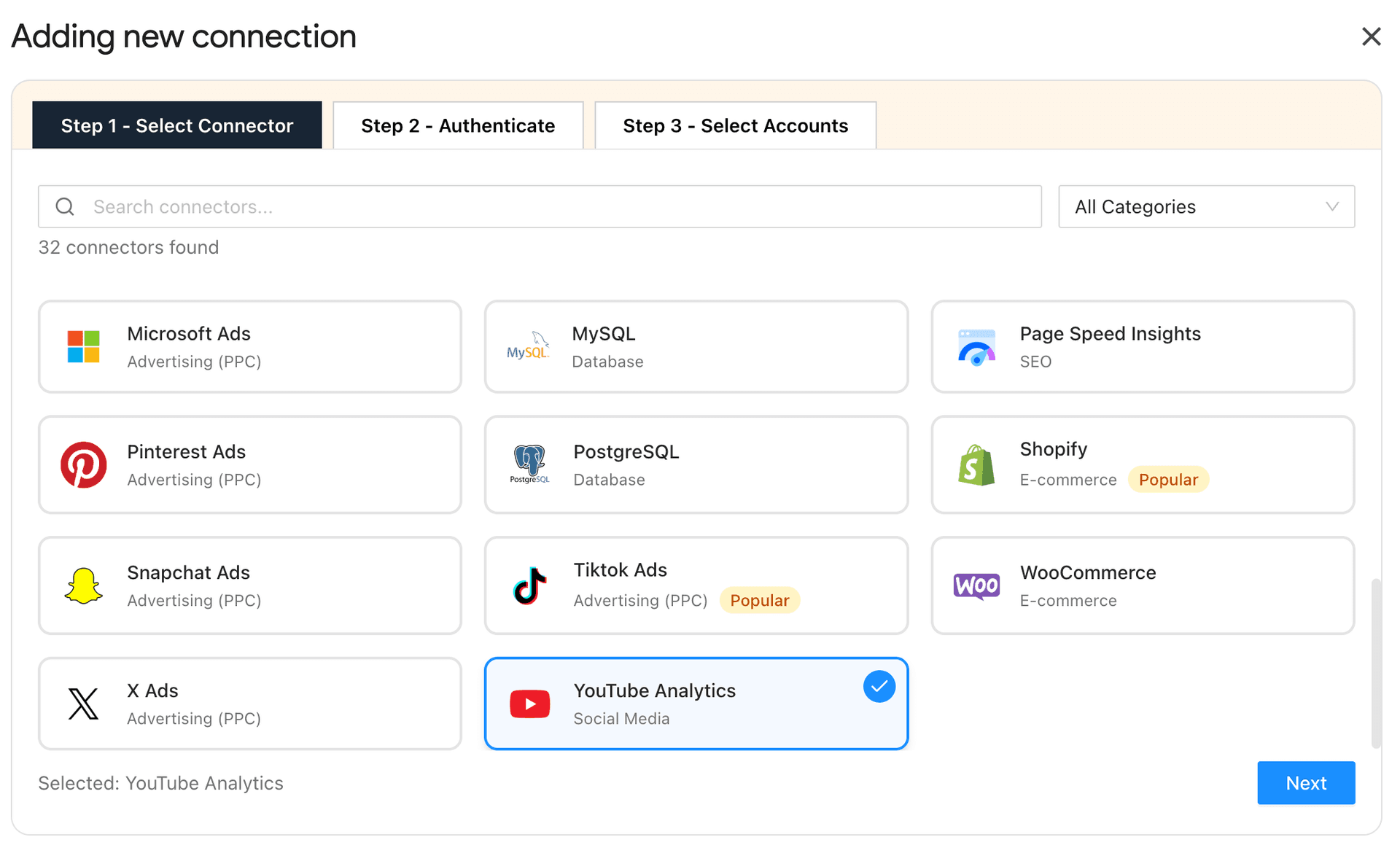
1. Connect your YouTube Channel Accounts
- Install the Two Minute Reports add-on from the Google Workspace Marketplace.
- Next, connect your client’s YouTube channel account securely via Google authentication to extract channel-level and video-level performance data.
- Organize and map the right channel with the right client effortlessly from a single workspace.
2. Choose Metrics Based on the Channel’s Goal
Don’t overload the report. Align key metrics with intent.
- If the goal is reach → Focus on Impressions, CTR, Traffic Sources.
- If the goal is engagement → Focus on Watch Time, Average View Duration, Retention.
- If the goal is growth → Focus on Subscribers, Returning Viewers.
- If the goal is revenue → Include RPM and conversion signals.
Tip: One channel, one primary objective. Structure your report around that.
3. Customize Your Report to Reflect the Channel’s Effectiveness
This is where your report becomes strategic. Customize based on:
Content format: Seperate Shorts and long-form content performance to clearly identify patterns.
Audience behavior:
- If new viewers dominate → emphasize acquisition metrics such as impressions, unique viewers, etc.
- If returning viewers are rising → highlight loyalty growth metrics such as returning viewers, subscriber growth, etc.
Target demographic: If a viewer's demographics don’t match with the intended audience, surface it. That’s a key strategic insight to highlight.
Monetization model:
- For brand channels, prioritize engagement and conversions.
- For creator channels, emphasize RPM and watch time efficiency.
Structure your YouTube Analytics report around this model so it reflects how this specific channel grows with precision.
4. Automate Your Report for Real-time Insights
Schedule your reports to be sent at your client’s preferred intervals.
Each report should include:
- A concise performance summary
- Clear pattern identification
- One optimization decision
- An experiment to be conducted for the next cycle.
Automation handles delivery. Insights deliver value.
Pro Tip: Create reusable, branded YouTube Analytics reports with custom layouts and automate delivery to save time, scale faster, and highlight real-time wins effortlessly.
Translate your YouTube Analytics Report into a Growth Engine
A YouTube Analytics report should do more than summarize performance. It should guide decisions. The following actions let you turn your YouTube analytics into measurable progress.
1. Diagnose Distribution Before Creating Content
- Compare impressions and CTR to check whether the issue is with titles, thumbnails or algorithm reach.
- Identify traffic source trends to understand how YouTube is distributing your content.
- Optimize thumbnails on high-impressions, low-CTR videos before producing new uploads.
Growth insight: Fix distribution leaks before increasing production volume.
2. Eliminate Retention Breakdowns Early
- Review the first 30 to 60 seconds of retention graphs across recent uploads.
- Identify repeated drop-off points and adjust hooks or pacing accordingly.
- Replicate segments where retention stabilizes or spikes.
Growth insight: Better retention leads to broader reach.
3. Strengthen Subscriber Conversion Per Video
- Track subscribers gained per video instead of the overall subscriber count.
- Identify content themes that consistently convert viewers into subscribers.
- Refine value proposition and CTA placement on high-view, low-conversion videos.
Growth insight: Subscriber efficiency determines long-term momentum.
4. Connect Performance To Business Impact
- Track RPM and revenue trends alongside Watch Time.
- Align high-intent search terms with conversion-focused CTAs.
- Validate YouTube traffic impact using GA4 conversion data.
Growth Insight: YouTube growth must translate into measurable value.
5. Turn Insights into a Monthly Optimization Plan
- Document one major pattern observed in the reporting cycle.
- Define one content adjustment based on the audience behavior.
- Establish one controlled test (format, thumbnail style, intro structure)
Growth Insight: Analytics without experimentation stalls progress.
Wrapping Up
YouTube growth is engineered through consistent analysis, structured reporting and disciplined optimization.
When your YouTube Analytics report highlights distribution gaps, retention leaks, subscriber efficiency and revenue alignment, growth stops being reactive and becomes intentional. The difference isn’t the data you collect. It’s in how clearly you structure and act on it.
So whenever you create a YouTube Analytics client report, ensure to:
- Start with what changed this month, not a full metric dump.
- Highlight wins and areas to improve.
- Compare performance against the last period to show the momentum. Be transparent.
- Showcase agency expertise by aligning strategy to ROI growth.
- Close with what you’ll exactly optimize next.
The simplest way to accomplish this is to use the Two Minute Reports’ YouTube Analytics reporting tool. Just connect your client’s YouTube channel accounts and automatically deliver real-time performance insights without any manual effort.
Start building smarter YouTube Analytics reports with Two Minute Reports. Experience the difference for yourself by testing it free for 14 days.
Frequently Asked Questions
To generate your YouTube Analytics report, first connect your channel with Two Minute Reports by installing it from the Google Workspace Marketplace. Next, choose metrics that align with your channel’s goals, personalize the report to showcase its performance, and automate it to deliver real-time video performance insights to your clients.
You can easily set up automation by scheduling your reports to be sent at custom intervals (daily, weekly or monthly) that work best for your clients. Make sure each report includes a summary of performance, key patterns, a suggested optimization decision, and an outline of an experiment for the next reporting cycle.
Start with a pre-built YouTube Analytics report template instead of building from scratch. Then tailor the dashboard to reflect your client’s priorities by selecting relevant metrics, organizing them logically, and aligning them with campaign goals. Finally, share the dashboard as a link so clients can access real-time performance updates.
Log in to your YouTube account, then open YouTube Studio to view your channel’s performance metrics in a centralized dashboard.
Related Blogs




Meet the Author
Shalini MuruganShalini is driven by ideas that create a tangible impact. At Two Minute Reports, she specializes in content that helps marketers optimize their reporting workflows. When she's not transforming complex data into meaningful insights, you might find her lost in a book, jotting down ideas in her notebook, or connecting the dots others overlook.

