Summarize this blog post with:
Think about the last time you searched on Google and saw “Sponsored” results at the top, or scrolled through Instagram and noticed a “Promoted” post that felt surprisingly relevant. That’s PPC in action (definitely not a coincidence). Brands pay to show ads to the right people at the right time, and they only pay when someone clicks.
For a beginner, this world of digital ads can feel like a high-stakes auction where everyone is speaking a different language. However, once you peel the jargon, PPC is one of the most logical and rewarding ways to grow your business.
This guide will walk you through the basics of what PPC marketing is, how it works, the platforms to start with, how to create your first campaign, and which metrics matter the most. By the end of your read, you will understand how to launch and manage PPC campaigns without feeling overwhelmed.
What Is PPC Marketing?
Pay-Per-Click (PPC) is a digital advertising model where you pay for actual results. Instead of paying a flat fee to display an ad (like a billboard or a TV commercial), you only pay the platform when someone clicks on your ad to visit your website.
In simple terms: you aren't paying for the view; you are paying for the visit.
According to industry research, paid advertising can return around $2 for every $1 spent on average, though actual results vary widely by industry, targeting, and campaign quality.
How PPC Works Behind the Scenes?
Key point: Ads do not appear randomly.
Every time you search for something or refresh a feed, a lightning-fast automated auction takes place, and here is how it works:
- The Trigger: A user searches for a specific keyword (like best coffee beans) or fits a specific interest profile.
- The Evaluation: The platform (Google or Meta) looks up to businesses that want to show an ad to that user. It checks their bid (how much they are willing to pay) and their ad quality (how relevant the ad is).
- The Result: The platform ranks the ads within milliseconds. Tada! The winner gets the top spot, and the process repeats for the next user.
How PPC Marketing Works (Step-by-Step)?
Setting up a campaign can feel like learning a new language, but the process follows a logical path. Here is how you get from an idea to a live PPC ad.
1. Choosing an Ad Platform
Your choice of platform varies depending on where your audience spends their time and what you want them to do. These are the primary networks for beginners.
Popular PPC Platforms Beginners Should Know
- Google Ads (search intent): This is the most common starting point and includes Search, Display and YouTube.
- Facebook & Instagram Ads (social discovery): These are owned by Meta. They are visual and work by showing ads to people based on their interests and behaviors while they scroll.
- LinkedIn Ads (B2B targeting): Ideal for professional services. You can target people by their job title, company, or industry.
- Amazon Ads (Ecommerce intent): If you sell physical products, this helps you appear at the top of shopping results when people are ready to buy.
Other PPC Platforms Beginners May Explore Later
- Microsoft Ads (Bing Ads) often has lower competition and can deliver cheaper clicks, especially for certain industries and older demographics.
- TikTok Ads work well for visual, consumer-focused brands that rely on short-form video and creative storytelling rather than search intent.
Tip: If people are actively searching for your service (like a plumber), start with Google Ads. If you have a visual product and need to build awareness, start with Facebook or Instagram.
2. Campaign Targeting & Audience Strategy
Once you pick a platform, you must decide who sees your ads.
In the early days of advertising, you had to hope your target audience saw your billboard or TV spot. With PPC, you no longer have to hope. Targeting options allow you to be surgical, ensuring your budget is spent only on the people most likely to convert.
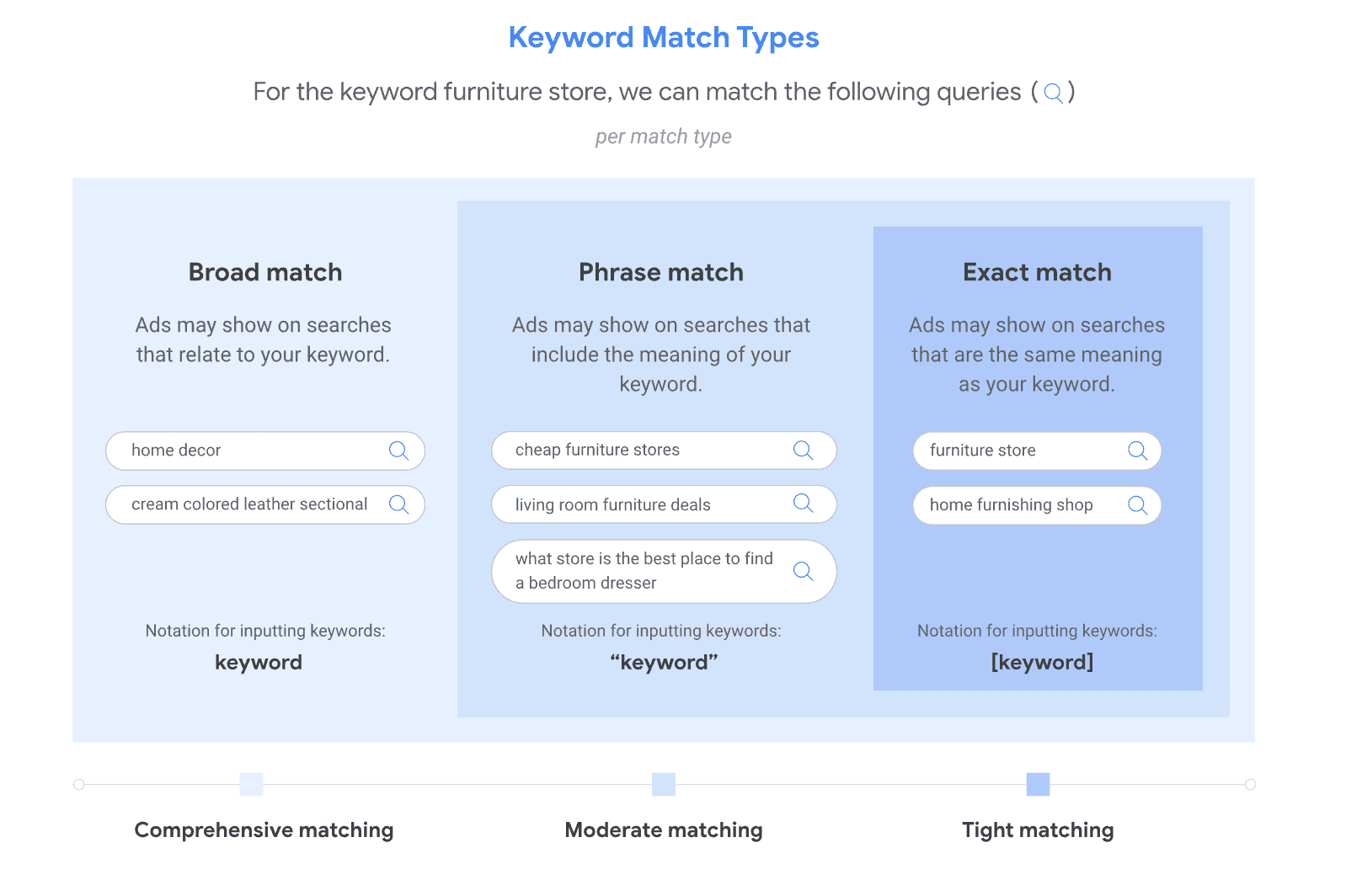
 Image Source: Google Help
Keyword targeting is the foundation of search advertising. It allows you to show your ads based on the specific words or phrases users type into a search engine. To master this, you must understand Match Types, which dictate how closely a user’s search must align with your keyword:
- Broad match: Your ad shows for searches related to your keyword, including synonyms and misspellings.
- Phrase match: Your ad shows for searches that include the meaning of your keyword.
- Exact match: Your ad only shows for searches that have the same meaning or intent as your keyword.
By using a combination of these and maintaining a negative keyword list, you can filter out irrelevant traffic and focus on high-intent searches.
II. Audience Targeting
While keywords focus on what is being searched, audience targeting focuses on who is doing the searching. This is especially powerful on social media platforms like Meta or LinkedIn. You can group users based on:
- Interests: Targeting people based on hobbies, the pages they like, or the topics they engage with online.
- Affinity & in-market: Targeting users who have shown a long-term interest in a topic (Affinity) or those who are currently in the market to buy a specific product based on their recent browsing behavior.
- Demographics: Narrowing your reach by age, gender, parental status, or household income.
III. Location and Device Targeting
Where and how your audience accesses the internet matters just as much as who they are.
- Location (Geofencing): You can target users by country, state, city, or even a specific zip code. For local businesses, you can set a radius around your physical store so that only people nearby see your ads.
- Device targeting: Users behave differently on a smartphone than on a desktop. You can adjust your bids or create specific ad formats for mobile, tablet, or desktop users. For example, if your website's checkout process is difficult on mobile, you might choose to lower your bids for mobile devices to save money.
IV. Remarketing Basics
Remarketing (or Retargeting) is the art of reaching out to people who have already interacted with your brand.
Have you ever visited a website, left without buying anything, and then saw an ad for that same company 10 minutes later? That is remarketing.
It works by placing a small piece of code (often called a Pixel) on your website. When a visitor leaves your site, the pixel notifies the ad platform to show them your ad elsewhere. As these users are already familiar with your brand, remarketing ads typically have a much higher conversion rate, though results depend on audience size, timing and offer relevance.
3. Bidding and Ad Auctions Explained
You do not just pay a set price for an ad. Instead, you enter a real-time auction.
- You set a maximum bid, which is the highest amount you are willing to pay for one click.
- When someone searches or scrolls, the platform compares your bid and your ad quality against competitors.
- The platform chooses a winner. Remember, quality matters; a better ad can often beat a higher bid.
4. What Happens After Someone Clicks Your Ad?
A click is just the invitation.
After the click, the user lands on your landing page. This is a specific page on your website tailored to the ad. If your ad promises a discount on boots, your landing page should show those boots and the discount immediately. Your goal here is to turn that paid visitor into a lead or a sale.
Key PPC Terminologies Every Beginner Must Understand
Before you launch your first campaign, you need to speak the language. These metrics tell you if your ads are making money or burning a hole in your pocket.
1. CPC (Cost Per Click)
This is the amount you pay for each click on your ad. It is the most common way to measure your basic advertising cost.
Formula: Total Cost/Number of Clicks
2. CPM (Cost Per Mille)
Mille is Latin for thousand. CPM is the cost you pay for 1,000 impressions (views) of your ad. This is used for brand awareness when you want many people to see your ad.
Formula: Total Cost/{Number of Impressions} *1,000
3. CTR (Click-Through Rate)
This is the percentage of people who saw your ad and actually clicked it. A high CTR usually means your ad is relevant to your audience.
Formula:{Number of Clicks/Number of Impressions}*100
4. Quality Score
Google uses this 1–10 rating to measure the quality and relevance of your keywords and ads. It is not a direct calculation you do yourself, but it is based on three factors:
- Expected Click-Through Rate: How likely people are to click.
- Ad Relevance: How well your ad matches the search term.
- Landing Page Experience: How helpful your page is once they arrive.
5. Ad Rank
Ad Rank is a value that determines your ad's position on the page. In simple terms, a better rank means a higher spot.
Formula:{Bid Amount}*{Quality Score}
6. Conversion Rate
A conversion is when a user clicks your ad and takes an action you care about, such as buying a product. The conversion rate tells you what percentage of clicks turned into results.
Formula:{Total Conversions/Total Clicks}*100
7. ROAS (Return on Ad Spend)
This tells you how much revenue you earned for every dollar spent on ads. It is the best way to see if your marketing is profitable.
Formula: {Total Revenue from Ads/Total Ad Spend}
How Much Does PPC Marketing Cost?
One of the best things about PPC is that you decide exactly how much you want to spend. There is no minimum fee to enter the game, but there are strategic ways to ensure your money isn't wasted.
Minimum Budget Needed to Get Started
You can start a campaign with as little as $5 or $10 a day. However, your budget needs to be high enough to get actual clicks.
For example, if the average cost for a click in your industry is $2 and your daily budget is only $5, you will only get 2 or 3 visitors a day. This makes it very hard to gather enough data to see if your ads are working.
A common recommendation for beginners is to aim for a budget that allows at least 10 to 20 clicks per day.
Daily vs. Monthly Budgets
Most platforms ask you to set a daily budget, but they manage it over the course of a month.
- Daily budget: The average amount you want to spend each day.
- Monthly budget: This is your daily budget multiplied by 30.4 (the average days in a month).
Note: On some days, Google might spend up to twice your daily budget when it sees high traffic. Don't panic; the platform will balance it out so you never exceed your monthly limit.
Common Beginner Budgeting Mistakes
- Spreading the Budget Too Thin: Trying to target 50 different keywords with only $10 a day. It is better to dominate 5 keywords than to be invisible on 50.
- To Set and Forget Trap: Setting a budget and not checking it for a month. You might find you spent your whole budget on "junk" clicks that didn't lead to sales.
- Not Setting a Safety Margin: Always plan to spend about 20% more than your "ideal" budget during the first month for testing and learning.
- Ignoring Location: Showing ads to the whole country when you only serve one city. This wastes money on clicks from people who can't buy from you.
How to Create Your First PPC Campaign?
Building a successful campaign requires more than just picking a few keywords and launching. It requires a structured approach that aligns your business goals with the technical settings of the ad platform. Here is how to build your foundation.
1. Establish Your Campaign Goals
Before spending a single dollar, you must define what success looks like. Without specific objectives, you cannot accurately measure your progress or track key performance indicators (KPIs). For example, a SaaS company might focus on Monthly Recurring Revenue (MRR) by tracking new trial sign-ups, while a local service provider might focus on phone calls.
Common goals include:
- Brand Awareness: Focusing on visibility. Success is measured through impressions and reach rather than immediate sales.
- Lead Generation: Collecting user data via forms or downloads. KPIs include cost-per-lead and lead quality.
- Conversion: Driving direct actions like purchases or demo bookings. This is measured by conversion rate and Return on Ad Spend (ROAS).
- Remarketing: Re-engaging people who visited your site but didn't convert, typically measured by a lift in conversion rates.
2. Decide on Your PPC Budget
Your budget should be rooted in industry data and your own financial goals. While costs vary, many mid-sized businesses allocate significant monthly sums to stay competitive. To find your starting point, look at the average Cost-Per-Click (CPC) for your industry. If you are in a high-competition niche like finance or legal services, expect to pay a premium.
When planning, remember to account for more than just the ad spend. You may also need to budget for PPC management tools or agency fees, which typically range from 12% to 30% of your total ad spend.
3. Define and Segment Your Audience
Segmentation allows you to personalize your message for different groups of people. You can narrow your audience by:
- Demographics: Age, income level, or job title.
- Geography: Targeting specific regions or a radius around your business.
- Devices: Optimizing for mobile users versus desktop users. In many industries, a majority of paid clicks now come from mobile devices. Some studies show that over half of paid clicks (around 53%) happen on mobile, making mobile optimization critical.
- Timing: Using ad scheduling to only show ads during your peak business hours.
4. Create and Launch Your Ad
This is where your research turns into creative content. Your ad copy should highlight your Unique Selling Proposition (USP), what makes you better than the competition?
Every ad needs a clear Call to Action (CTA) like Start Free Trial or Get a Quote. It is a best practice to create multiple versions of your ad to A/B test which headlines or buttons perform best. Finally, ensure your ad leads to a dedicated Landing Page that is simple, fast, and focused entirely on the action you want the user to take.
5. Set Up Your Campaign Tracking
PPC is a data-driven process, not a set-and-forget task. You must use tracking tools to see which ads are actually producing revenue.
- Google Analytics & Ads Manager: For real-time tracking of engagement and bounce rates.
- Google Data Studio: To aggregate data from different sources into one visual report.
- Third-Party Tools: Software like Two Minute Reports helps you with PPC multi-channel reporting and analytics, while AdEspresso, can help automate A/B testing and alert you if your budget is being spent inefficiently.
Common PPC Mistakes Beginners Make (And How to Avoid Them)
Even with a healthy budget, a few simple tactical errors can drain your funds without producing a single lead. Recognizing these common pitfalls early will put you miles ahead of other new advertisers.
1. Targeting Too Many Keywords
A common beginner instinct is to cast the widest net possible. You might think that bidding on 100 different keywords increases your chances of success, but it usually just dilutes your budget.
- The Risk: When you spread $20 a day across 100 keywords, each keyword only gets a few cents of exposure. You won’t gather enough data to know which ones actually work.
- The Fix: Start small. Focus on 5 to 10 high-intent keywords that are most likely to lead to a sale. Master these before expanding.
2. Ignoring Negative Keywords
If keyword targeting tells the platform who to show your ad to, negative keywords tell it who to avoid. Failing to use them is one of the fastest ways to waste money.
- The Risk: If you sell premium watches, but don't add free or cheap as negative keywords, you will pay for clicks from people who have zero intention of buying a luxury product.
- The Fix: Regularly review your Search Terms Report. If you see your ad appearing for irrelevant queries, add those terms to your negative keyword list immediately.
3. Sending Traffic to Poor Landing Pages
The job of the ad is to get the click; that of the landing page is to close the deal. Many beginners spend weeks on their ad copy but send the traffic to their generic homepage.
- The Risk: A user clicks an ad for a 20% discount on yoga mats but lands on a homepage showing generic gym equipment. They won't go hunting for the deal; they will simply leave (bounce).
- The Fix: Ensure your landing page is a direct mirror of your ad. It should be fast, mobile-responsive, and have a single, clear call-to-action (CTA).
4. Not Tracking Conversions Properly
If you aren't tracking conversions, you aren't doing PPC; you're just gambling.
- The Risk: Ad A got 100 clicks, and Ad B got 50 clicks. You might assume Ad A is better. However, if Ad B resulted in 10 sales and Ad A resulted in zero, you are accidentally pouring money into the wrong ad.
- The Fix: Set up conversion tracking (like the Google Ads tag or Meta Pixel) before you turn your ads on. You need to see the journey from click to cash.
5. Making Changes Too Frequently
PPC platforms rely heavily on machine learning. Every time you make a significant change to your budget or bids, the algorithm enters a re-learning phase.
- The Risk: Beginners often panic if they don't see a sale in the first 24 hours and start changing headlines or lowering bids. This resets the learning process and prevents the platform from optimizing.
- The Fix: Be patient. Once you launch or make a major change, let the campaign run for at least 7 to 14 days to gather enough data before you decide to pivot.
PPC Optimization Tips for Beginners
Once your campaign is live, the real work begins. Optimization is the process of refining your settings to get more results for less money. Instead of guessing, you use the data you’ve collected to make informed adjustments.
1. Improving Quality Score
In platforms like Google Ads, Quality Score is a rating of how relevant and helpful your ad is to the user. A high score (typically 7–10) can actually lower your cost-per-click and give you a better ad position.
How to optimize: Ensure your ad copy contains the exact keywords you are bidding on. More importantly, make sure your landing page content directly answers the user's search query. If your ad promises ‘Organic Dog Food’, the landing page should be about ‘Organic Dog Food’, not just a general pet supply page.
2. A/B Testing Ads
You should never run just one ad. A/B testing (or split testing) involves running two different versions of an ad simultaneously to see which one performs better.
How to optimize: Test one element at a time. For example, use the same image but with two different headlines. Over a week, you might find that "Get 50% Off Today" performs significantly better than "Premium Quality Products." Once you have a winner, pause the loser and create a new challenger.
3. Pausing Low-Performing Keywords
Not every keyword you researched will be a winner. Some will spend your budget without ever resulting in a conversion.
How to optimize: Review your keywords every two weeks. Look for those with high spend but zero conversions. If a keyword has had 100 clicks and no sales, it is likely too broad or irrelevant. Pause it. This allows your budget to flow toward the keywords that are actually making you money.
4. Adjusting Bids Gradually
If you find that your ad is showing up on the second page of search results, you may need to increase your bid. Conversely, if you are spending your daily budget too fast, you might want to lower it.
How to optimize: Avoid making massive jumps. If your current bid is $1.00, don't jump straight to $5.00. Increase or decrease bids by 10% to 20% at a time. This allows the platform to adjust without causing a massive spike in your spending.
5. Using Automation Carefully
Most modern ad platforms offer "Smart" or "Automated" features that handle bidding for you. While these can be very powerful, they require data to work correctly.
How to optimize: As a beginner, do not turn on full automation. While there is no fixed threshold, campaigns with consistent conversion volume deliver stronger optimization signals. The AI needs that historical data to "learn" who your customers are. Once you have enough data, automation can save you hours of work by bidding more aggressively for users who are most likely to buy.
PPC Tools Beginners Can Use to Simplify Campaigns
Managing a PPC campaign manually is possible, but it is often inefficient. In 2026, the right software can act as a force multiplier, helping you find better keywords, design professional ads, and make sense of your data without needing a degree in statistics.
Creative automation for PPC & performance ads | Marpipe | Scaling catalog-based ad creatives | Automatically turns product catalog data into ready-to-use ad creatives. |
Conclusion
PPC marketing can feel like a complex puzzle when you first look at the dashboard, but once you understand the mechanics of goals, targeting, and tracking, it becomes one of the most predictable ways to grow a business.
The beauty of PPC lies in its transparency and control. It is beginner-friendly because it allows for instant feedback.
If an ad isn't working, you can pause it immediately.
If a keyword is profitable, you could invest more.
This level of control minimizes risk and allows you to learn the ropes without a massive upfront investment.
Scaling isn't about spending more; it is about investing more into what is already proven to work.
Next Steps: Testing, Learning, and Tracking Results
To move from a beginner to a confident advertiser, focus on these three actions:
- Test Constantly: Never settle for your first version of an ad. Always run a challenger ad to see if you can beat your current results.
- Commit to Learning: PPC platforms change frequently. Stay curious about new features and targeting options that can give you a competitive edge.
- Prioritize Tracking: Ensure your data is clean. Whether you are using platform-native tools or automated dashboards like Two Minute Reports, make sure you are looking at the metrics that actually impact your bank account.
The journey of a thousand clicks begins with a single campaign. Set your goals, watch your data, and start growing.
Frequently Asked Questions
Yes, PPC can work very well for small businesses when managed carefully. One of the biggest advantages is budget control. You decide how much you want to spend per day or per month, and you only pay when someone clicks your ad. This makes PPC especially useful for small businesses that want quick visibility, test demand, or generate leads without waiting months for organic results.
PPC can start showing results almost immediately after your ads are approved and go live. You may see clicks and impressions within hours. However, meaningful performance insights usually take a few days to a couple of weeks, as the platform gathers enough data to understand what is working and what needs optimization.
Yes, beginners can manage PPC on their own, especially for small campaigns. Most ad platforms offer guided setup, automation, and recommendations that make it easier to get started. That said, beginners should start small, focus on learning the basics, and avoid running multiple complex campaigns at once.
A good CTR (Click-Through Rate) depends on the platform and industry, but for beginners, anything around 2% to 5% is generally a healthy starting point for search ads. Instead of chasing benchmarks, beginners should focus on improving relevance, ad copy clarity, and landing page experience over time.
PPC can feel risky if campaigns are not set up properly, but it is not inherently risky. The biggest risks usually come from poor targeting, unclear goals, or a lack of conversion tracking. When budgets are controlled, campaigns are monitored regularly, and data is reviewed carefully, PPC becomes a manageable and predictable marketing channel.
Related Blogs




Meet the Author
Shabika VenkidachalamShabika, at her core, is a storyteller who believes even data-heavy topics can be infused with heart. At Two Minute Reports, she blends creative writing with user intent to create clear, purposeful content that is deeply human. Away from her desk, she finds inspiration in nature, where creativity flourishes without distractions.

