
Summarize this blog post with:
You run an agency and manage LinkedIn marketing for your clients. Leads pour in. You pull numbers from your analytics. You cross-check conversions in your CRM.
But when it's time to report, something is missing.
You might have the data to answer – impressions, engagements, clicks, conversions. But they’re scattered across three different dashboards. And your client sees neither.
This is where LinkedIn reporting breaks down. You have metrics. You have attribution. But you don’t have a cohesive narrative that connects your LinkedIn marketing activity to actual business growth.
That’s why LinkedIn analytics in 2026 is all about revenue visibility. You need a tool that unifies campaign data, audience behavior and conversion outcomes into a clear ROI narrative that your clients can trust.
In this article, we’ll break down the 10 best LinkedIn analytics tools that directly connect your marketing efforts to measurable business outcomes.
TLDR: Short Summary of the Best LinkedIn Analytics Tools
Here’s a brief overview of the top LinkedIn Analytics tools:
- Two Minute Reports – Best for agencies and marketers handling multi-client LinkedIn reporting.
- LinkedIn Native Analytics – Ideal for beginners who want to track LinkedIn performance insights at a basic level.
- SproutSocial – All-in-one platform for managing LinkedIn analytics and approval workflows.
- HootSuite – Best for team collaboration and unified workflows.
- SocialInsider – Comprehensive LinkedIn Analytics with competitive benchmarking.
- SocialPilot – Affordable LinkedIn analytics platform for smaller teams managing multiple accounts.
- Shield App – Best LinkedIn Analytics platform for personal branding, advocacy programs and profile growth.
- Brand24 – Robust social listening tool that tracks LinkedIn mentions, sentiment and audience emotions.
- Taplio – AI-powered LinkedIn analytics tool to drive growth.
- Buffer – Simple, easy-to-use platform offering reliable LinkedIn analytics.
10 Best LinkedIn Analytics Tools for 2026
Let’s explore the top 10 LinkedIn analytics tools that help you streamline reporting, connect performance data, and clearly visualize marketing impact.
1. Two Minute Reports
If you’re looking for an efficient way to automate LinkedIn reporting across multiple clients, Two Minute Reports is the right choice. You can track follower growth, content performance, audience demographics, page views, button clicks, etc and seamlessly export data to Google Sheets or Google Data Studio to create client-ready reports in minutes.
You can take your analysis a step further with AI-powered reporting. Build client-ready LinkedIn Pages dashboards with simple prompts, then quickly see what’s working and what needs improvement. Instead of reviewing each metric manually, you can focus on the aspects of your page performance that matter most.
Besides, with cross-channel marketing reporting, you can position LinkedIn performance in the context of overall marketing results – making it easier to demonstrate real business impact, not just activity.
Key capabilities:
- Load your LinkedIn Analytics reports faster in under 5 seconds with exclusive Speedboost technology.
- Build branded, AI-powered LinkedIn Pages dashboards that are clear, structured, and tailored to each client.
- Track both organic and paid performance by integrating LinkedIn Pages and LinkedIn Ads into Google Sheets, Google Data Studio or Native Dashboards.
- Reuse existing reports across multiple clients to maintain consistency without rebuilding from scratch.
- Add, organize, or update your client accounts in a single dashboard.
- Set goals to track your LinkedIn Page performance. Monitor metrics like page views, followers, post impressions, engagement, etc to see how you’re progressing towards your targets.
- Ask questions to Claude, ChatGPT or Manus via TMR MCP about your LinkedIn Page performance and get insights within seconds.
- Automate report delivery in your preferred format (Excel or PDF) for seamless client communication.
- Let Dash AI draft you a ready-to-send LinkedIn Pages performance summary tailored to your client, so you don't have to rewrite everything yourself.
Pricing:
The pricing plan starts at $81/month (billed annually). It includes three accounts per connector, unlimited users, 100+ templates, Goals, MCP platform access, API access and report scheduling for automated delivery. You can also export your data to Google Sheets and build native AI dashboards to turn your data into actionable insights.
2. LinkedIn Native Analytics
LinkedIn Native Analytics serves as a starting point for marketers who want to monitor content performance and audience interaction at a basic level. For organic content, it provides visibility into how posts perform and your audience growth over time.
However, while it’s useful for performance monitoring, it has limitations, especially for agencies. There’s no white-labeling, limited customization, and no automated reporting, which makes client scalability extremely restrictive and time-consuming.
Key capabilities:
- Track key metrics, including impressions, views, clicks, and engagement rate, to assess post performance.
- Monitor Company Page performance through page views, unique visitors, and custom button clicks.
- View follower growth trends and access competitor comparison insights for benchmarking.
Pricing:
It is completely free to use.
3. SproutSocial
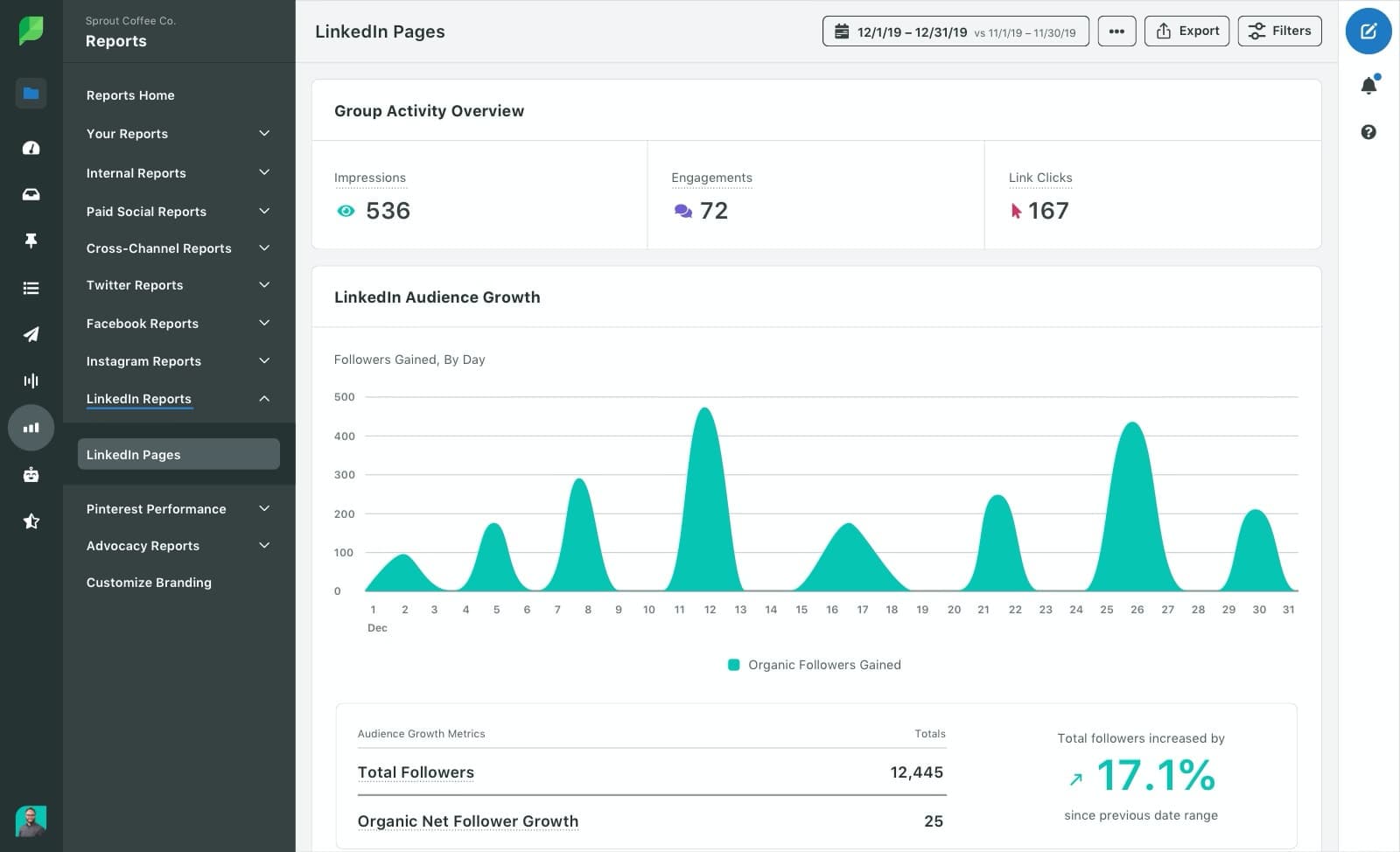
 Image Source: SproutSocial
SproutSocial is a sophisticated social media management platform that offers structured LinkedIn analytics alongside publishing and engagement capabilities. It enables you to monitor both organic and sponsored performance and generate clean, polished LinkedIn reports to clearly act on next steps.
Key capabilities:
- Benchmark performance across your LinkedIn Company Pages by tracking follower growth, engagement rates, and publishing frequency over time.
- Analyze audience demographics, including seniority and job titles, to refine targeting strategies.
- Manage team workflows with user-based permissions for publishing, approvals, and reporting.
- Compare organic and paid campaign performance to evaluate overall LinkedIn ROI impact.
Pricing:
The pricing starts at $199/month.
4. HootSuite
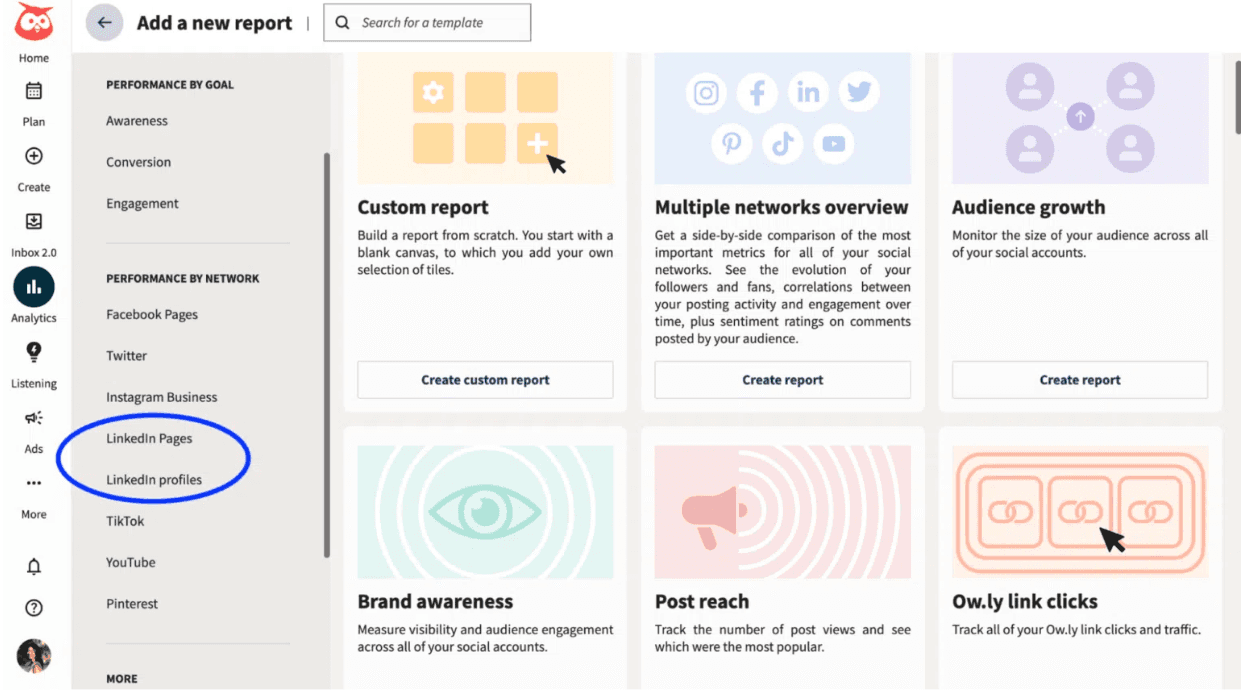
 Image Source: HootSuite
HootSuite lets you publish, schedule, and analyze LinkedIn content from a centralized workspace. It’s especially valuable for teams managing multiple social channels looking to streamline reporting instead of switching between platforms.
From personalized recommendations to ROI reporting and analysis, HootSuite makes it easier to measure your LinkedIn performance at scale. It helps teams better understand follower growth, engagement trends, and lets you stay ahead with competitive and industry-level benchmarking.
Key capabilities:
- Monitor social messages and interactions in a unified inbox.
- Publish your LinkedIn posts when your audiences are most active to boost visibility and engagement.
- Streamline team collaboration with user permissions and approval workflows.
- Analyze individual post performance and quickly sort content to identify top-performing ones.
- Measure performance impact across paid and organic efforts to understand which posts and networks contribute to better outcomes.
Pricing:
The paid plans start at $199/month.
5. SocialInsider
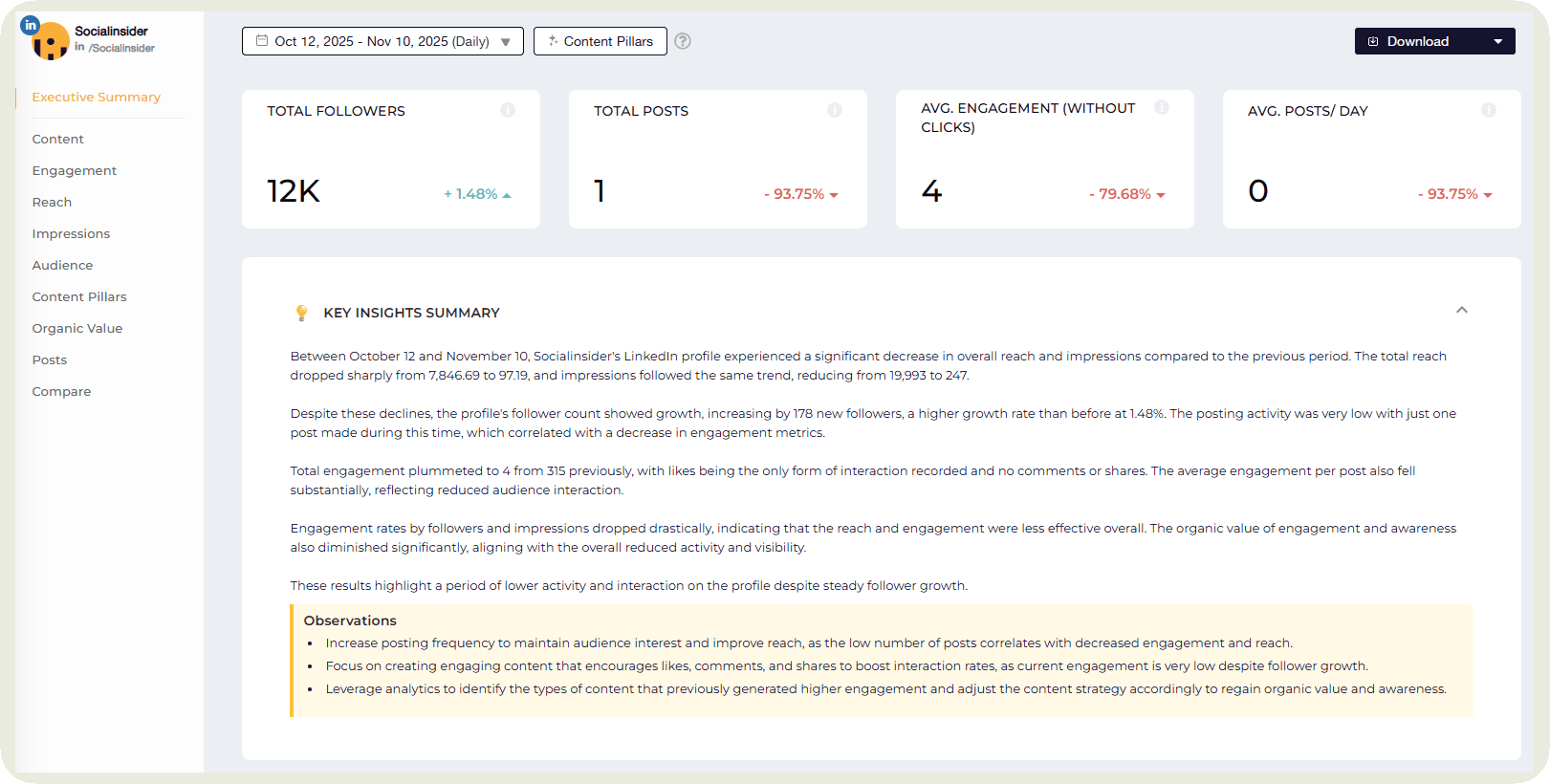
 Image Source: SocialInsider
SocialInsider is a comprehensive LinkedIn analytics tool providing in-depth insights to optimize performance. It helps you track essential metrics such as page views, follower growth, post impressions, engagement, clicks and reactions, giving you a streamlined view of how your content is performing over time.
What differentiates SocialInsider is its competitive benchmarking. You can analyze competitor pages alongside your own to evaluate content strategy, engagement trends, and publishing patterns. This makes it easier to spot performance gaps, uncover content opportunities, and refine your LinkedIn strategy based on current market trends, not just internal metrics.
Key capabilities:
- Track the best and least performing posts and identify what can be done to improve.
- Analyze the content pillars engagement (eg, thought leadership, tutorials, product launches, etc.) and double down on what format works.
- Schedule reports to get automatically delivered to your client’s inbox.
- Estimate the dollar value of your organic LinkedIn performance by assigning value to your key metrics.
- Compare your LinkedIn analytics to other social media channels and visualize unified ROI.
- Detailed LinkedIn audience insights to better optimize your brand awareness and visibility.
Pricing:
The pricing plan starts at $83/month.
6. Shield Analytics
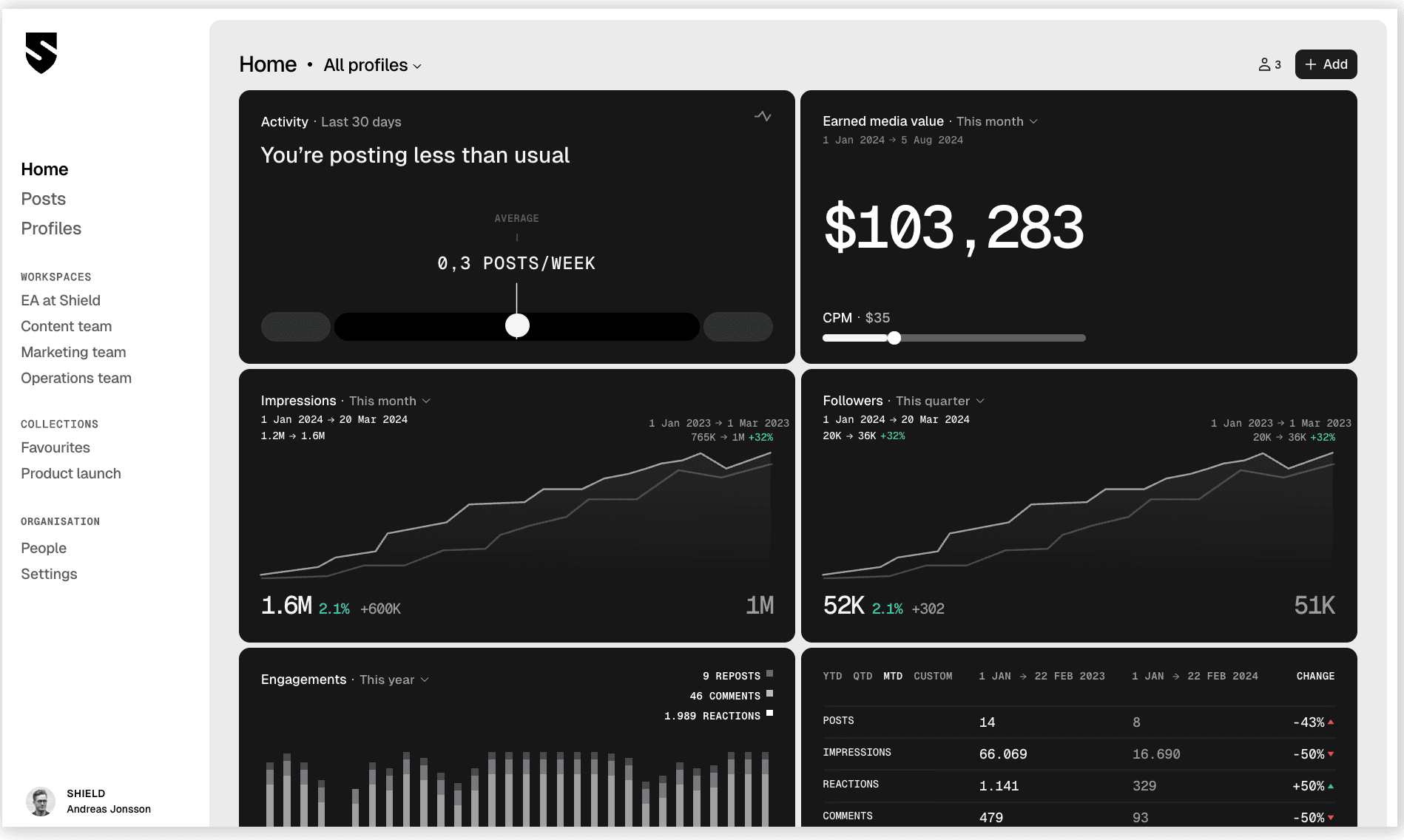
 Image Source: Shield App
Shield Analytics is a LinkedIn analytics tool built specifically for agencies and teams focused on growing personal brands. It provides detailed insights into post and profile performance, helping you understand which content resonates, what drives engagement, and where you can improve.
Compared to other analytics tools, Shield stands out with its clean, distraction-free interface designed for organic LinkedIn analytics. It is best suited for content creators, thought leaders, and marketers who want to build their personal brand on LinkedIn with in-depth tracking and measurement insights.
Key capabilities:
- Track posting activity to understand your publishing consistency and changes in profile visibility over time.
- Manage multiple LinkedIn profiles with role-based access, from onboarding accounts to assigning user permissions.
- Use advanced filters and search options to analyze performance by keywords, hashtags, post type, profile or custom date ranges.
- Access audience demographics insights, including job titles, locations, companies, and industry size.
- Visualize content performance across different time periods to spot trends and long-term growth patterns.
Pricing:
The pricing starts at $25/month.
7. Brand24
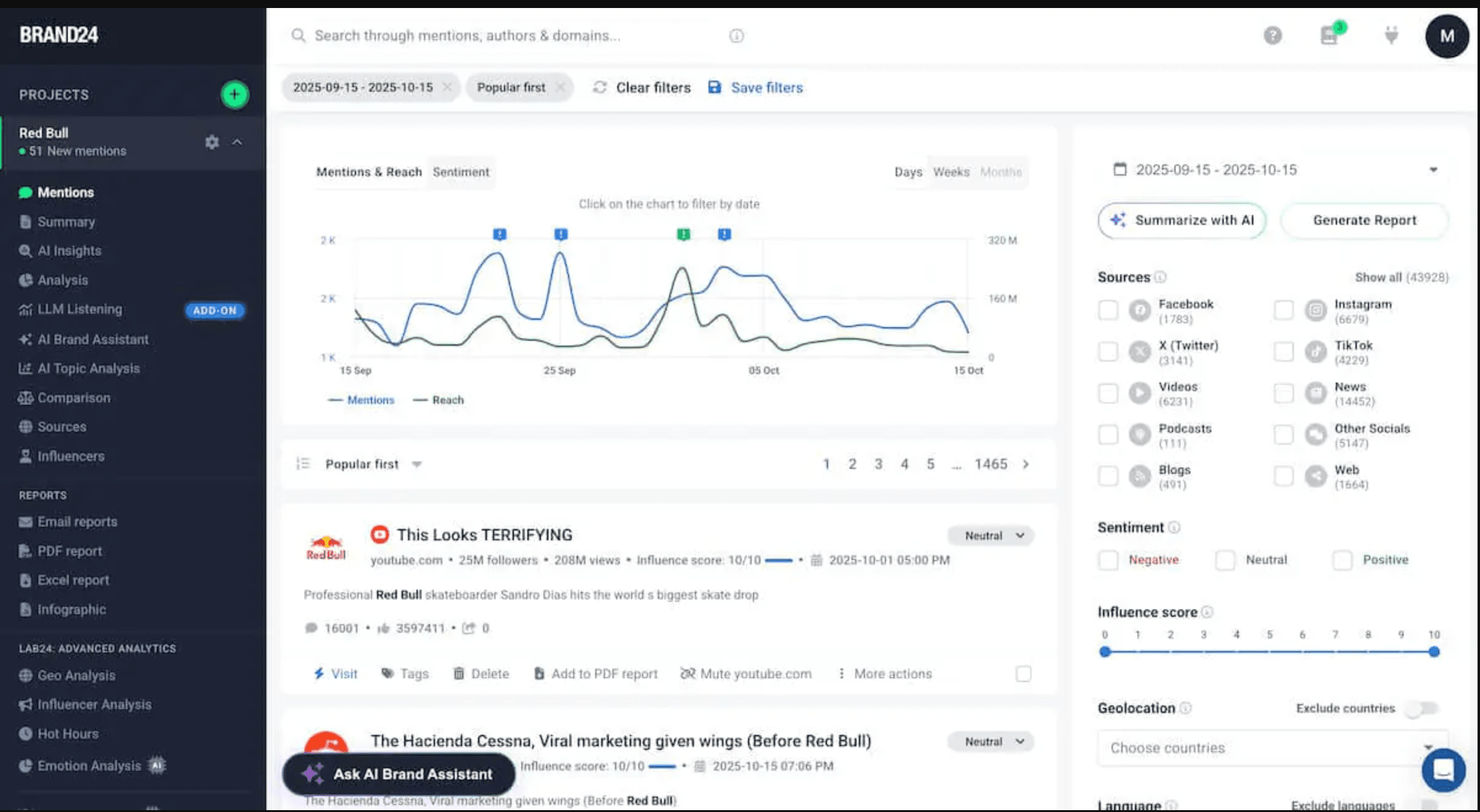
 Image Source: Brand24
Imagine your brand is being discussed in LinkedIn comments, industry groups, or even competitor posts, but your team isn’t tagged directly. Those conversations can influence perception, buying decisions or partnerships, yet they go unnoticed.
This is where Brand24 truly stands out.
Brand24 is a social listening tool with amazing LinkedIn analytics capabilities. It displays detailed performance insights related to sentiment analysis, mentions, hashtags, share of voice, etc., in one place. Besides, its advanced AI-driven suite helps you categorize audience’s reactions into different levels (positive, negative, neutral) instead of vague or unclear signals.
Key capabilities:
- AI-powered personalized suggestions for growth.
- Analyze the reason behind high spikes in mentions with the help of event-based detection.
- Share daily and weekly performance reports with clients and stakeholders.
- Measure and benchmark brand awareness over time to understand how your online popularity evolves around specific topics.
- Identify top LinkedIn influencers in conversations with relevant topics for potential collaborations.
Pricing:
The Individual plan starts at $149/month.
8. SocialPilot
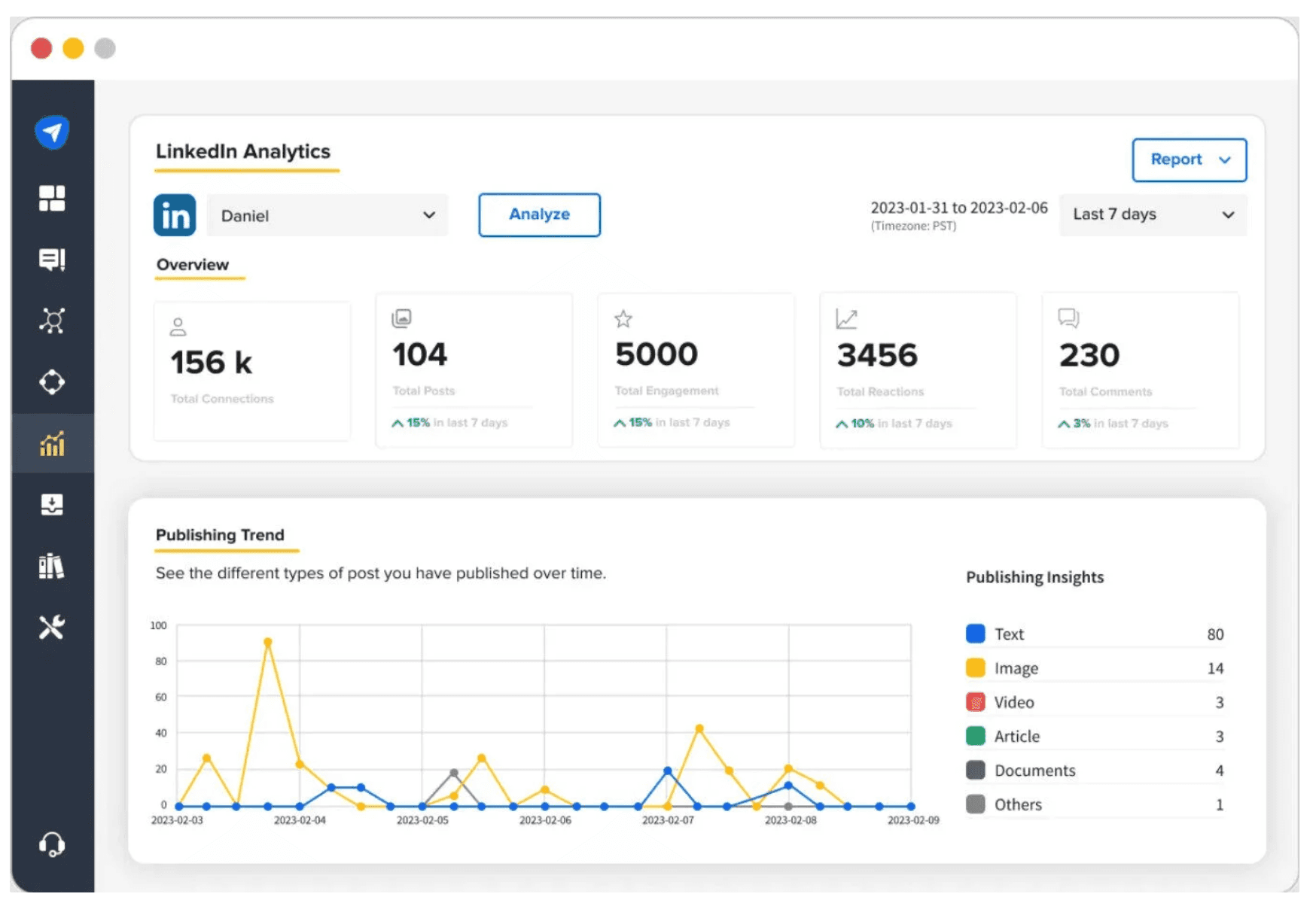
SocialPilot is a LinkedIn analytics and management platform built for marketers, agencies and SMBs that want reliable reporting without complex setup. It allows you to track performance across LinkedIn profiles and Company pages, monitor engagement trends, long-term patterns, and content effectiveness.
What sets it apart is how easily it supports collaboration and multi-account management. From a single dashboard, you can manage analytics for multiple LinkedIn Company pages and personal accounts – making it effective for agencies handling several clients simultaneously.
By combining centralized control with customizable reporting, SocialPilot helps teams keep LinkedIn performance organized, consistent and scalable.
Key capabilities:
- Track impressions, likes, comments, shares, etc., across all your LinkedIn posts.
- Build custom, white-label reports with a drag-and-drop interface.
- Compare LinkedIn performance insights with other social media channels holistically.
- Access to detailed competitor insights highlighting how they engage their audience and improve engagement.
- Analyze watch time, viewer count, and completion rates to refine your LinkedIn video content strategy.
- Automatically deliver reports to your clients weekly and monthly.
Pricing:
The Standard Plan starts at $30/month.
9. Taplio
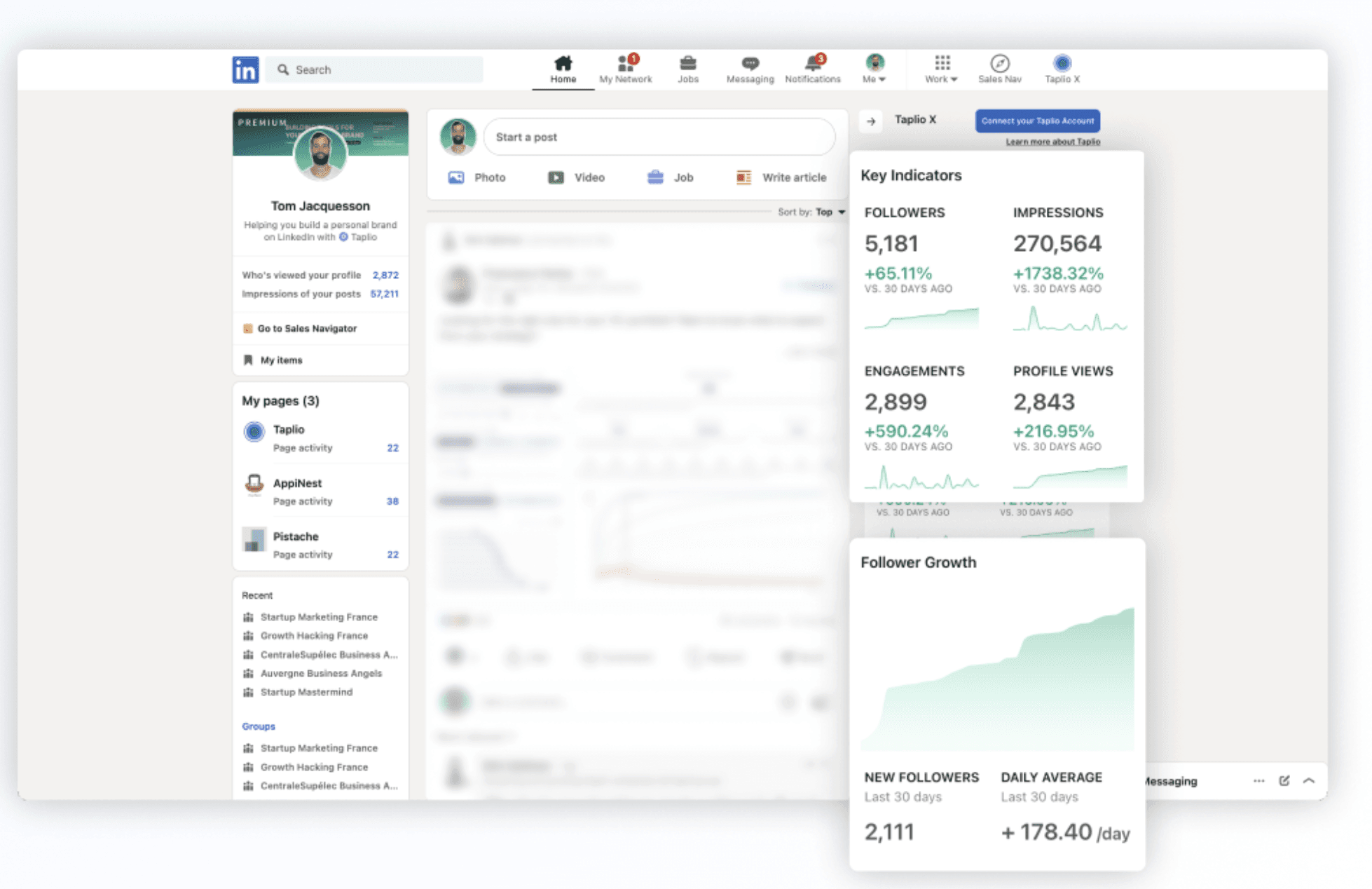
 Image Source: Taplio
Taplio is an AI-powered LinkedIn Analytics platform built for creators, founders, and professionals serious about scaling their personal brand. It combines content creation, scheduling, and performance tracking into one ecosystem, enabling you to move from idea to execution.
Its powerful AI capabilities let you connect with the right influencers to expand your network faster. It excels in helping individuals optimize their LinkedIn visibility, authority and audience growth with streamlined performance insights.
Key capabilities:
- Track top-performing posts, identify what works and spot growth opportunities.
- Free LinkedIn Chrome extension to access key profile KPIs at a glance.
- Kanban view to organize and manage your posts by status (drafts, scheduled or published).
- View the best-performing posts from specific people when visiting their profiles.
- Discover top posts within your industry to tap into new content ideas.
- Access to engagement tools and lead tracking to capitalize on your content efforts.
Pricing:
The Starter plan costs $32/month.
Note: Shield Analytics focuses on deep performance tracking and post-level insights. Whereas Taplio is a complete LinkedIn growth toolkit combining AI content creation, scheduling, engagement, automation, lead generation and analytics in one suite.
10. Buffer
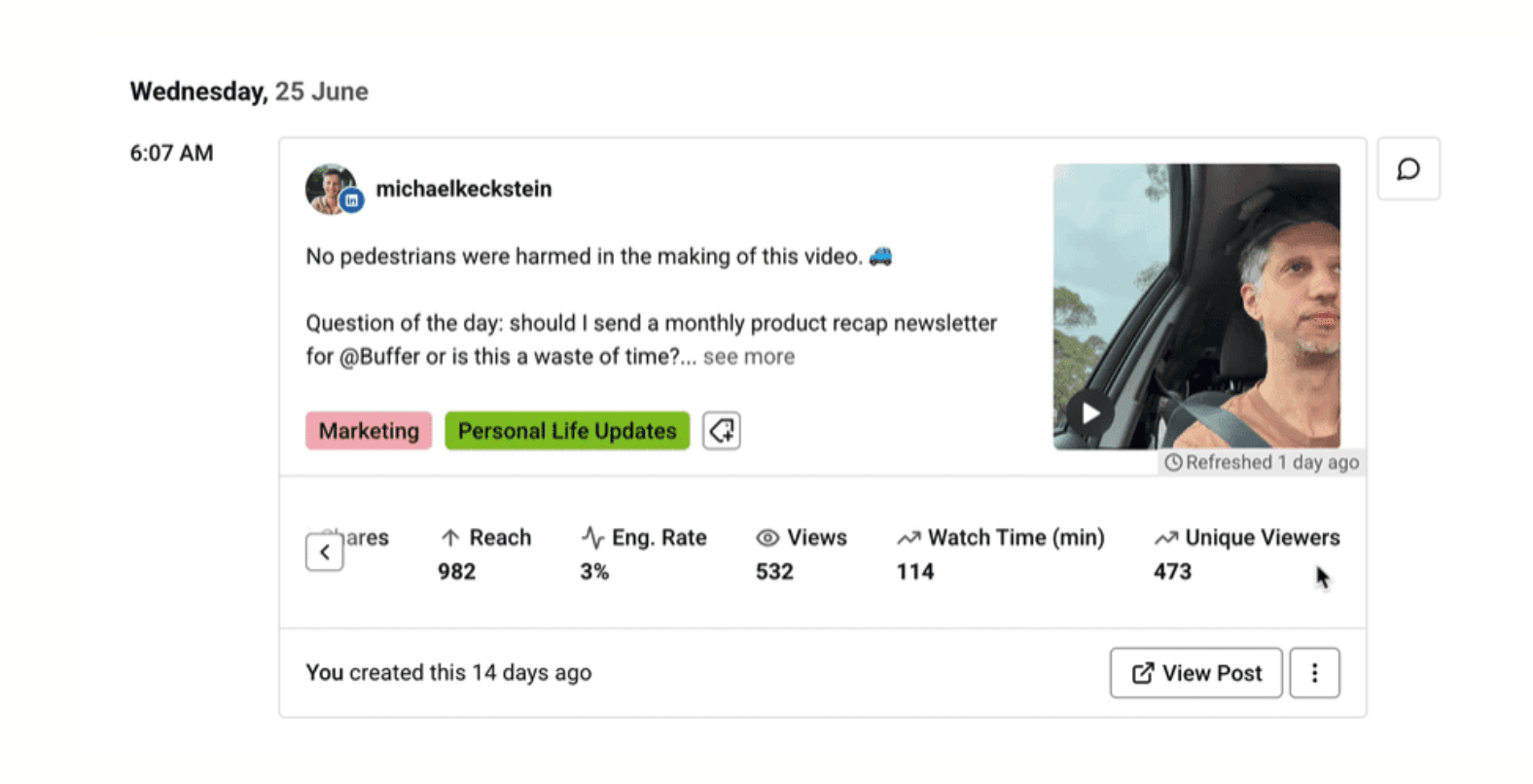
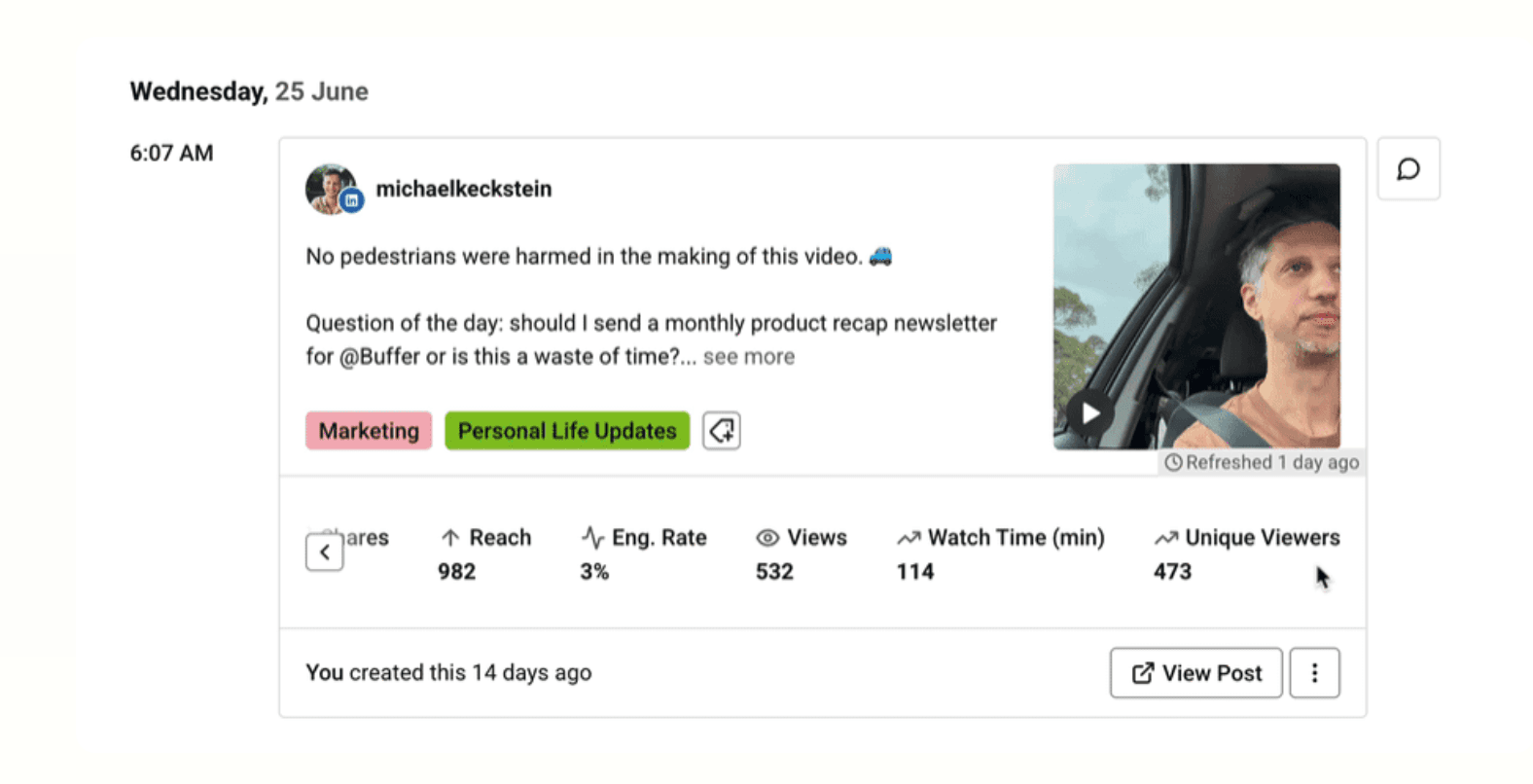 Image Source: Buffer
Buffer is a user-friendly social media management platform that helps you plan, schedule, and optimize LinkedIn performance. In addition to Company Page analytics, it now supports personal profile tracking, giving creators and professionals visibility into post-level performance directly within the platform.
Key capabilities:
- Track total followers, clicks, comments, engagements, engagement rate and impressions per post for your Company Page.
- Analyze and sort key metrics that are important to measure your company’s content performance.
- Receive suggestions such as the best day to post, the best content type to post, and publishing frequency.
- Monitor views, watch time, unique viewers, etc., for personal profile performance tracking.
Pricing:
Buffer offers a forever-free plan. The paid plans start at $20/month.
How to Choose the Right LinkedIn Analytics Tool?
Not every LinkedIn analytics tool is built for the same purpose. Some are optimized for personal brand growth. Others are designed for agency workflows and in-depth performance reporting.
Choosing the right one depends more on how you operate. Here’s how you can evaluate:
1. Ease of Use
If your team needs hours to build a report, it is costing you efficiency:
Look for:
- Intuitive dashboards
- Minimal setup time
- Easy onboarding for teams and clients
For example, tools like Two Minute Reports and Buffer emphasize simple, user-friendly experiences that let you build reports faster without complicated setup.
2. Multi-Account Handling
If you manage several LinkedIn Pages or client accounts, this is non-negotiable. Ask the following questions:
- Can you manage multiple LinkedIn Pages and ad accounts from one interface?
- Can you switch between clients without reconnecting data sources?
- Are permissions role-based?
Tools with the native multi-account support (e.g., SocialPilot) save you time and keep workflows clean.
3. Customizing Reports
LinkedIn performance isn’t one size fits all. Your tool should let you:
- Filter by date ranges, post types, and campaigns.
- Ability to add own logo and layouts.
- Segment by audience attributes.
- Track paid and organic performance side by side.
If you can’t customize reports, you’ll struggle to answer real business questions beyond “how many likes did this post get?”
4. Cross-channel Analytics
If you are running Google Ads, Meta Ads, etc., alongside LinkedIn, your reporting should show performance comparatively. Cross-channel visibility helps answer:
- Is LinkedIn assisting conversions?
- How does the cost per lead compare with other advertising channels?
Tools that consolidate cross-channel reporting in one dashboard provide stronger ROI narratives.
5. Automation & Scheduling
Manual exports kill productivity, especially when reporting needs to be frequent and consistent. Evaluate:
- Can reports be scheduled (daily, weekly, monthly)?
- Can I export in preferred formats (PDF, Excel, Sheets)?
Automation ensures insights reach stakeholders reliably and frees your team to focus on optimization.
6. Data Accuracy & Reliability
Automated insights are only valuable if the data is trustworthy.
Consider:
- Sync frequency
- How the tool handles LinkedIn API limitations
- Whether the metrics align with the built-in analytics
Reliable data builds confidence with both internal stakeholders and clients.
7. Cost vs Operational Impact
The cheapest tool isn’t always the most cost-effective. Consider:
- Time saved on manual reporting
- Scalability as clients grow
- Whether the tool reduces the need for additional software
Quick Comparison of the Best LinkedIn Analytics Tools
Here’s a simple, quick table comparing the best LinkedIn Analytics tools to help you make the right decision:
Wrapping Up
The right LinkedIn Analytics tool should be aligned with your reporting workflow, client expectations, and revenue goals. Here’s how it works:
- If you’re a creator, growth-focused insights and content optimization may matter most.
- If you’re an agency, automation, multi-client handling, and white-label reporting become critical.
- If you’re performance-driven, then cross-channel visibility and data reliability should guide your decision.
For teams that need to consistently present LinkedIn performance in a structured, client-ready format, tools built specifically for automated reporting, such as Two Minute Reports, can simplify the process by centralizing tracking and reporting in one place.
Ultimately, the best choice is the one that helps you report with clarity, confidence and measurable impact, not just more data.
Frequently Asked Questions
For agencies, you can select a tool that centralizes and streamlines LinkedIn reporting, such as Two Minute Reports. It automates the reporting process and lets you create performance reports for different clients efficiently, giving you more time to focus on strategy and optimization.
Yes. LinkedIn Native Analytics is a solid starting point for beginners looking to track core profile and Company Page performance metrics at zero cost.
LinkedIn analytics tools are used to track and analyze performance metrics related to your LinkedIn marketing efforts, such as content performance, audience engagement, and campaign effectiveness. They help you connect your marketing activities to measurable business outcomes.
A LinkedIn analytics report summarizes key performance metrics from your LinkedIn marketing activities, such as engagement rates, follower growth, and content performance. Tools like Two Minute Reports can help automate the creation of these reports for easy sharing with clients.
Related Blogs





Meet the Author
Shalini MuruganShalini is driven by ideas that create a tangible impact. At Two Minute Reports, she specializes in content that helps marketers optimize their reporting workflows. When she's not transforming complex data into meaningful insights, you might find her lost in a book, jotting down ideas in her notebook, or connecting the dots others overlook.

