

Understanding and Resolving Discrepancies in Klaviyo Data with Two Minute Reports
As a user of Two Minute Reports, you might have encountered discrepancies in your Klaviyo analytics data. This article discusses common issues you may face and provides solutions to help you obtain the most accurate data possible.
Flow emails displayed as campaigns
When fetching data for revenue or email metrics and breaking it down by campaign dimensions using Two Minute Reports, you might notice that flow emails also appear in the list of campaigns. In Two Minute Reports, all types of emails — including those from campaigns and flows — are listed as campaigns.
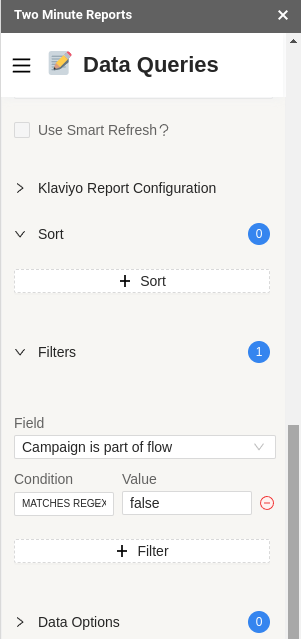
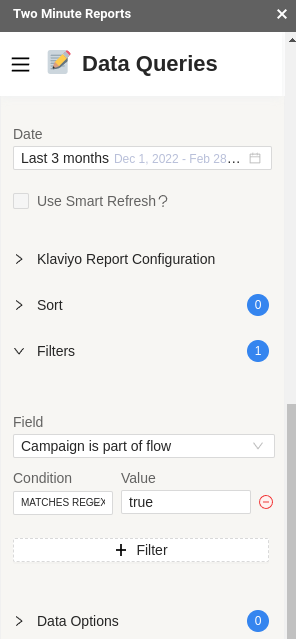
To address this, set up a filter using the Campaign is part of a flow dimension. Use the following filters to obtain data for campaigns only or flows only.
Filter to obtain data for campaigns only:
| Setting | Value |
|---|---|
| Field | Campaign is part of a flow |
| Condition | MATCHES REGEX |
| Value | false |
Filter to obtain data for flows only:
| Setting | Value |
|---|---|
| Field | Campaign is part of a flow |
| Condition | MATCHES REGEX |
| Value | true |
Discrepancies in metrics
You may encounter discrepancies in metrics when using Two Minute Reports with Klaviyo, because Klaviyo attributes email and sales events differently in its dashboard and API.
- In the dashboard, Klaviyo assigns email and sales events to the date when the user received the email connected with those events.
- In the API, Klaviyo attributes these events to the actual day they took place, regardless of when the user received the relevant email.
Two Minute Reports extracts data from Klaviyo's API, so query results might differ from what you see in Klaviyo's dashboard. To reduce the impact of differing attribution dates, use longer date ranges in your queries.
Discrepancies in open and click rate data
Two Minute Reports calculates email open and click rates by dividing unique opens or unique clicks by total emails delivered. This data comes directly from the Klaviyo API, which supports daily or monthly retrieval.
When a query uses an incomplete time frame — such as a week (Monday to Sunday), a full month, or a partially completed month — Two Minute Reports may send multiple daily requests, or a mix of daily, weekly, and monthly requests. That can cause unique open and unique click values to be counted more than once, leading to minor discrepancies.
For unique clicks and unique opens, prefer these date ranges when possible:
- A complete week (Monday to Sunday)
- A full calendar month
- The current month (when reporting on month-to-date performance)
Longer date ranges generally improve accuracy, though small differences can still appear.
Open rate or click rate values exceeding 100%
When a query breaks down unique open or unique click rate by date, the rate can exceed 100%. Receive and open events do not always occur on the same day.
Metrics are attributed to the date the event occurred, not the message send date. Open rate can exceed 100% when opens in a period outnumber emails received in that same period.
Example: 40 emails were sent on Monday and 20 on Tuesday. Five were opened on Monday and 30 on Tuesday.
- Open rate for Monday = (5 ÷ 40) × 100% = 12.5%
- Open rate for Tuesday = (30 ÷ 20) × 100% = 150%
To avoid this, pull unique open and unique click rates by campaign or for a longer time frame (for example, an entire month) instead of a daily breakdown.
Total integration value instead of Klaviyo attributed value
By default, Two Minute Reports can show total integration value instead of Klaviyo attributed value. You can change this in the query or with a filter.
In the Klaviyo report configuration, choose Filter insights, only attributed to Klaviyo Campaigns and Flows to limit results to insights tied to Klaviyo campaigns and flows.
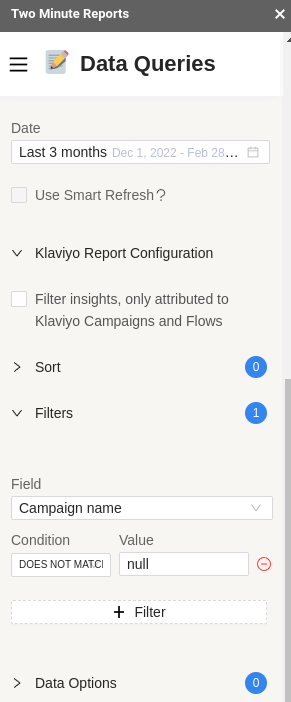
Alternatively, apply a filter like this:
| Setting | Value |
|---|---|
| Field | Campaign name |
| Operator | DOES NOT MATCH REGEX |
| Value | null |