

Google Sheets
Set up the Two Minute Reports add-on in Google Sheets, run queries, schedule refreshes, and manage your spreadsheets.
The Two Minute Reports add-on puts your marketing data into Google Sheets. It connects to 30+ advertising, analytics, e-commerce, and marketing platforms. You can then analyze, chart, and share the data in your spreadsheet.
To start, install the add-on and create a connection. Then run a query, and schedule a refresh so the data updates on its own.
In this section
- Install the add-on
- Run queries
- Schedule refreshes
- Data options
- Dynamic date range by cell reference
- Manage your spreadsheets
- Troubleshooting
Looking to use Two Minute Reports with Google Data Studio instead? See the Google Data Studio section for setup guides and connector documentation.
Use your data in AI tools
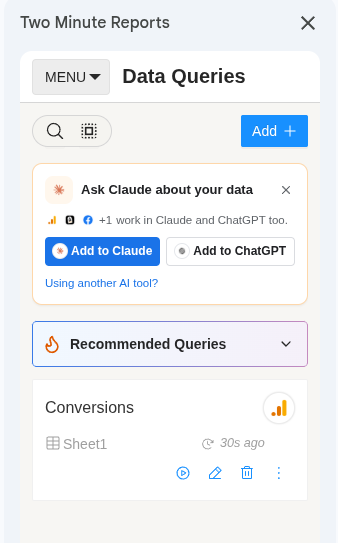
The connections that you create in the add-on also work with Dash, the AI assistant in the Hub, and in Claude, ChatGPT and other AI tools.
- At the top of Data Queries, the Ask Dash about your data card has Ask Dash. It opens the AI tools page in the Hub with Dash open and a first question about your data typed in. Change the question if you like, then send it. To use Claude or ChatGPT instead, select Claude or ChatGPT on the card. It opens the AI tools page in the Hub, where you add Two Minute Reports to that tool. To close the card, select the close button. The card stays closed in that browser for 30 days.
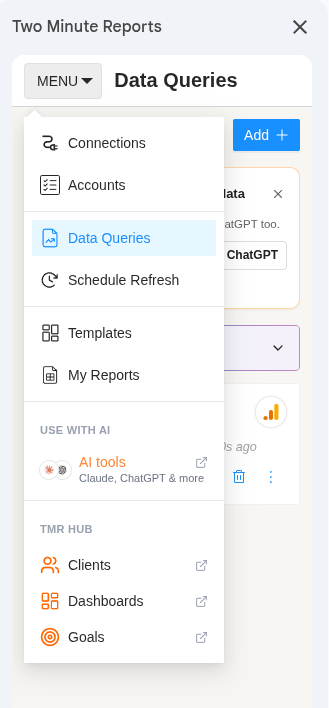
- In the add-on menu, under Use with AI, select AI tools to open the AI tools page in the Hub.
See AI tools.