

Split text
Many teams encode information in campaign names, like US_Brand_Search_2024. The Split text method pulls a specific part out of a value so you can group and report on it. Split text is available for custom dimensions only.
What you can do
- Split a dimension value by a delimiter (like
_or-) - Extract a specific fragment by position
- Optionally rename the extracted values to friendlier labels
How split text works
You point Split text at a source dimension. Then you tell it how the value is delimited, and which piece to keep.
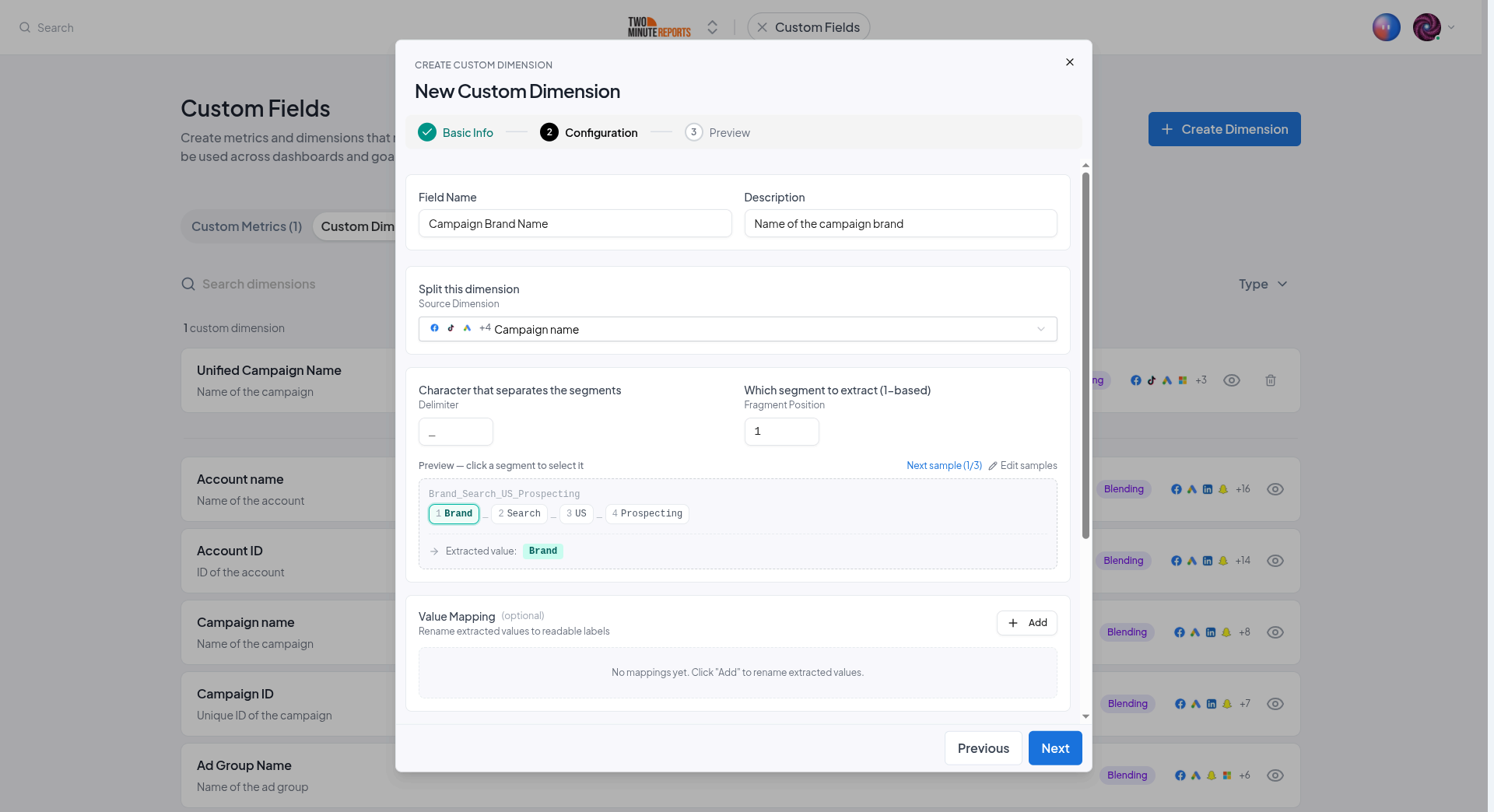
Configure:
- Source dimension - the field to split (for example, Campaign name)
- Delimiter - the character the value is split on (defaults to
_) - Fragment position - which piece to keep, counted from 1
You can also select a segment in the preview to use its position.
For US_Brand_Search_2024 split on _:
| Position | Value |
|---|---|
| 1 | US |
| 2 | Brand |
| 3 | Search |
| 4 | 2024 |
So Fragment position 2 extracts Brand.
Rename values (optional)
The extracted fragments are often codes rather than readable labels. Use the optional Rename values table to rename them. Map each Original value to a New value.
For example, map US → United States, UK → United Kingdom, so your dashboards show clean, presentable labels instead of raw codes.
br, brand, and Brand all to a single "Branded" label.Set it up
Choose the method
In the dimension builder, select Split text. Then select Next.
Configure the split
Select the source dimension, set the delimiter, and choose the fragment position.
Rename values (optional)
Select Add to add a row to the Rename values table. Enter an extracted code and the label to show instead.
Preview and save
Use the live preview to confirm the right fragment is extracted, then save.
Next steps
- Formulas and conditions - Categorize values with conditional rules instead
- Blending across connectors - Unify a field across platforms
- Use custom fields - Group dashboards by your extracted dimension
Blending across connectors
Map the same field from each of your connectors into a single unified custom field, summed for metrics or unified into one column for dimensions.
Use custom fields
Where custom fields show up once created, how to use them in dashboards and goals, plus recipe ideas and best practices.