

The six standard roles
Every team comes with six roles. What they can do nests: each role includes everything the smaller ones can. But they are not six levels of seniority. They are six different jobs, and the two in the middle exist because setting data up and building dashboards on it are usually done by different people. A Data Manager is not a junior Deputy Admin; they are the person who owns the connections.
You can see all six in the Hub at Settings › Roles & permissions, along with any your team has built for itself.
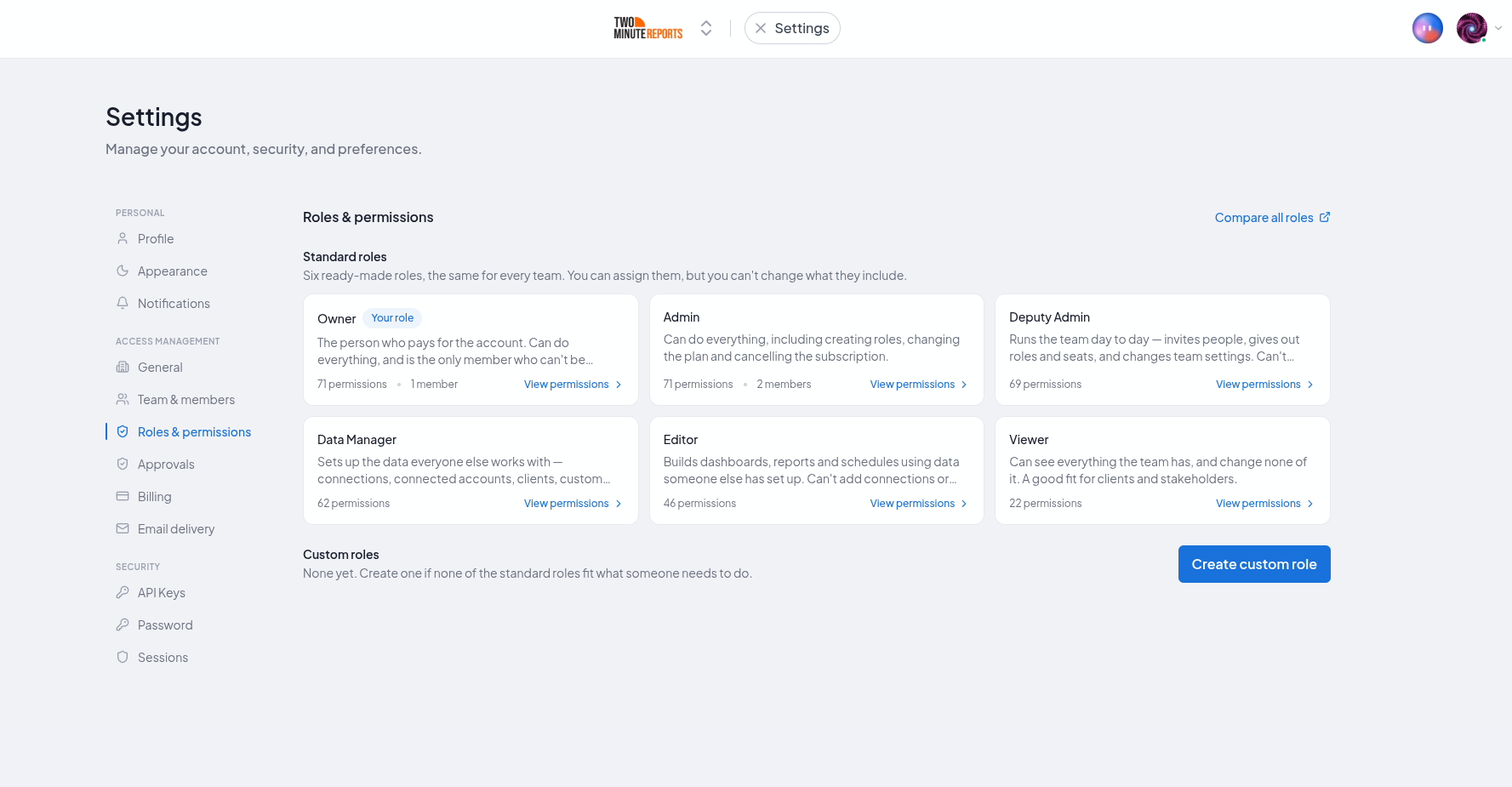
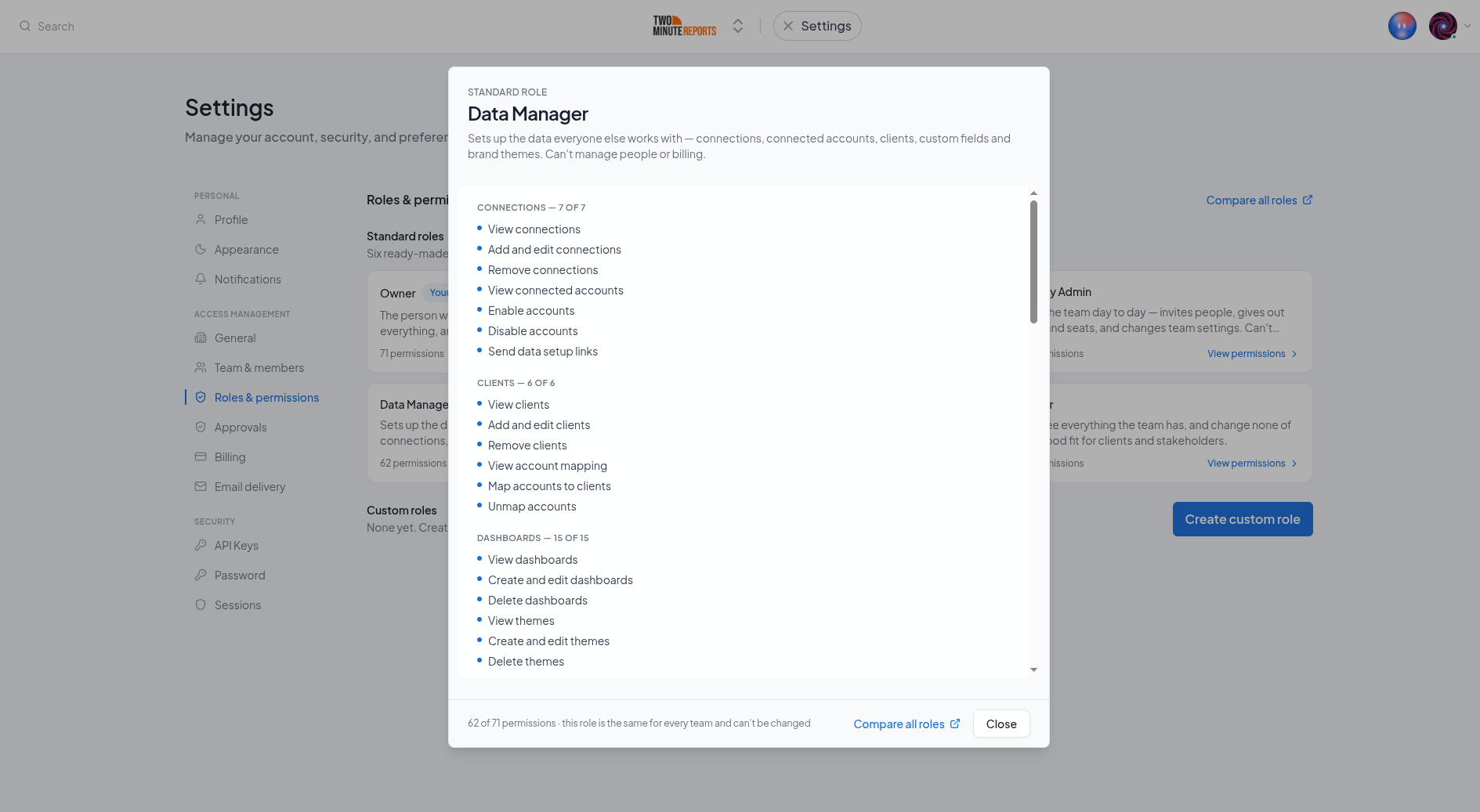
Selecting a role opens a grid of all 76 permissions, grouped by area, showing what the role includes and what it does not. The second half is the more useful one: "why can't this person do X" is answered by finding X unticked.
At a glance
Smallest first. Each role can do everything in every row above it, plus its own additions. So reading down the table accumulates, and no row repeats what an earlier one already said.
| Role | Who it is for | What it adds |
|---|---|---|
| Viewer | Stakeholders and colleagues who only need to look | Reads everything the team has: dashboards, clients, the queries in a sheet |
| Editor | Report builders working on data someone else set up | Builds the work: dashboards, goals, briefings, sheet queries and schedules, Google Data Studio query configs |
| Data Manager | Whoever owns the connections and the data setup | The setup everyone else builds on: connections, connected accounts, which accounts belong to which client, custom fields, brand themes |
| Deputy Admin | An operations lead who runs the team and owns the client list | The client roster (adding and removing clients) and running the team: invites, roles, seats, team settings, plus the plan and the audit log |
| Admin | A co-owner you would trust to end the contract | Billing, custom roles and the custom domain: changing the plan, payment details, cancelling |
| Owner | The person the subscription belongs to | Nothing: identical permissions to Admin. What differs is that nobody can remove or re-role them |
To read what a role cannot do, look at the rows below it. An Editor cannot add a connection because that is Data Manager's row; a Data Manager cannot add a new client or invite anyone because both are Deputy Admin's. Nothing is withheld from Admin or Owner.
The permissions matrix has the exact lists, all 76 of them, with the roles side by side.
Viewer
Reads everything the team has and changes nothing. Viewers can open dashboards, see clients, and read the queries in a sheet. Every control that would change something is unavailable to them.
Viewers do not see the plan, invoices or billing. They also cannot run a query on demand, because each run calls the ad platform and costs money.
Give this to stakeholders and anyone whose job is to look. Not to clients: they are given access by sharing a dashboard with them, not by joining the team.
Editor
Builds dashboards and other work on data somebody else set up: dashboards, goals, Google Sheets queries and schedules, Google Data Studio query configs, briefings.
An Editor cannot add a connection, enable a connected account, assign an account to a client, or define a custom field. That is not a restriction on their competence. Those actions have consequences beyond their own work. Enabling an account consumes a plan limit and costs money; removing a connection breaks every dashboard drawing on it.
This is the default role for most people who do the work.
Data Manager
Owns the setup. Connections, connected accounts, which accounts are assigned to which client, custom fields and brand themes: everything that has to exist before anyone can build a dashboard. Plus everything an Editor can do.
Adding a client is not part of this role; assigning accounts to one is. A Data Manager decides which connected accounts feed which client, which is what every client-scoped dashboard contains. They cannot create a new client or delete an existing one. Deciding who your clients are sits with Deputy Admin, Admin and Owner.
No team administration either: a Data Manager cannot invite anyone, change a role, or assign a seat.
In an agency this is usually the person who onboards a new client's ad accounts once someone has added the client.
Deputy Admin
Runs the team and owns the client list: invites people, sets their roles, assigns and unassigns seats, changes team settings, adds and removes clients, and does everything a Data Manager and Editor can do.
Adding a client is here rather than with Data Manager because it is a decision about the business rather than about data ("we have taken on this client"). It is also the same person who decides who joins the team.
Holds three permissions fewer than Admin. A Deputy Admin cannot change the plan: no buying seats, altering payment details or cancelling. They can see what the plan is and how much of it is used, so they know when to come and ask. They cannot create or edit roles, which is what stops somebody building a custom role to give themselves the first one. And they can see the custom domain but cannot add or remove it.
This is the right role for an operations manager, a team lead, or whoever actually onboards people.
Admin
Everything the Owner can do, including changing the plan, cancelling the subscription and setting the custom domain. The difference is not a permission: an Admin holds exactly the same set. The difference is that an Admin is a role somebody assigned, and can therefore be unassigned.
Because the two sets are identical, one Admin cannot change or remove another: roles are only editable downwards and equal does not count as below. The account Owner can, and is the only person who can. If you need an Admin removed and you are not the Owner, the Owner has to do it.
Give this to a business partner or a co-founder: someone you would trust to end the contract.
Owner
The person whose email the subscription is under. The Owner holds every permission and is the one role nobody else can touch: they cannot be removed, cannot be given a different role, and do not need a seat of their own to change the plan or hand out seats.
That last part is deliberate. If the Owner needed a seat to assign seats, a team that ran out of seats could never assign another one.
The Owner follows the account, not the person. It is not a role you hand out. To change who it is, contact [email protected].
How to choose
Three questions get it right almost every time:
- Do they set data up, or build on data that is already there? Setting up is Data Manager; building on it is Editor.
- Do they decide who your clients are, or only which accounts belong to them? Adding and removing clients is Deputy Admin; assigning accounts to a client that already exists is Data Manager.
- Do they need to add and remove people? If yes, Deputy Admin. If they also need to change the plan, Admin.
If none of the six fit, build a custom role with exactly the permissions you want.
Roles and seats are separate
Assigning a role does not give someone a seat. A member with the Editor role and no seat sees the whole Hub and can change none of it. Every editing control is disabled with an explanation.
That combination is useful on purpose: it is how you give a colleague full visibility of the dashboards without spending a seat on them. But if you have given someone a role and they tell you nothing works, check their seat first.
Roles and permissions
How Two Minute Reports decides what each person on your team can do: a role says what they may do, a seat says whether they may change anything.
Permissions Matrix
Every permission in Two Minute Reports and which of the six standard roles holds it, including which permissions require a seat.