

Seats
A seat is permission to act in one team — to change things, and to use what the team pays for. The current plans include unlimited seats, so on those a seat is not something you buy — it is a switch you control, per person.
Assigning a role and assigning a seat are two separate actions. A member with a role and no seat can see everything that role allows and change none of it.
The Four Rules
- No seat means you can look, not act. Every permission that requires a seat is withheld; every permission that does not still works. Mostly that is editing — and also the few things that spend what the team pays for rather than change anything, like refreshing on demand or asking Dash.
- Seats are per team, per request. The same login, the same API key and the same MCP connection answer differently depending on which team is involved. If you belong to two teams, you can have a seat in one and not the other — and that is a normal setup, not a broken account.
- The Owner is the exception. The account owner can change the plan and assign seats with or without a seat of their own. Otherwise a team that used its last seat could never assign another.
- Removing a seat is not removing a person. They keep every read their role allows until you actually remove them from the team.
Seated vs Seatless, Surface by Surface
The Hub
| With a seat | Without a seat |
|---|---|
| Create and edit dashboards, widgets, pages and themes | Read every dashboard the role allows; every editing control is disabled with the reason |
| Create, edit and delete clients, goals, custom fields and initiatives | See all of them, change none |
| Add connections and enable connected accounts | See which platforms are connected and whether each is still authorised |
| Share a dashboard publicly and send briefings | Open a dashboard someone else shared |
| Ask Dash about the team's data | — refused, because each question spends the team's AI capacity |
| Invite members, set roles and assign seats, if the role allows it | See the member list, if the role allows it |
Google Sheets Add-On
| With a seat | Without a seat |
|---|---|
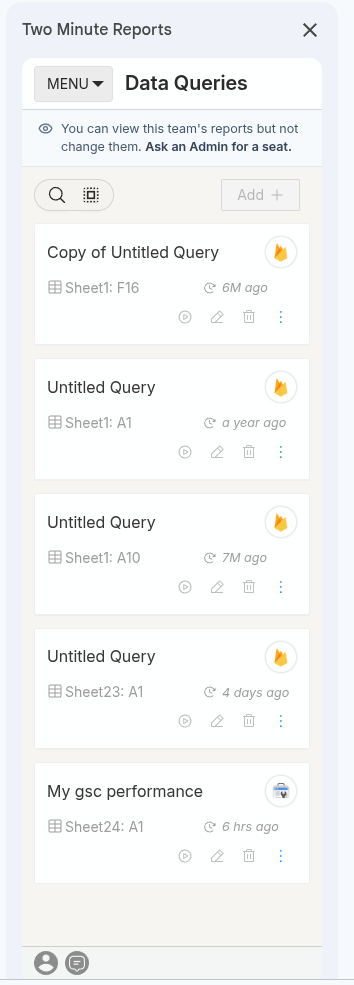
| Create, edit, copy and delete queries | Open the sidebar and read every query in the sheet |
| Create, edit and delete schedules | See the schedules and when each last ran |
| Refresh a sheet on demand, and use Run all queries | — refused, because each run calls the ad platform |
| Add connections and enable accounts | See connections and their accounts |
| Copy a template or duplicate a report | Browse the template gallery |
A seatless member sees a banner at the top of the sidebar explaining the situation, so they are not left guessing why a button is grey.
Looker Studio Popup
| With a seat | Without a seat |
|---|---|
| Create, rename, re-authenticate and delete connections | See the connections and their status |
| Enable and disable connected accounts | See which accounts are enabled |
| Create, edit and delete query configs | See the query configs |
API and MCP
This is the part worth reading twice.
A key carries the permissions of the person who created it, and its scopes can only narrow that — never widen it. A key made by a Viewer cannot write, no matter what scopes it is given. A key made by an Editor who later loses their seat stops being able to write, without the key changing at all.
API and MCP access itself does not require a seat. If someone set up an integration and later lost their seat, the connection keeps working and its read calls keep answering. What stops is the writes.
Scheduled Refreshes Never Stop
A Google Sheets schedule keeps running whoever created it — even if that person has lost their seat or left the team entirely.
The only things checked on the running path are that the team's plan is active and its limits are not exceeded. Seats gate creating or editing a schedule, not the refresh itself.
This is deliberate. A scheduled refresh has no person in it: it is the team's plan doing work on the team's behalf. Making it depend on somebody's current seat would mean a client's Monday-morning report silently stopping because an account manager changed jobs.
Running Out of Seats
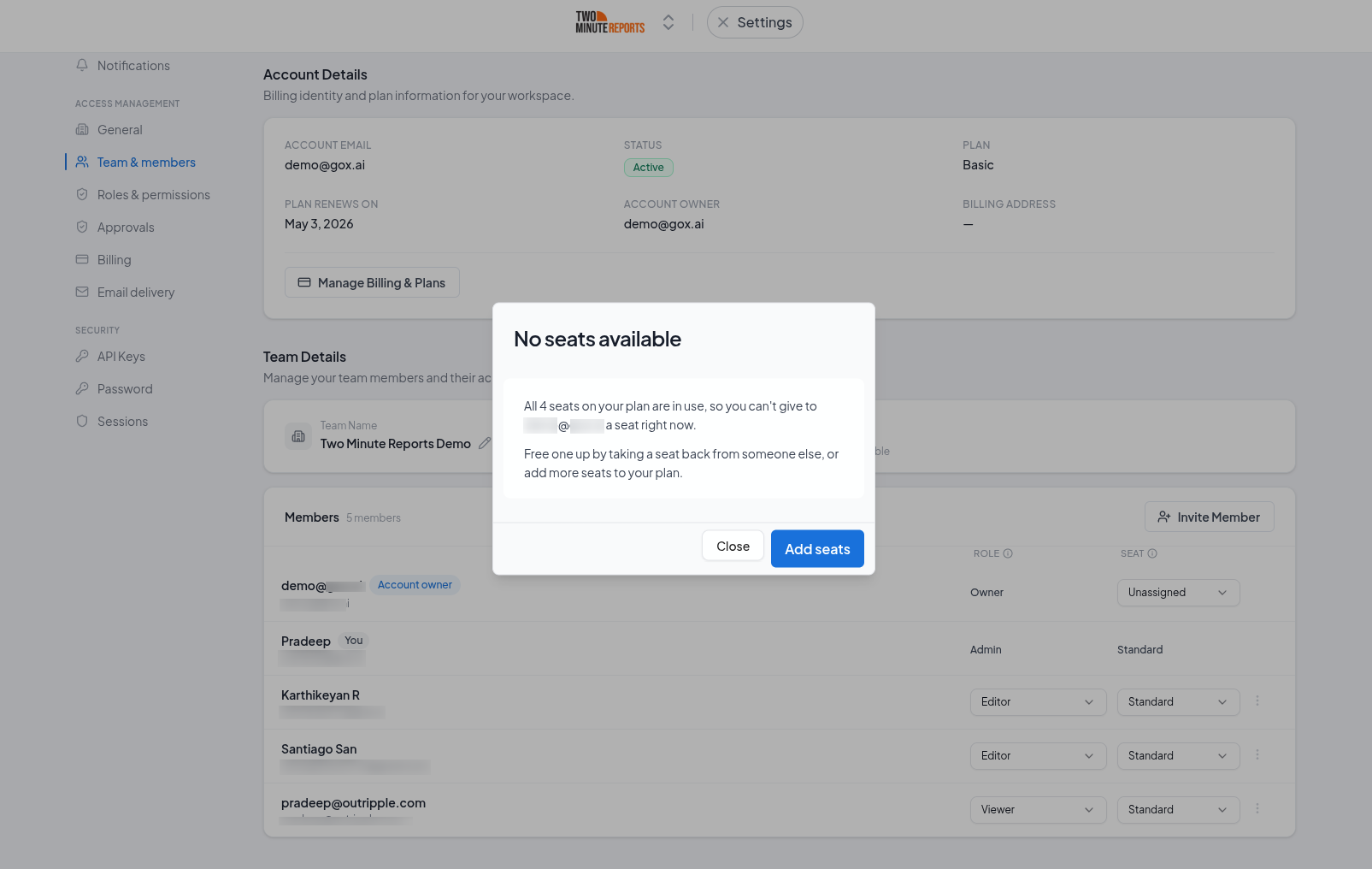
Not something current plans do — they include unlimited seats, so there is no limit to reach.
Some older plans bought before the current lineup carry a fixed seat count. On one of those, if every seat is taken you have two ways out:
- Un-assign a seat from somebody who does not currently need one. Their reports keep running and they keep every read.
- Move to a current plan, which has no seat limit. Only someone with permission to change the plan — the Owner or an Admin — can do that.
A Deputy Admin can assign seats but cannot change the plan, so on an older plan that is the point at which they need an Admin. The message you get says which of those two you are.
Common Questions
Does a seatless member count towards my plan? On a current plan there is nothing to count towards — seats are unlimited. On an older plan, seats are what the plan counts, and the seat count also caps how many people can be in the team at all.
Should I add a client to my team? No. Share the dashboard or report with them, or send a data setup link when they need to connect their own accounts. Neither costs a seat and neither puts them inside your workspace.
Do I get a seat back immediately when I un-assign one? Yes. Seat counts are live.
Does the Owner use a seat? The Owner can change the plan and assign seats without one. For everything else, the Owner is like anybody else and needs a seat to make changes.
Permissions Matrix
Every permission in Two Minute Reports and which of the six standard roles holds it, including which permissions require a seat.
Custom Roles
Build a role with exactly the permissions your team needs, and understand the one rule that governs it: you can only grant permissions you hold yourself.