

API Bridge: how to set your Base URL
The API Bridge connector lets Two Minute Reports pull data from any REST API. The Base URL is the base of your connection. Each request joins your Base URL with the Suffix URL of the endpoint that you want to query.
What should I enter as the Base URL?
Your Base URL is the root address of the API itself: the part that all the endpoints that you use have in common, without a specific resource path.
Good examples:
https://api.example.comhttps://api.example.com/v1https://api.example.com/v3/data
Not recommended:
https://example.com/loginhttps://portal.example.com/dashboardhttps://api.example.com/v3/data/records
A login page or dashboard is a web application, not an API. Similarly, a URL that already contains a specific resource should generally be used as the Suffix URL instead.
You can check your Base URL by opening it in a browser. If it displays a login screen, dashboard, or other HTML page intended for users, it is likely not the correct API Base URL. A real API root may return JSON, an API-specific error, or a 404 response instead.
Base URL vs. Suffix URL
When you build a query, you give a Suffix URL: the path for the data that you want, such as /users or /records.
Two Minute Reports combines the Base URL and Suffix URL to create the request URL:
- Base URL:
https://api.example.com/v3/data - Suffix URL:
/records - Request:
https://api.example.com/v3/data/records
Avoid duplicate paths
A common configuration mistake is including the same path in both the Base URL and Suffix URL. For example:
- Base URL:
https://api.example.com/v3/data/records - Suffix URL:
/v3/data/records
This produces a duplicated URL, and the request will fail:
https://api.example.com/v3/data/records/v3/data/records
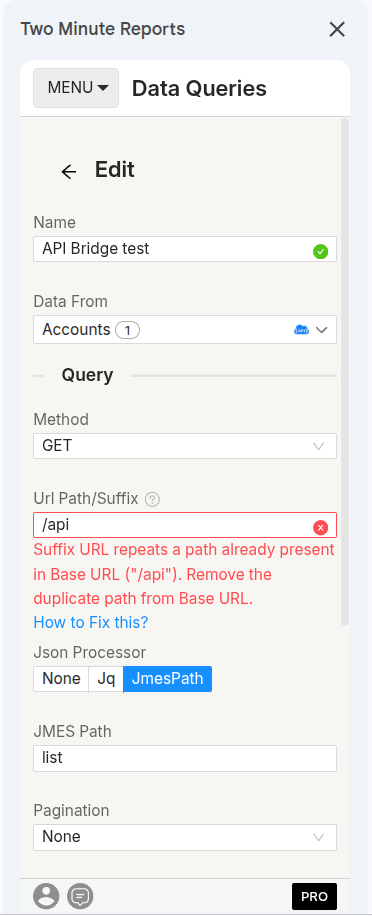
If you see a duplicate path error, remove the repeated resource path from the Base URL and keep it in the Suffix URL. The error says:
Suffix URL repeats a path already present in Base URL ("/records"). Remove the duplicate path from Base URL, or adjust the Suffix so it doesn't repeat it.
The validation also detects cases where part of the Base URL path is repeated in the Suffix URL. For example, if your Base URL is https://api.example.com/v3/data/records, using /records as the Suffix URL will be flagged because it would create a duplicate path.
A similar word in both URLs does not always mean that there is a duplicate. For example, https://api.example.com/v1/users with /user/preferences is valid, because the Suffix URL does not repeat the existing users path.
Test your API Bridge connection
When you create or edit an API Bridge connection, you can turn on Test before saving. Then you give a sample HTTP method and Suffix URL, so that Two Minute Reports can check that the connection works.
For example:
- Method:
GET - Suffix URL:
/records
Two Minute Reports sends a real request using your:
- Base URL
- Authentication
- HTTP method
- Suffix URL
- Request body, when applicable
With Test before saving on, the connection is saved only after the test succeeds. In the Hub, the button is Test and save. The test helps you find problems such as:
- Incorrect Base URL
- Invalid authentication or credentials
- Unreachable API
- Incorrect endpoint path
- Incorrect HTTP method
Checklist before saving your connection
- Base URL points to the API itself, not a login page or web dashboard.
- Base URL does not contain the specific resource path used in your Suffix URL.
- Base URL is copied from your API provider's documentation.
- Base URL includes
https://. - Suffix URL starts with
/, such as/records. - The same path is not repeated in both Base URL and Suffix URL.
- If you test the connection, the HTTP method is correct.
- If you test the connection, the Suffix URL is correct.
Still not working?
If the connection test fails, first verify that the Base URL, authentication, HTTP method, and Suffix URL match the API provider's documentation.
If the test succeeds but your report returns empty data or errors, check the following:
- The HTTP method (such as
GETorPOST) matches what the endpoint expects. - Required query parameters, such as date ranges or pagination parameters, are in the Suffix URL or the request body, not in the Base URL.
- The account or API key has permission to access the specific resource in your Suffix URL.
Account missing access or connection expiry
How to fix account missing access permissions and connection expiry errors in Two Minute Reports queries and schedules.
Can't sign in with Google or Microsoft
Fix a Hub sign-in with Google or Microsoft that does not complete or is cancelled, and what to ask your administrator if your organization blocks the app.