

AI tools
Dash
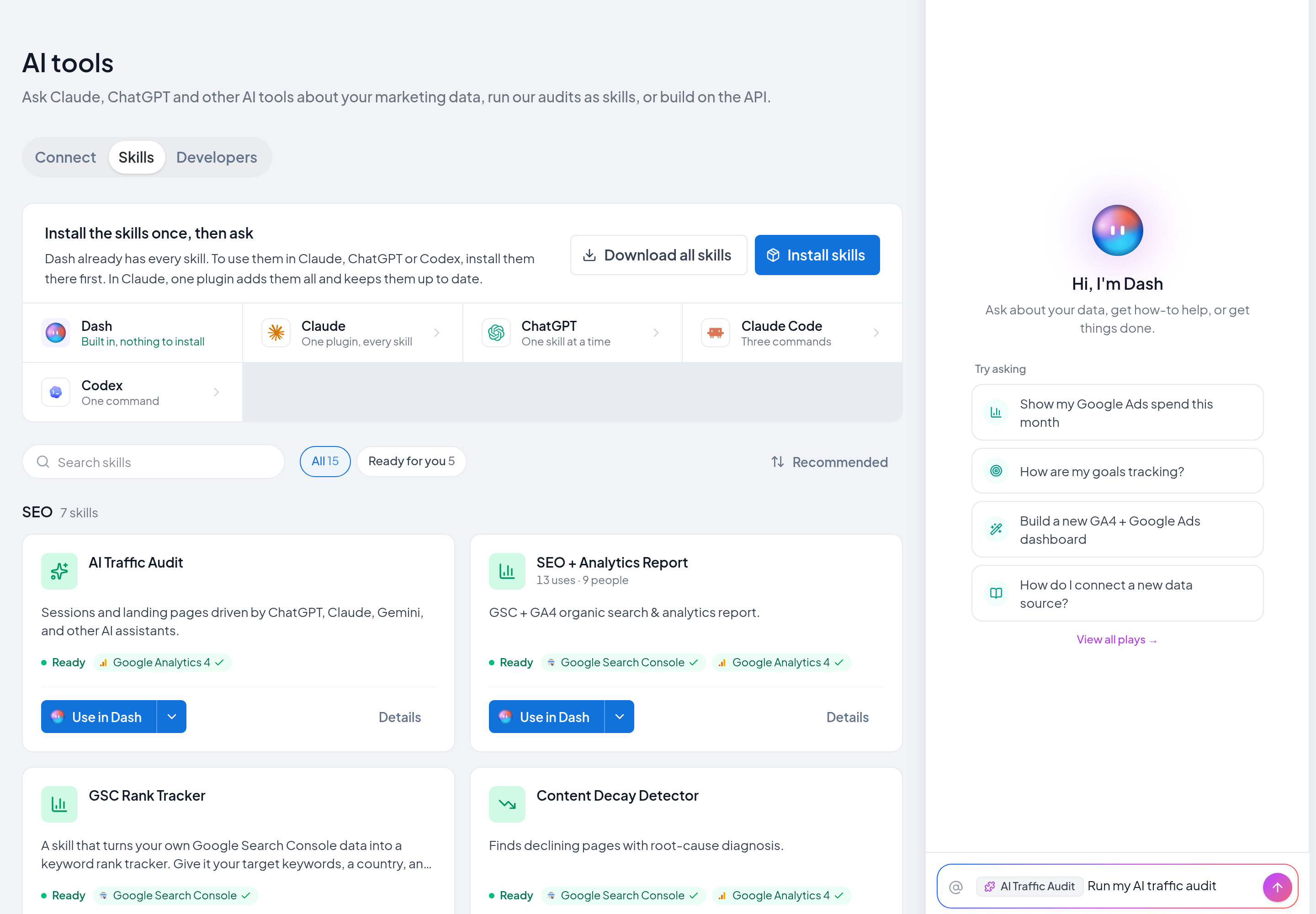
Dash is the AI assistant built into Two Minute Reports. Ask about your data and run skills, with nothing to connect.
Dash is the AI assistant in Two Minute Reports. It is built into the Hub, so there is nothing to connect or install.
What you can do
- Ask about your data in plain words.
- Run a skill, for example a Google Ads audit.
- Build and edit dashboards. See Edit with Dash.
- Get summaries of your clients' results.
Open Dash
Use one of these methods:
- In the top bar, select the Dash icon.
- Press ⌘J (Mac) or Ctrl+J (Windows).
- On the AI tools page, next to Dash, select Open Dash.
Ask about your data
Type your question in plain words. For example:
- "Which accounts do I have connected in Two Minute Reports?"
- "Which campaigns spent the most last week with no conversions?"
To ask about a specific dashboard, client or goal, type @ and select it.
Run a skill
- In the Hub, select AI tools, then the Skills tab.
- Find the skill.
- Select Use in Dash.
Dash opens with the skill attached and its question ready. Send the question to run the skill on your data.
You can also type / in Dash and select a skill from the list.
What Dash can do with your role
Dash can do only what your role on the selected team allows. A Viewer can read, but cannot run data queries. See What each person can do.